Back to top
31
The Playback Interface (cont.)
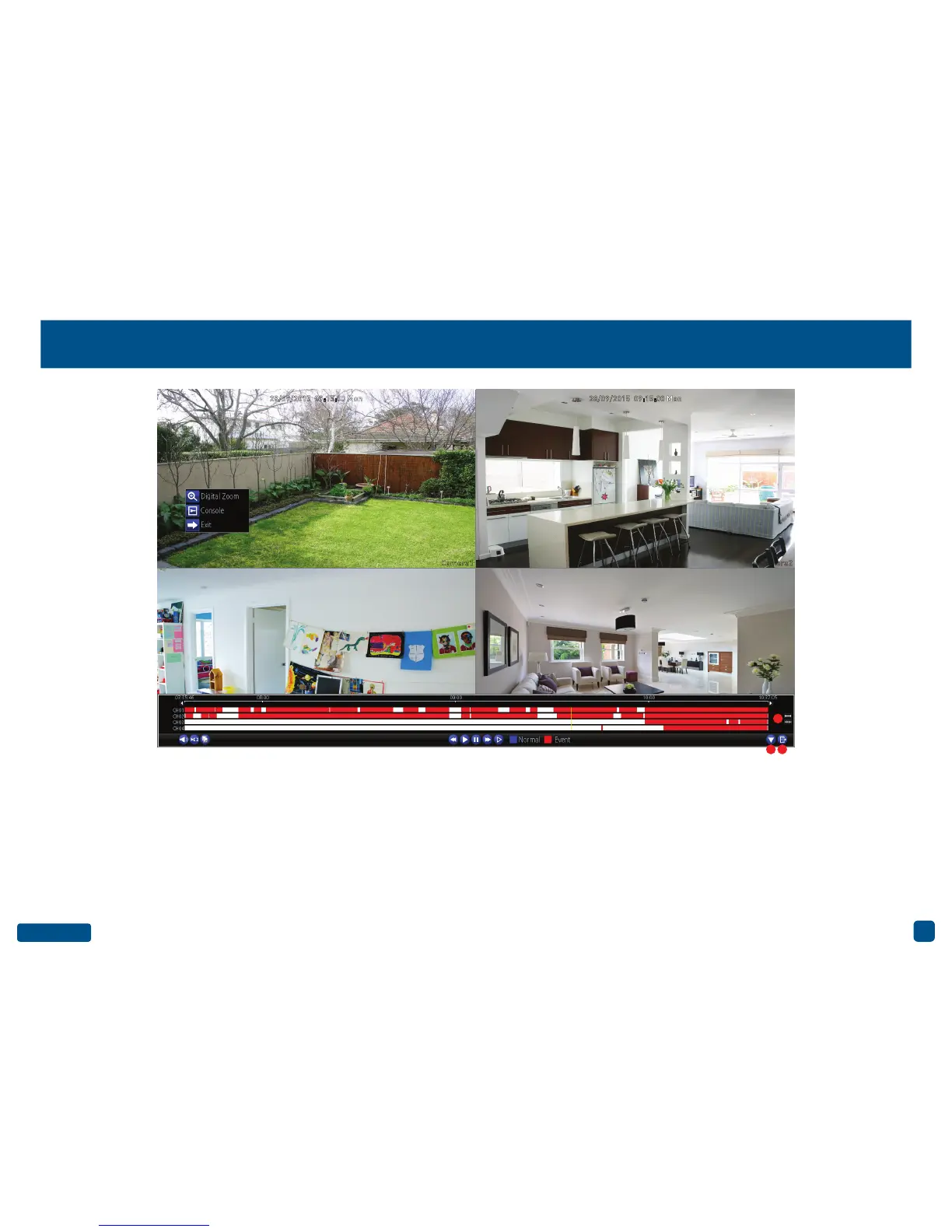
9. Hide: Click this to hide the on-screen inter-
face so you can maximise your viewing area.
10. Exit: Click this to exit.
11. Zoom In/Out: Zoom in and out of the time-
line for precise control.
You can access the sub-menu to enter Digital
Zoom mode (see above example). Right-click
the mouse over the channel you want to view
then click “Digital Zoom”. The channel will dis-
play full screen and the zoom controls will ap-
pear on-screen. From left to right, here are the
descriptions for each button:
Zoom In: Click this to zoom into the video. Keep
clicking to zoom further (6x zoom available).
Zoom Out: Click this to zoom out of the video.
Region Zoom: Click this to zoom into a par-
ticular section of the video (6x zoom available).
When zoomed, click and hold the mouse to
scroll around.
Restore: Click this to restore the zoom level.
Exit: Click this to exit.
Camera1 Camera2
9 10
11
28/09/2015 09:15:00 Mon 28/09/2015 09:15:00 Mon


 To Next Page