Back to top
30
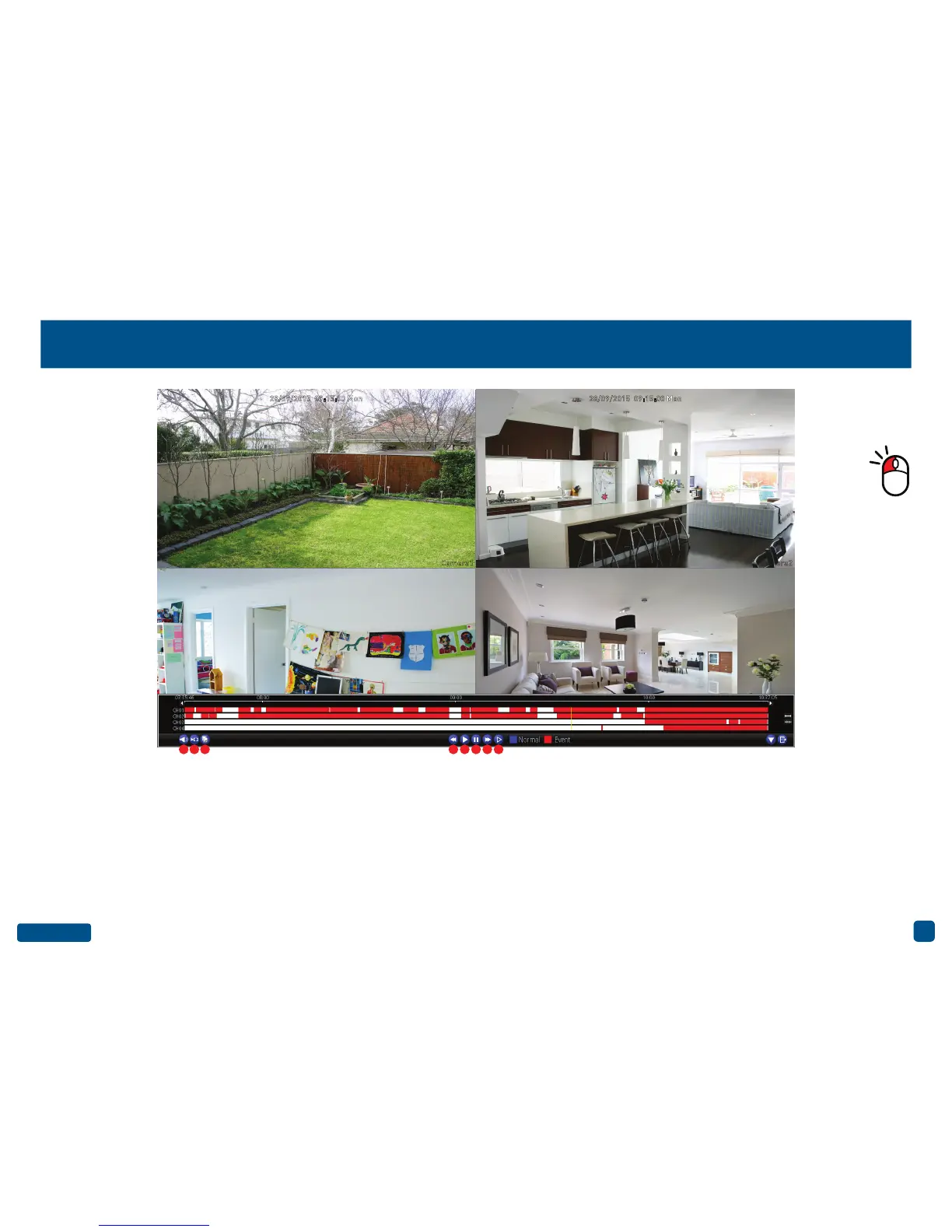
The Playback Interface
1. Mute: Mutes audio playback.
2. Cut: This button allows you to make cuts in
your video which you can then export to a USB
storage device. When a video is playing, press
this button then press and hold the mouse but-
ton while dragging along the timeline to set the
mark in and out points. You will see a scissor
icon above the timeline indicating the mark in
and out points. Multiple points can be created.
3. Copy: Click this to save to a USB storage de-
vice such as a flash drive.
4. Fast Rewind: Click this to play backwards.
Click a number of times to increase speed.
5. Play: Click to play.
6. Pause/Single Frame: Pauses playback. Sub-
sequent presses will move a single frame for-
ward in the video.
7. Fast Forwards: Speeds up playback. Click a
number of times to increase speed.
8. Slow Forwards: Play video at reduced speed.
Click a number of times to reduce the speed.
Double-click a
video channel to
view full screen.
Camera1 Camera2
1 2 3 4 5 6 7 8
28/09/2015 09:15:00 Mon 28/09/2015 09:15:00 Mon


 To Next Page