Back to top
21
Controlling a PTZ Camera
4
5
6
32
1
7
8
9
10
11
12
13
14
To control a PTZ camera, use the mouse and click the channel the cam-
era is connected to. Click the “PTZ” button on the camera toolbar. The
PTZ controls will appear on-screen.
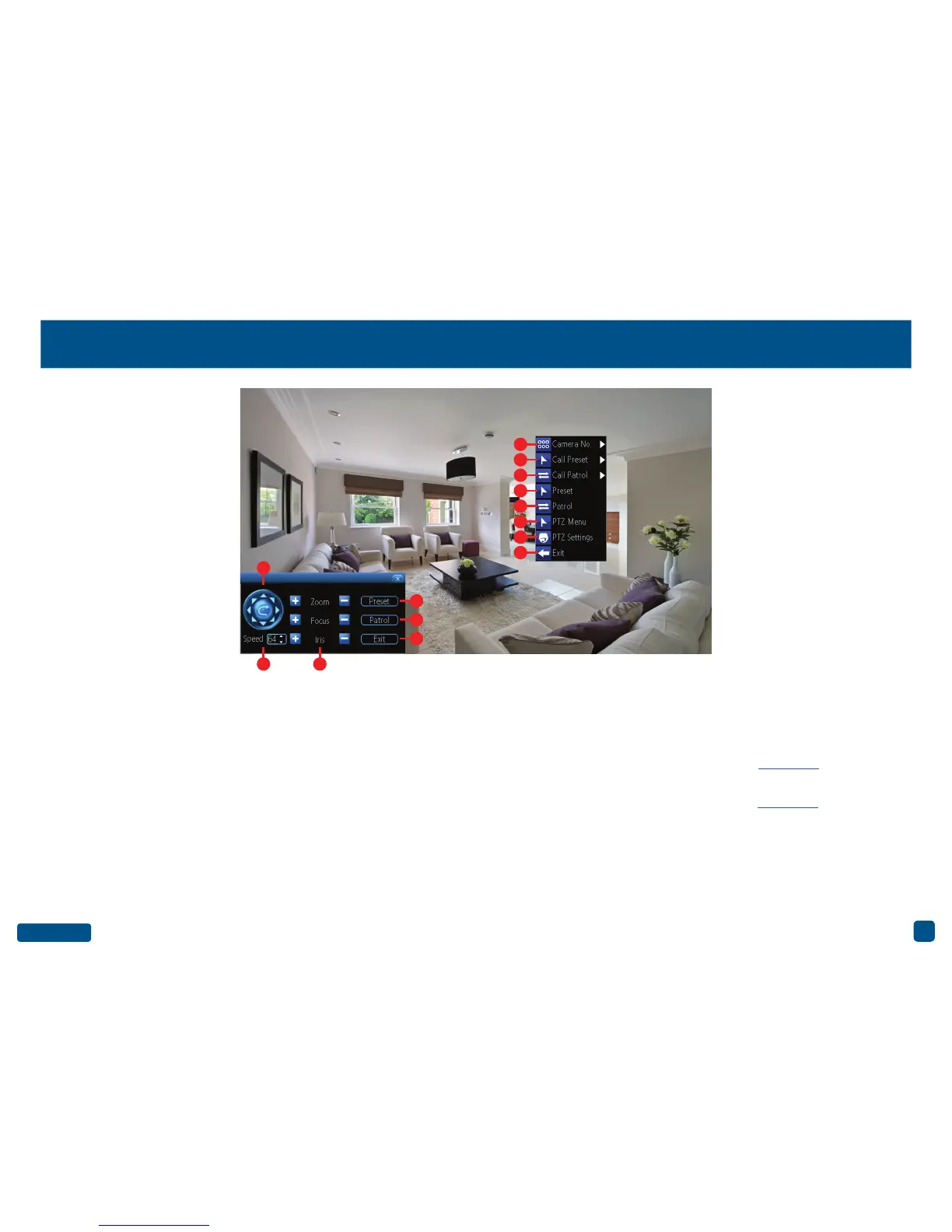
1. Click the directional buttons to move the camera in the direction se-
lected.
2. This determines how fast the camera will move. The lower the num-
ber the slower the camera will move (this does not affect the speed
when the camera is in Patrol mode).
3. The ability to zoom into an object and to control the level of focus (the
“Iris” controls are not available).
To access the PTZ menu, right-click the mouse (as seen above).
7. Click this to select a different channel.
8. Click this to select a different Preset position.
9. Click this to select a different Patrol mode.
10 (4). Click this to access the Preset menu - Click here for more infor-
mation.
11 (5). Click this to access the Patrol menu - Click here for more infor-
mation.
12. Click this to hide the PTZ controls. Click again to return.
13. Click this to access the PTZ settings menu.
14 (6). Click this to exit. You will be taken back to the default Live View
mode.


 To Next Page