11
First steps
Gigaset E500H / Aton CL317 / Schweiz PTT EN / A31008-M2256-F151-1-2X19 / first_steps.fm / 07.07.2010
Second step: setting up the charger
The charger is designed for use in dry rooms in a temperature range
of +5°C to +45°C.
¤ Set up the charger on a level, non-slip surface or mount the
charger on the wall ¢ page 50.
The phone's feet do not usually leave any marks on surfaces. How-
ever, due to the multitude of different varnishes and polishes used
on today's furnishings, the occurrence of marks on the surfaces can-
not be completely ruled out.
Third step: connecting the charger
Please note
Pay attention to the range of the base. This is up to 250 m in
unobstructed outdoor areas and up to 40 m inside buildings. The
range is reduced when Eco Mode is activated (¢ page 40).
Warning
u Never expose the telephone to the influence of heat sources,
direct sunlight or other electrical devices.
u Protect your Aton from moisture, dust, corrosive liquids and
fumes.
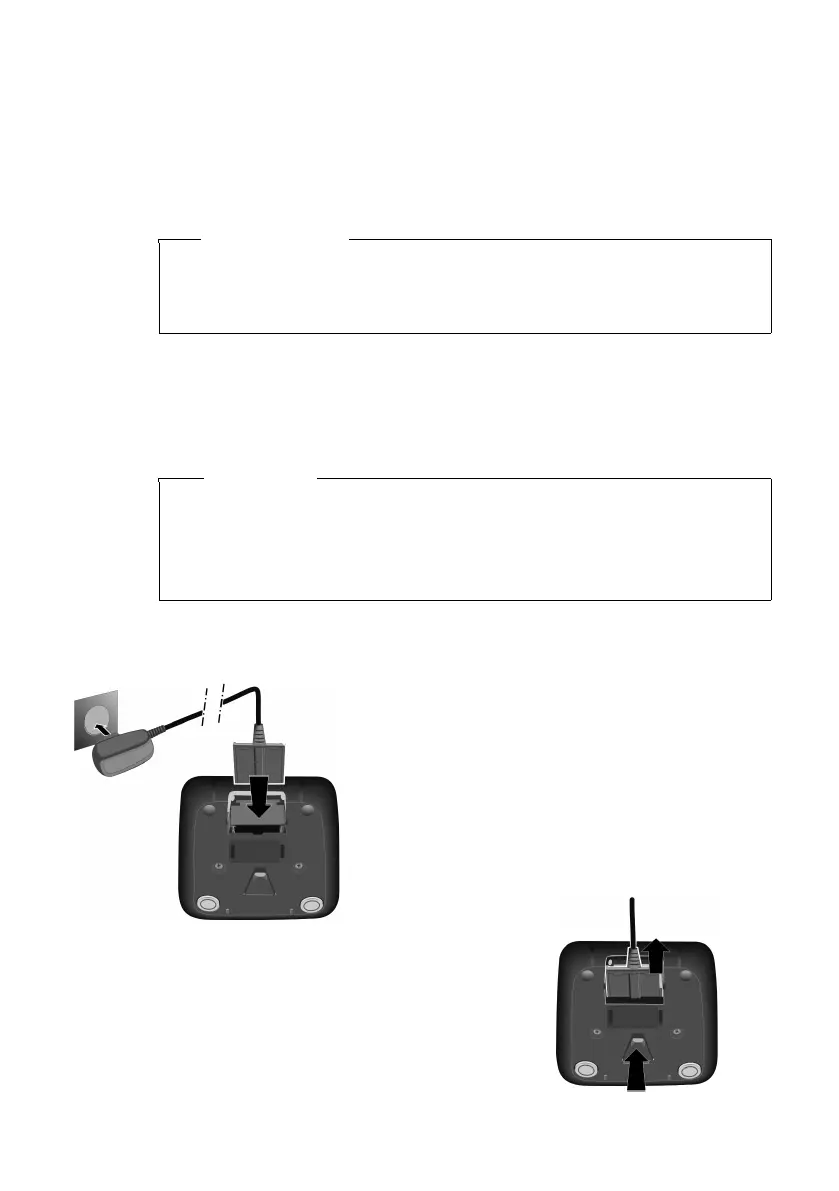
¤ Plug the power adapter into
the plug socket 2.
¤ Connect the flat plug on the
power adapter 1.
To disconnect the plug from the charger,
press the release button 3 and discon-
nect the plug 4.
1
2
3
4



 To Next Page