2
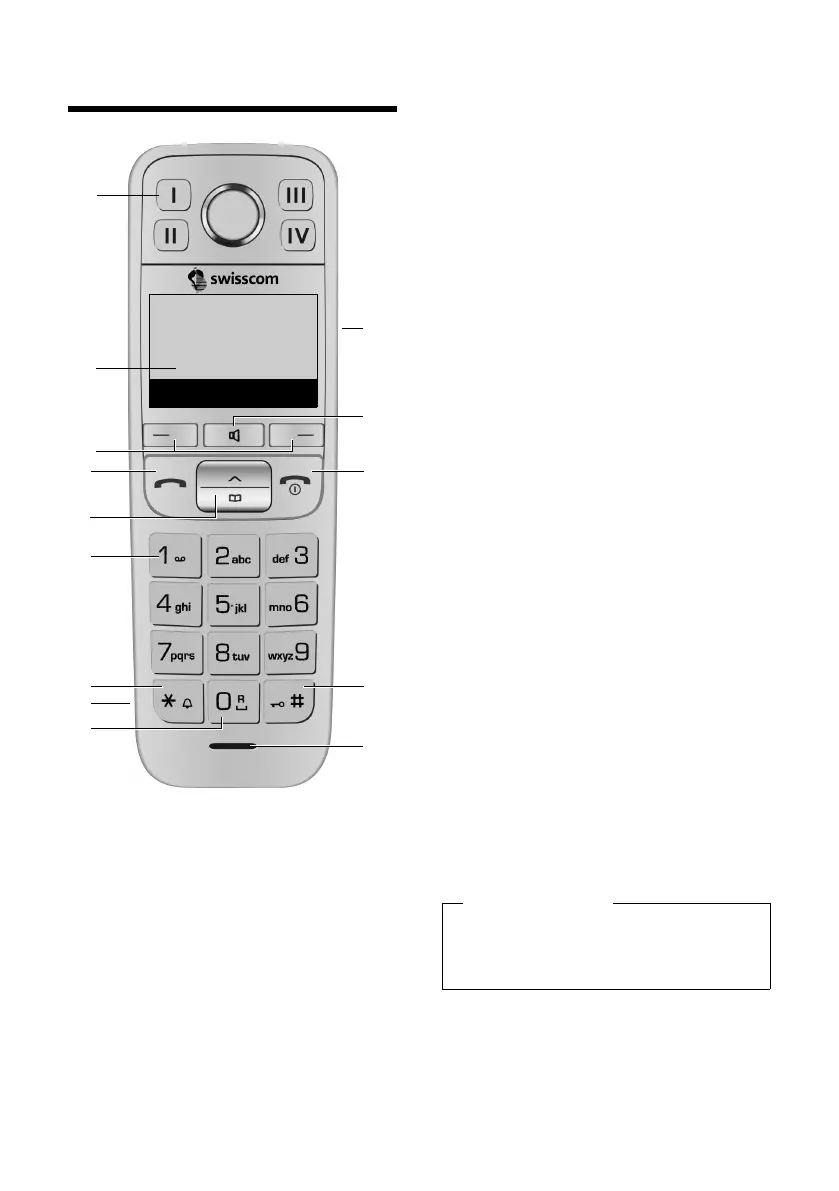
Overview of handset
Gigaset E500H / Aton CL317 / Schweiz PTT EN / A31008-M2256-F151-1-2X19 / overview.fm /
Version 4, 16.09.2005
Overview of handset
1 Direct dialling keys I to IV
(¢ page 34)
2 Display in idle status
(¢ page 20)
3 Display keys (¢ page 4)
4 Talk key
Accept a call, start dialling
5 Control key (¢ page 5)
6 Key 1
Call network mailbox (¢ page 39)
7 Star key
Ringers on/off (press and hold)
8 Connection socket for headset
9 0 key/recall key
Consultation call (flash): press and
hold
10 Side key
Set the volume (¢ page 5)
11 Handsfree key (¢ page 31)
Switch between earpiece and
handsfree mode;
Lights up: handsfree activated;
Flashes: incoming call
12 End call key, On/Off key
End call; cancel function; go back
one menu level (press briefly); back
to idle status (press and hold); acti-
vate/deactivate handset (press and
hold in idle status)
13 Hash key
Keypad lock on/off (press and hold,
page 24); upper/lower case and
digits (¢ page 49)
14 Microphone
4
5
12
13
14
8
3
11
10
7
9
6
Ð U
07:30
Redial Menu
2
1
Please note
To change the display language,
proceed as described on
page 41.



 To Next Page