7
Routing
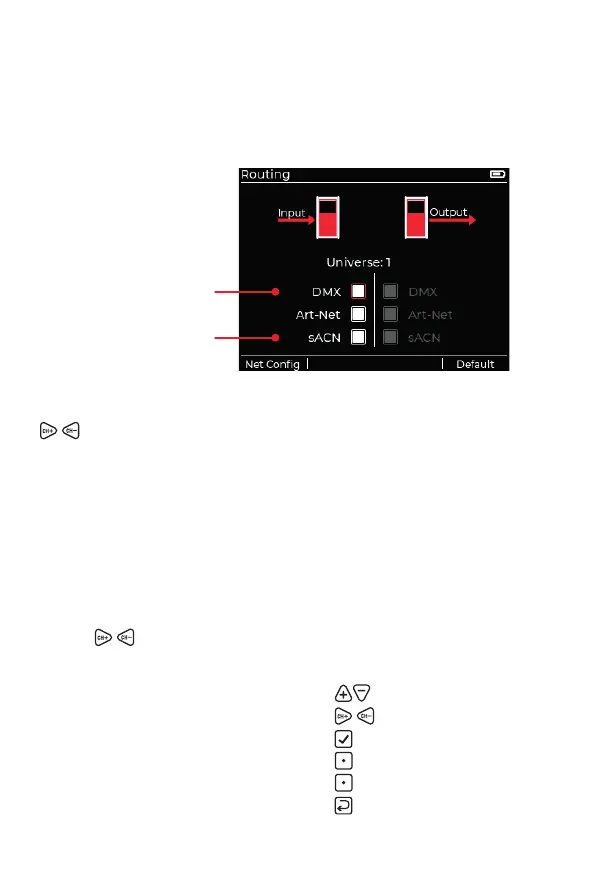
This page is accessed from either the Send or Receive apps by pressing
the [Routing] soft-key. The function of this page is to manage the various
supported protocols: DMX via the XLR connectors and/or Art-Net / sACN
via the RJ45 connector.
Either the Input or Output side will be active, depending on which app is
being used: Receive or Send. For Art-Net and sACN signals, use the
keys to choose the required universe.
Input (Receive app)
The protocols currently enabled for receiving by the XMT-500 are
indicated by their lled checkbox(es). The Receive app will display the
input of the highest checked protocol that is received (and the selected
universe) in this list.
Output (Send app)
Each active protocol is shown with a lled checkbox. In the Send app, the
chosen channel values are sent to each protocol in parallel. If necessary,
use the keys to change the universe being used for Art-Net & sACN.
Navigation
• Choose signal type:
• Choose Art-Net/sACN universe:
• Select/deselect signal:
• View the Network Con guration page:
[Net Confi g]
See page 12
• Restore default values:
[Default]
• Return to previous page:
Highest priority
Lowest priority



 To Next Page