OperationManual
Sy‐Klone.com/RAinfoJune2021
ENGLIT0000342D
15
10 SECS
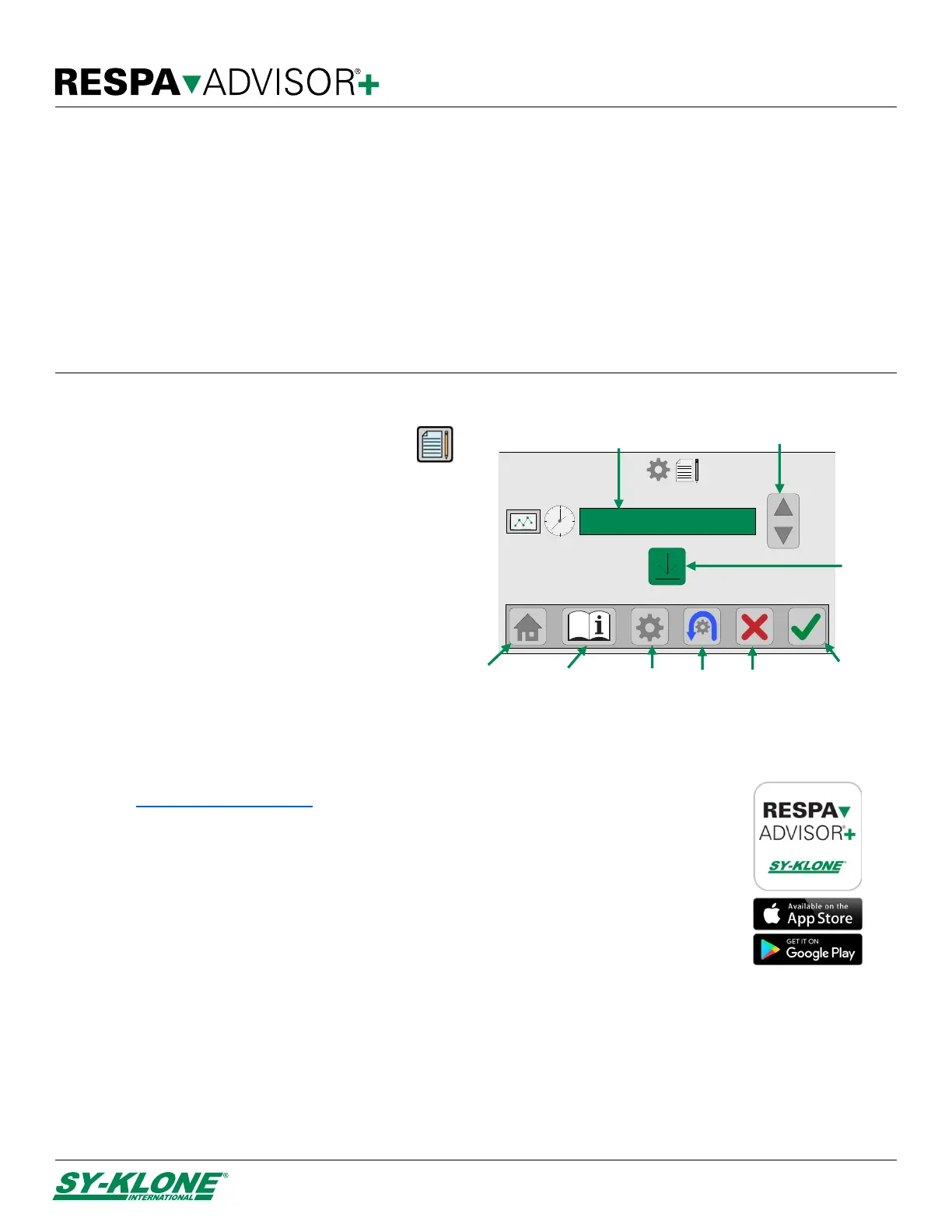
Confirm button
(erase logs)
Cancel button
Main menu
button
Info button
Home
button
Reset
button
List of data sampling
intervals
Select
data sampling
interval
Download
logs
button
Data Logging Interval Setting
To access the Data Logging screen, press the
Data logging button on the Main Menu.
1. Use the Up/Down Data Sampling Interval
buttons to adjust the interval at which samples
are logged. NOTE: Selecting one second
intervals will give you a log of approximately one
hour, ten second intervals will give you a log of
approximately 10 hours, etc.
2. Press the Reset button to return the data
sampling interval to 10 seconds.
3. Press the Confirm button to confirm any
changes and return to the Main Menu screen.
NOTE: If you press the Confirm button, all
previous logging will be erased.
Data Logging Download
Please visit www.sy-klone.com/RAinfo or scan the QR code provided in the information screen for
instructions on how to access to the Sy-Klone phone application.
1. On the monitor, press the Download Logs button to allow the Sy-Klone phone application to
connect to the RESPA Advisor+.
2. Follow the prompts within the Sy-Klone phone application to download the logs to your mobile
device.
3. Press the Home button to return to the main display.
4. Press the Main Menu button to return to the Main Menu screen.
NOTE: Pressing the Confirm button will erase all previous logs.
Recalibrating the Monitor
If you are seeing erratic readings, or if you open the cab door and the pressure does not drop to zero, it is time to recalibrate the
monitor.
To recalibrate the RESPA Advisor+:
1. Press the Main Menu button on the main display.
2. The PIN Code Screen will be displayed.
a. Enter the six-digit recalibration PIN code. (777779)
TIP: If you enter number incorrectly, press the Reset button to clear entry.
b. Press the Confirm button to restart and recalibrate the monitor.


 To Previous Page