OperationManual
Sy‐Klone.com/RAinfoJune2021
ENGLIT0000342D
9
Pressure Units of Measure Setting
Press either the Pascal button or Inches of H
2
O button to select the
unit of measure for the alarm thresholds and real-time pressure
display. Note: Selected unit will highlight in green. After selecting
units, you will be returned to the Main Menu screen.
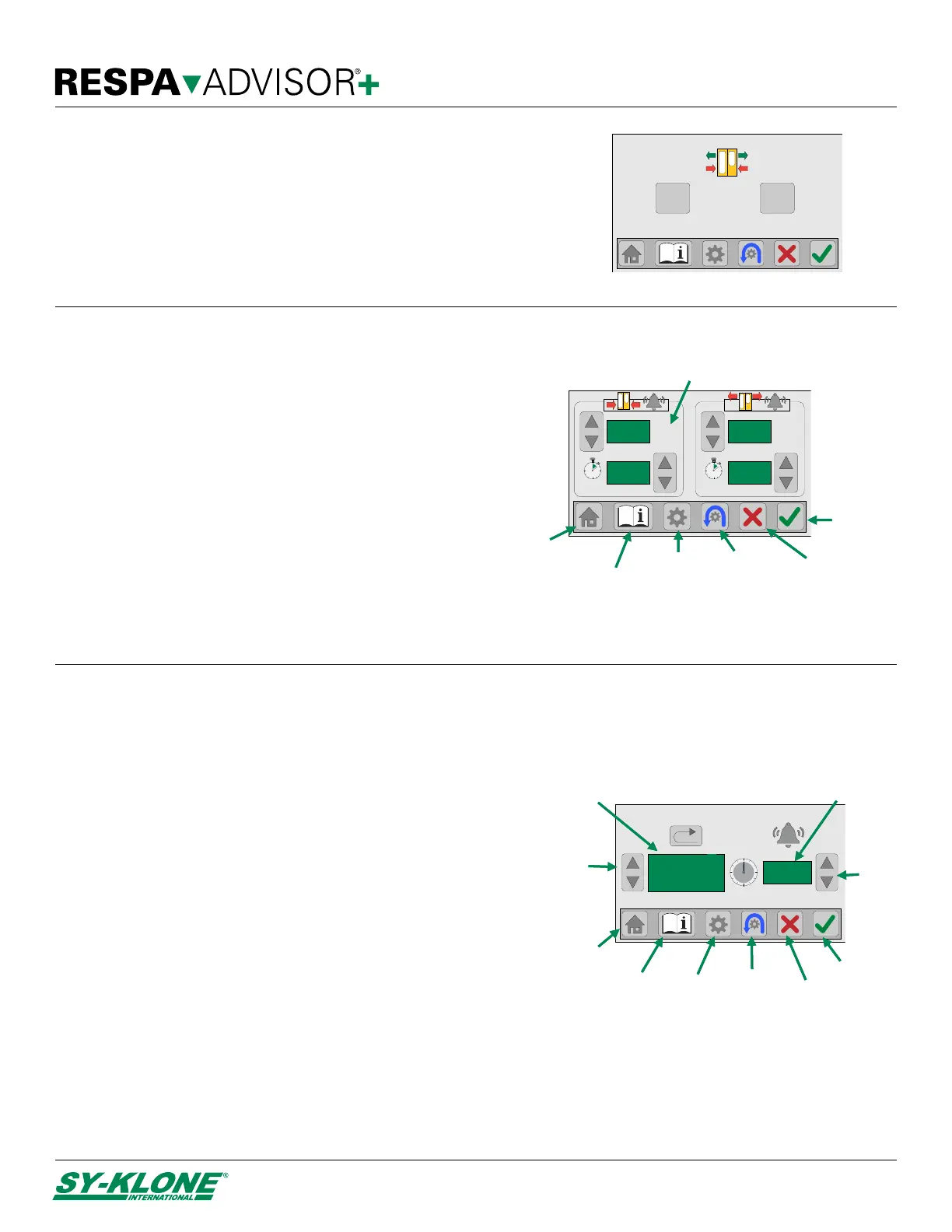
Pressure Alarm Setting
1. Use the Up/Down Alarm Threshold buttons to adjust
the low and high alarm levels or press the Reset button
to return the pressure setting to the original settings
(Low alarm – 20 Pa @ 3 sec, High alarm – 200 Pa @ 6
sec).
2. Use the Up/Down Alarm Time buttons to adjust the
low and high time to alarm values (seconds).
3. Press the Confirm button to save changes and return
to the main menu.
To exit without saving changes, press the Main Menu
button or Cancel button to return to the Main Menu screen,
or press the Home button to return to the main display.
Filter Life Setting
By default, the filter life is set to a pre-determined number of hours
based on filter type (see next page), but can be altered to suit the
conditions on your job site or to fit your preventative maintenance
cycle by following the steps below.
1. Use the Up/Down Filter Selection buttons to select the
installed filter you would like to adjust.
2. Use the Up/Down Adjust Hours buttons to adjust the filter life
(hours). The maximum allowable time is determined by filter
type. (See Filter Identification Specifications, next page)
3. If you wish to restore default value, press the Reset button to
return the filter life hours to maximum allowed.
4. Press the Confirm button to save changes and return to the
main menu.
To exit without saving changes, press the Main Menu button or
Cancel button to return to the Main Menu screen, or press the
Home button to return to the main display.
NOTES: Filter Life can only be adjusted once. If you wish to adjust again, the filter must be removed and selected again. (See Manual Filter Setup
Section, page 7) Use the Filter Life Menu screen to reset the hours used after manual filter replacement. (See Replacing the Filter, page 14)
20
3
Pa
sec
200
6
Pa
sec
Low alarm delay
(in seconds)
Home
button
Confirm
button
LOW PRESSURE
High alarm
threshold
Low alarm
threshold
High alarm delay
(in seconds)
Pressure
units
Main menu
button
HIGH PRESSURE
Info button
Reset
button
Cancel
button
1000
FEFF208
PF F9
MERV16
Reset
button
Adjust
hours
Home
button
Confirm
button
Info
button
Filter life
(in hours)
Filter
selection
button
Main menu
button
Selected
filter type
Cancel
button
inH2O
Pa H
2
O
Pascal


 To Next Page