LS4278 Product Reference Guide8-4
Connecting a USB Interface
See Chapter 4, Radio Communications for information about scanner/cradle pairing and wireless
communication
The scanner must be connected to the cradle for the host parameter setting to take effect. When the scanner
is not connected to a cradle, and a host parameter bar code is scanned, a long low/long high beep sequence
sounds.
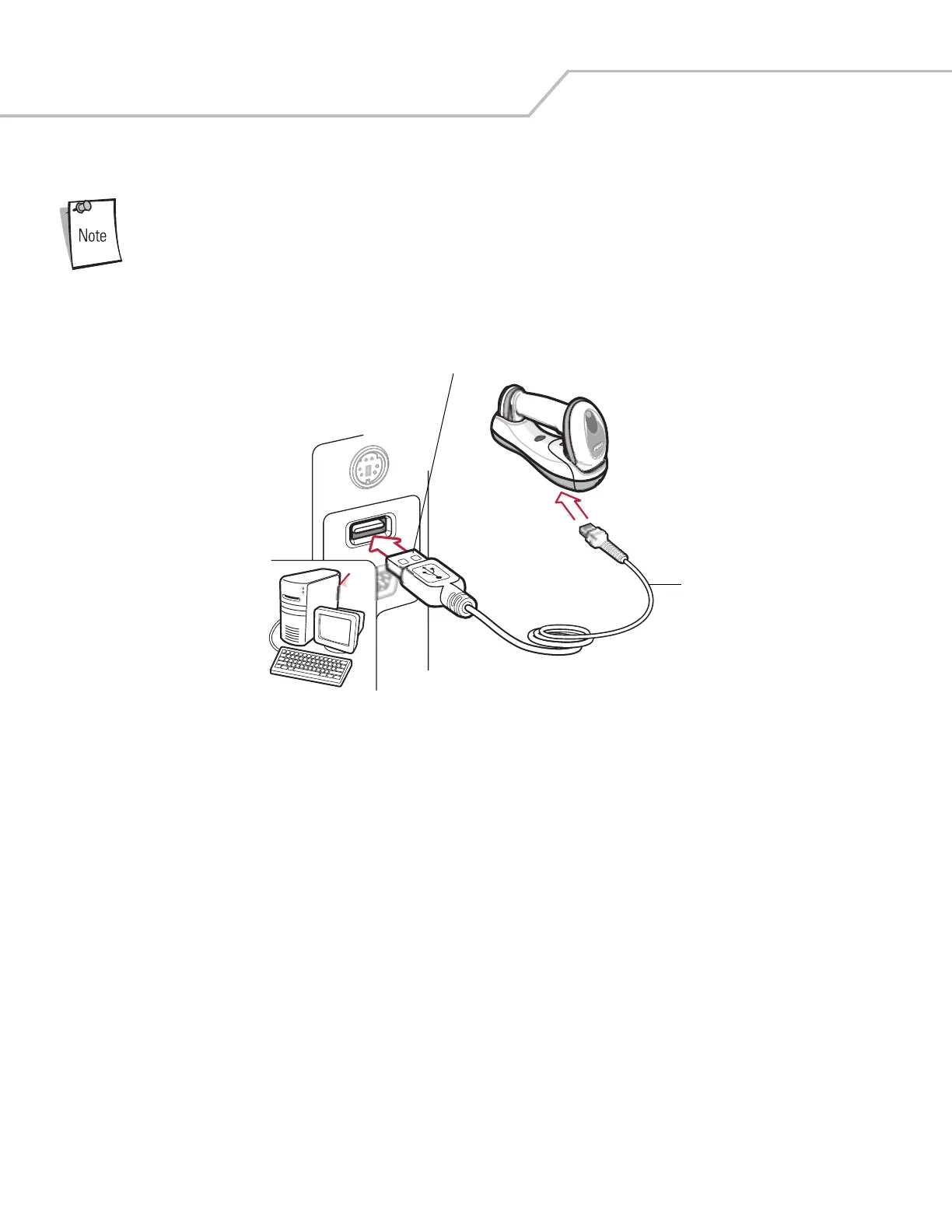
Figure 8-1. USB Connection
The scanner cradle connects with USB capable hosts including:
• Desktop PCs and Notebooks
• Apple™ iMac, G4, iBooks (North America only)
• IBM SurePOS terminals
• Sun, IBM, and other network computers that support more than one keyboard.
The following operating systems support the scanner cradle through USB:
• Windows 98, 2000, ME, XP
• MacOS 8.5 and above
• IBM 4690 OS.
The scanner cradle also interfaces with other USB hosts which support USB Human Interface Devices (HID). For more information on
USB technology, hosts, and peripheral devices, visit www.symbol.com/usb.
To connect the USB interface:
1. Attach the modular connector of the USB interface cable to the host port on the bottom of the scanner cradle (see Connecting
the Cradle on page 1-8).
Interface Cable
USB Series A Connector


 To Next Page