User’s Manual
Synaccess Networks, Inc. www.synaccess-net.com (760) 930 – 0473 Page 26 of 46
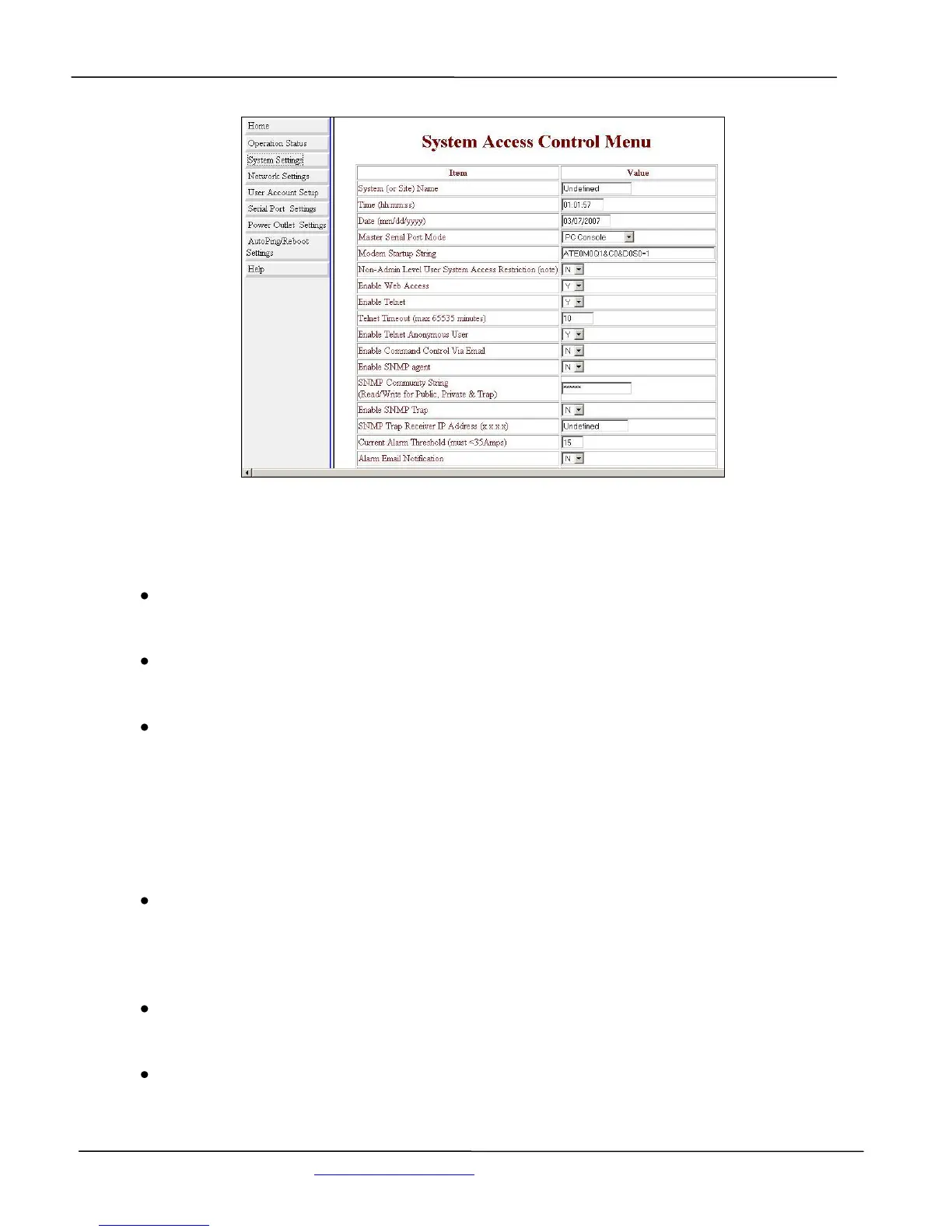
Figure 18 - System Access Control Menu (Web Page)
System(Device) name:
Assign a system name, sometimes referred as site or device name.
Date and Time:
Enter calendar date and real-time clock.
Serial Port Mode:
Configure the Local Master Port to interface type: either to a serial RS-232 port on your work
station or an external Modem device. An external Modem device is typically equipped with
a DCE (Data Communication Equipment) terminal connector. Since the system’s Local
Master Port and Modem device ports are not complementary, you need to use a NULL
Modem cable with both male connectors. For information about connecter pin assignment,
please see Appendix A.
Modem Startup String:
Define an external Modem control command string that is sent from the system to an external
modem device periodically (in every 15 minutes). If you do not need to define the control
string, leave the entry field empty.
Web Access:
Enable or disable web access to the system. Default to enable.
Telnet Access:
Enable or disable Telnet access to the system. Default to enable. Only one active Telnet
session is permissible.


 To Next Page