User’s Manual
Synaccess Networks, Inc. www.synaccess-net.com (760) 930 – 0473 Page 29 of 46
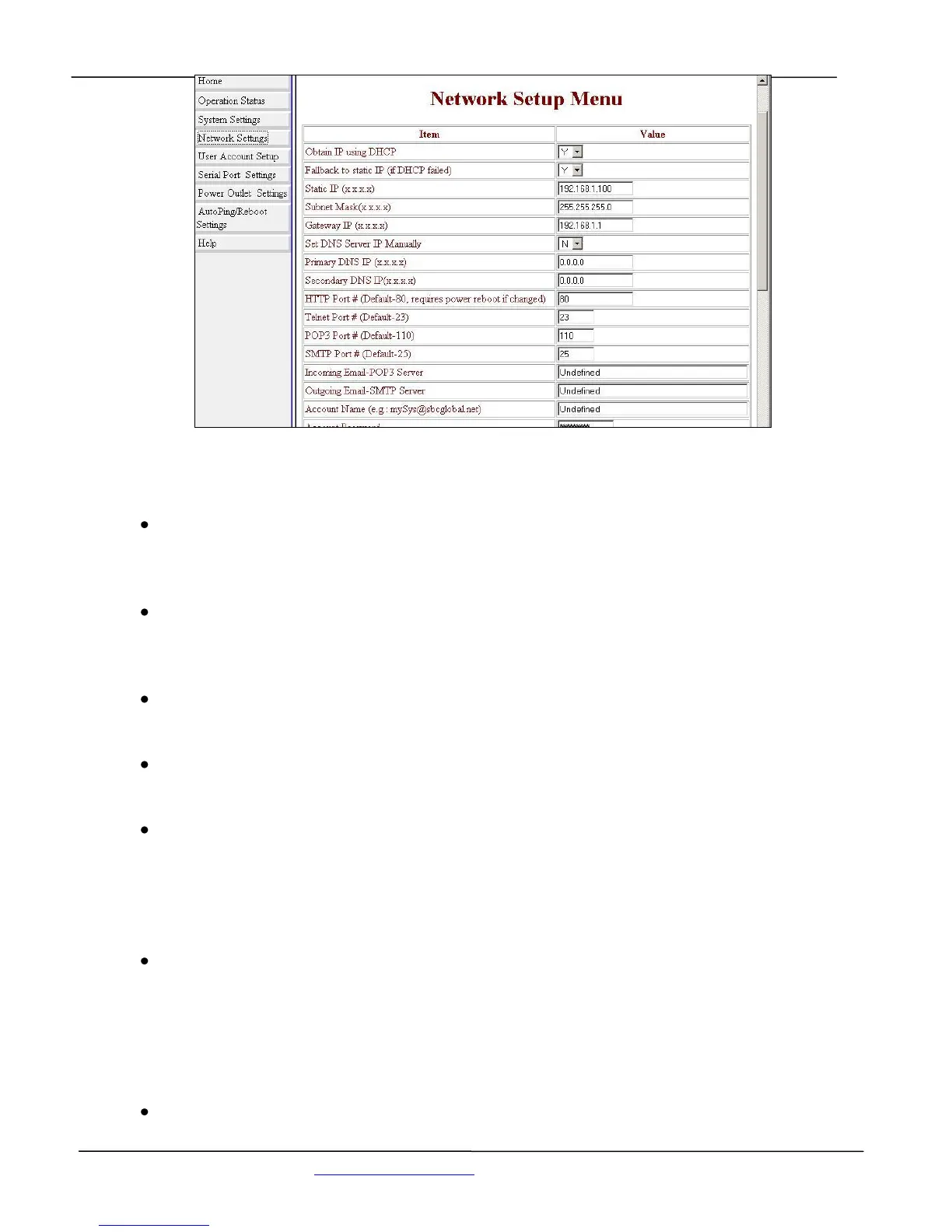
Figure 20 - TCP/IP Network Configuration Menu (Web Page)
Subnet Mask:
Defines a static subnet mask that is a part of your static network address settings. This entry
is for your IP network class, which is distinguished by using a subnet mask.
Gateway IP address:
Specifies a gateway IP address that is a part of your static network address settings. This is
your router’s IP address.
HTTP Port Number:
Specifies a HTTP port number. Default value is 80.
Telnet Port Number:
Specifies a Telnet port number. Default value is 23.
POP3 Email Server:
Specifies POP (incoming Email) server address. The system supports POP3 Internet Email
Protocols, not web based Email services. “mail.synaccess-net.com” and “pop.tom.com” are
examples of POP Email servers. Make sure that the POP server you use does not require log
on secure password authentication.
SMTP Email Server:
Specifies SMTP (outgoing Email) server address. This server will be used for you to send
outgoing (reply) Emails. “mail.synaccess-net.com” and “smtp.tom.com” are examples of
SMTP Email servers. NP supports SMTP log on secure password authentication option.
Helpful Info: use the command “emailget” to immediately check incoming emails.
Incoming Email Account Name:


 To Next Page