- 17 -
5.4 Procedure – POE Card Installation
Warning: These functions should only be performed by qualified personnel
only. It requires working with an open unit. Make sure to unplug the unit
wherever the instructions call for it. Failure to take the proper precautions
may result serious injury or death.
NOTE: Refer to the section 3.3.3 for additional information on configuration settings for this option.
1.
Unplug the power cord from the bottom of the Terminal and allow the unit to shut down after the battery
backup takes over. This will last about 20 seconds.
Unscrew and remove the front panel; there are 5 screws on the back side of the terminal.
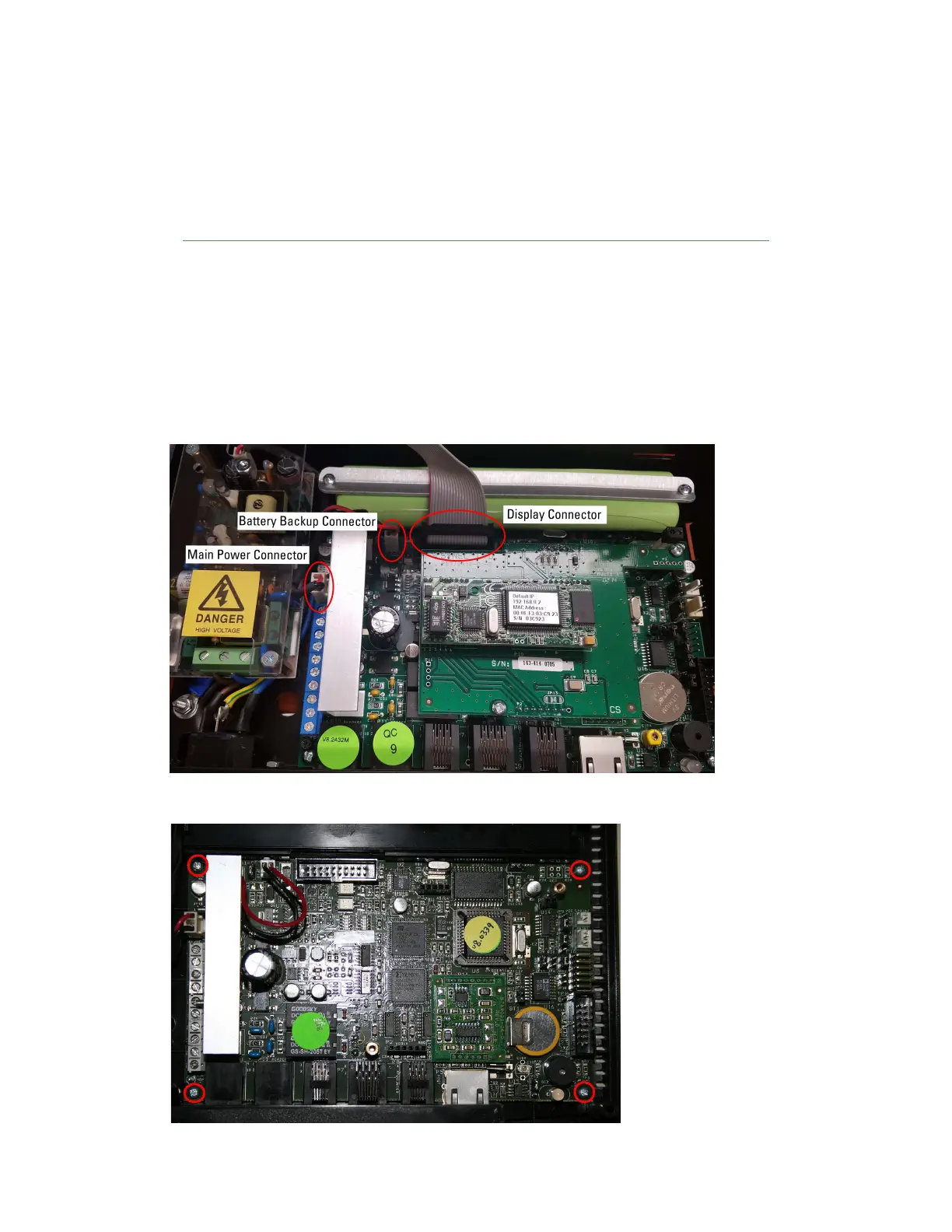
Unplug the connector for the display, and if equipped, the connectors for the fingerprint. See image below
for locations of connectors. You can now move the cover away from the unit.
Disconnect the connectors for the main power and battery backup
If necessary, remove the cover for the battery compartment if it’s in the way.
Remove the 4 screws that hold in the main board. See image below for locations of screws.


 To Next Page