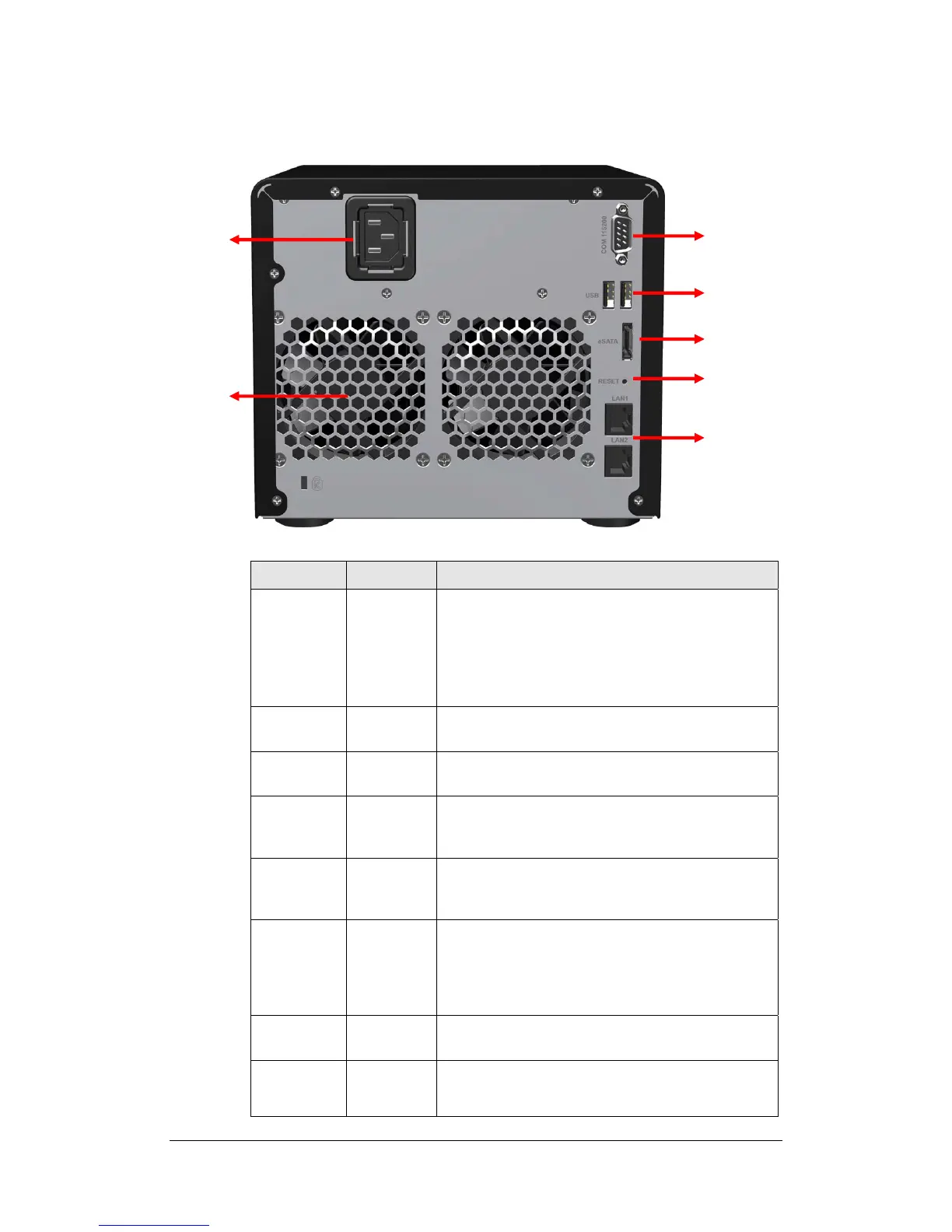
Rear View
Article Name Location Description
Power Button Front Panel The Power Button is used to turn Synology Server
On or Off.
To turn Off Synology Server, press the Power Button
until you hear a "beep" and the Power LED begins
blinking. The shutdown process will complete in 30
seconds.
LED Indicator Front Panel The LED Indicator is used to display the status of
the internal disk and the system.
Hard Disk
Tray
Front Panel There are 5 hard disk trays on the front panel. Each
tray is designed to hold a hard disk vertically.
Hard Disk
Tray Lock
Front Panel Each of the 5 hard disk trays is equipped with one
tray lock. Use the tubular key in the package to
lock/unlock the trays to the system.
USB Port Back Panel Synology Server offers 2 USB ports for adding
additional external hard drives or other USB
devices.
Fan Back Panel There are 2 fans on the back panel. The fans are
used to exhaust waste heat out of Synology Server.
The fans will start automatically when Synology
Server starts. If the fan is malfunctioning, system will
"beep" every 1 second.
Console port Back Panel The console port is where you connect Synology
Server directly to a computer.
RESET
Button
Back Panel 1. To restore IP, DNS, passwords for the
"admin" account to default value, and reset
the “guest” account to the “enabled” status.
Power
LAN
RESET
eSATA
USB
Console
Fan
19















 To Next Page