16 Synopsys, Inc.
SolvNetPlus
DesignWare
5.60a
March 2020
Setting Up Hardware Components PCIe IP Prototyping Kit Installation Guide
1.2 Hardware Setup
This section provides instructions for the following:
■
Setting Up HAPS-80
■
Setting Up PCIe Root Complex IP Prototyping Kits
■
Setting Up PCIe Endpoint IP Prototyping Kits
1.2.1 Setting Up HAPS-80
To set up the HAPS-80, perform the following tasks.
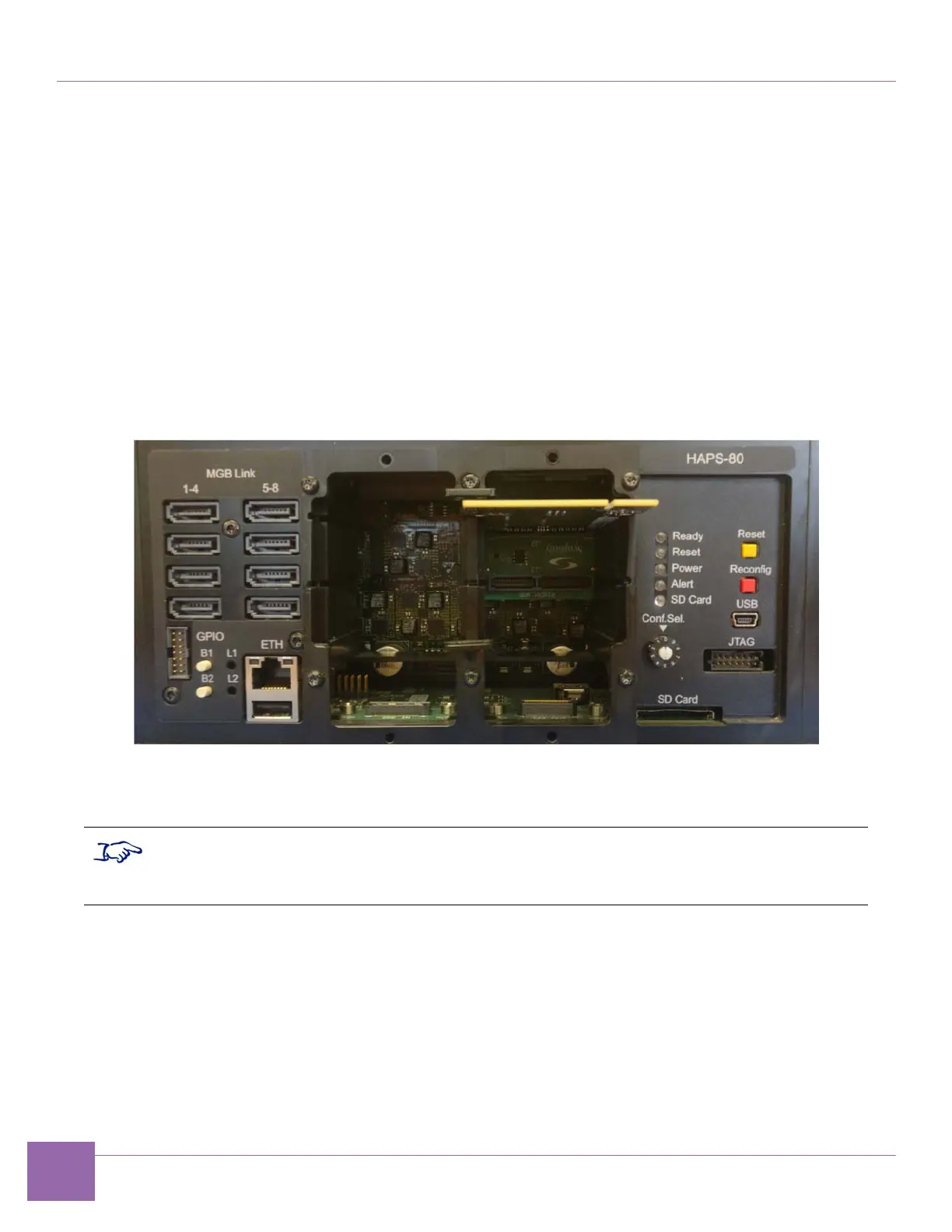
1. Insert the SD card containing the FPGA build files in the HAPS-80 board. The SD card slot is located
in the Front Panel, see Figure 1-7.
Figure 1-7 Detail of the HAPS-80 Front Panel
2. Use the HAPS-80 Conf. Sel. wheel to select the project you want to load. Conf. Sel. wheel position 0
targets the project within the autorun file on the SD card.
■
If you are using the IP Prototyping Kit with the Xilinx PHY, follow the steps 3 to 7.
■
If you are using the IP Prototyping Kit with the Synopsys PHY (E16, C10 or E32 PHY),
jump to step 8.


 To Next Page