2-16
CONTROLS
MULTI-INFORMATION DISPLAY
MAIN MENU SCREEN
MULTI-INFORMATION DISPLAY
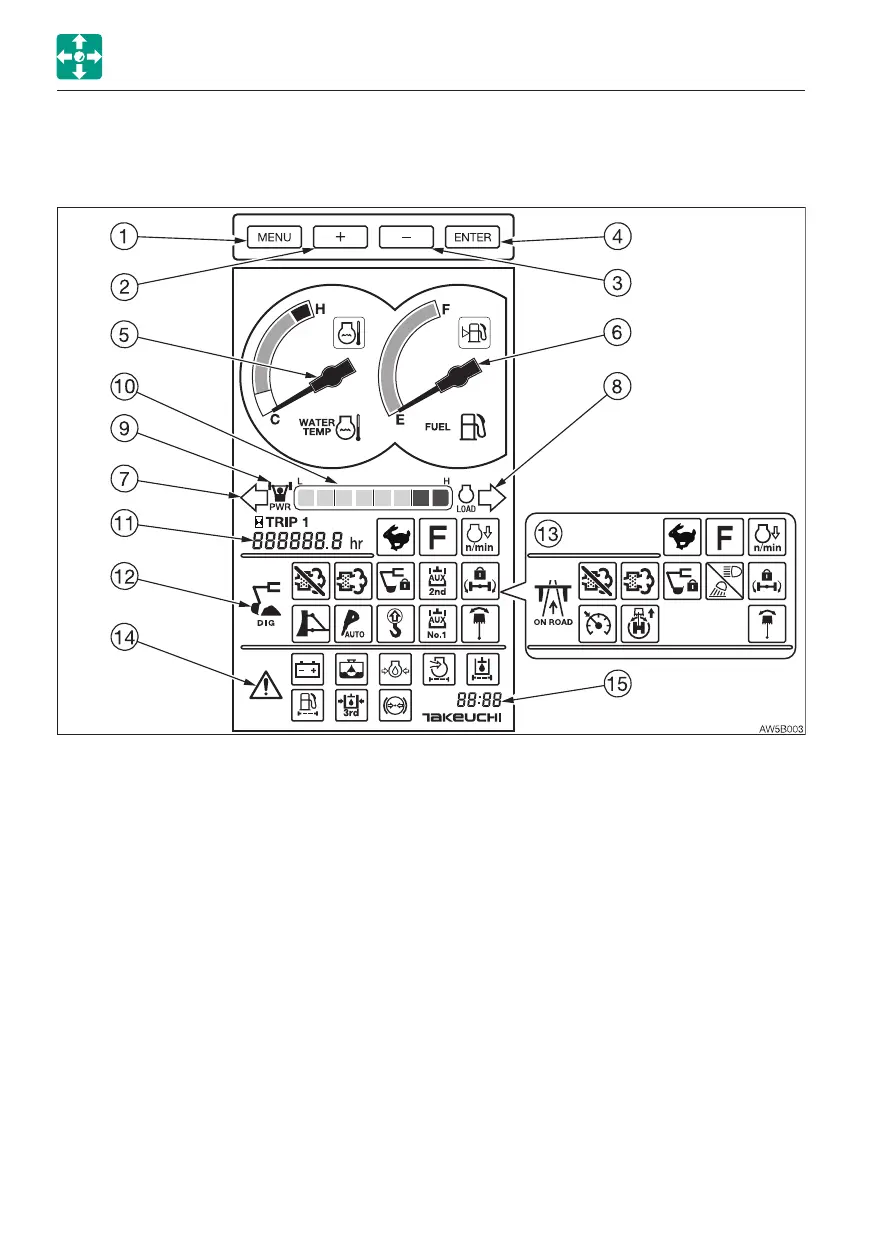
For explanation purposes, all items on this page are in the lit condition. This screen image is
quite different from that of the real operation. In the actual operation, if a warning is given or
any function is selected, the corresponding symbol appears.
When the starter switch is set to ON, the battery charge warning lamp and the engine oil
pressure warning lamp turn on with an alarm sound. The machine system is normal if the
lamps turn off after the engine is started.
1. Menu key
2. Plus (+) cursor key
3. Minus (–) cursor key
4. Enter key
5. Water temperature gauge /Coolant
temperature warning lamp
6. Fuel gauge /Fuel level warning lamp
7. Turn signal indicator lamp (L)
8. Turn signal indicator lamp (R)
9. Power mode indicator lamp
10. Engine load factor indicator
11. Hour meter /Trip meter
12. Digging mode display (Function lamps)
13. Traveling mode display (Function lamps)
14. Warning lamps
15. Clock



 To Next Page