A MORe DIRECT APPROACH
communication for
output or input. The "D"
suf-
fices for both.
Line 20 WRITEs "J. DOE"
to
buffer
#1. Since this
program is open for
direct
access, "J. DOE" will
remain in buffer
#1
until
the
program sends it
elsewhere.
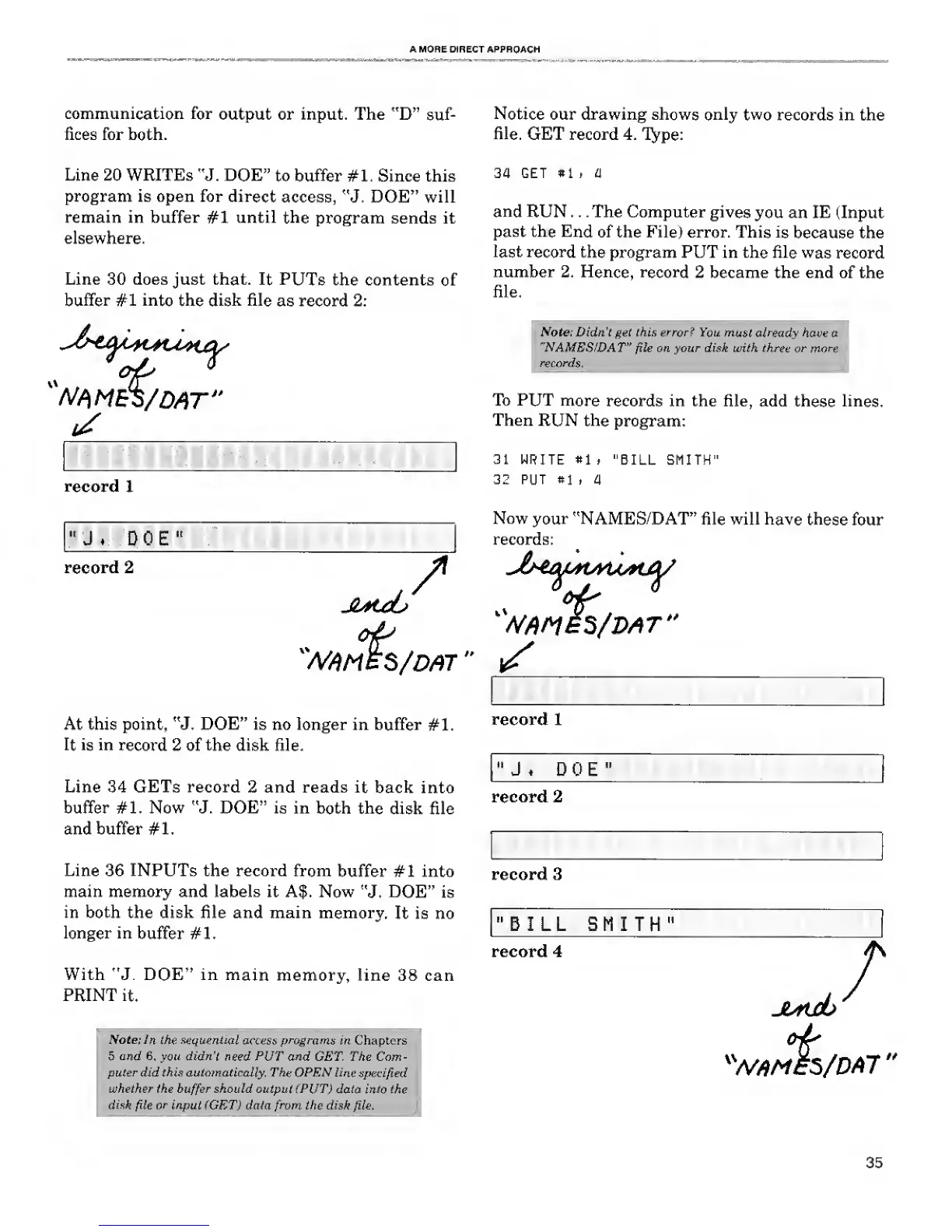
Line 30 does just that.
It PUTs
the contents
of
buffer #1 into the disk
file
as record 2:
Notice our drawing shows only
two
records in the
file.
GET record 4.
Type:
34 GET
»1
. a
and
RUN . .
.
The Computer
gives
you an IE (Input
past the
End
of the File) error. This
is
because the
last record
the program PUT in the file
was
record
number 2.
Hence, record
2 became the end of the
file.
it
Note: Didn't get this error? You
must already
have
"NAMES/DAT"
file
on your disk with three
or mo.
records.
:
record 1
" J DOE"
record
2
/
W^MES/DAT"
^
To PUT
more
records in the file, add
these
lines.
Then RUN
the
program:
31 WRITE
»1 t "BILL SMITH"
32 PUT si
, a
Now
your
"NAMES/DAT" file will
have these
four
records:
At this point, "J. DOE" is no longer in buffer
#1.
It is
in
record
2 of the disk file.
Line 34 GETs record 2 and reads
it
back into
buffer #1. Now "J. DOE" is in both
the
disk file
and buffer #1.
Line 36 INPUTs the record from
buffer #1 into
main memory and labels it A$. Now
"J.
DOE"
is
in both the disk file and main memory.
It is no
longer in
buffer #1.
With "J. DOE" in
main
memory, line 38 can
PRINT
it.
record
1
"
J . DOE"
.
record 2
record 3
"BILL SMITH"
record 4
Note: In the
sequential
access
programs
in Chapters
5 and
6, you
didn't
need PUT
and GET. The Com-
puter did this automatically. The OPEN line
specified
whether the
buffer
should output (PUT)
data into the
disk
file
or
input (GET) data
from
the disk
file.
JtMdb
X
W/)M£S
r
5/DA7
>*
35










 To Next Page