EasyManua.ls Logo

Tandy TRS-80 - Page 59

Tandy TRS-80
104 pages
Print Icon
To Next Page IconTo Next Page
To Previous Page IconTo Previous Page
Loading...
TRIMMING THE
FAT OUT OF DIRECT
ACCESS
DIRECT
INPUT
PROGRAM
*1
'OFFICE/DAT
10
OPEN "D".
20 R
=
R
+
1
30
GET
#1
, R
38 INPUT
Hi A, B$
50 PRINT
"RECORD"
R
":"
A
G0 IF
LOF(l) <> R
THEN
20
70 CLOSE »1
Note: You
can't
use the "LINE
INPUT
Program"
to
determine
how
many
bytes this
file
consumes.
LINE
INPUT
does not
input
the spaces in
a
record
which
follow
the
;
ENTER)
character.
EFFICIENCY,
EFFICIENCY
. .
.
We can
get
even
more
efficient.
Our next
direct
access program
consumes
only 16
bytes.
Erase
memory,
KILL
the old
"OFFICE/DAT"
file, and
type
and RUN
Program
7.
PROGRAM
7
16
bytes
10
OPEN
"D"» *1
. "OFFICE/DAT"
i
8
20
FIELD
»1
t
3
AS
At
t
5 AS
Bt
30
LSET
At
=
"5"
40 LSET
8$
=
"PEN"
50 PUT
»1
.
1
S0 LSET A$
=
"-IS"
70
LSET
B$
=
"PAPER"
90 PUT
«1
.
2
90 CLOSE
*1
There
are two new
words in
this
program
which
we'll
talk about
later.
Let's
see what
the program
does first.
SAVE it.
Then
erase
memory
and input
the file
with this
program:
FIELDED
INPUT
PROGRAM
10
OPEN "D"
,
1
t
'OFFICE/DAT"
.
S
20 FIELD
*i
,
3 AS A* >
5 AS B*
30
R
=
R
+
1
m
GET »1
, R
50
PRINT "RECORD"
R
":"
At! Bt
60
IF LOF(l)
<> R
THEN
30
70
CLOSE
»1
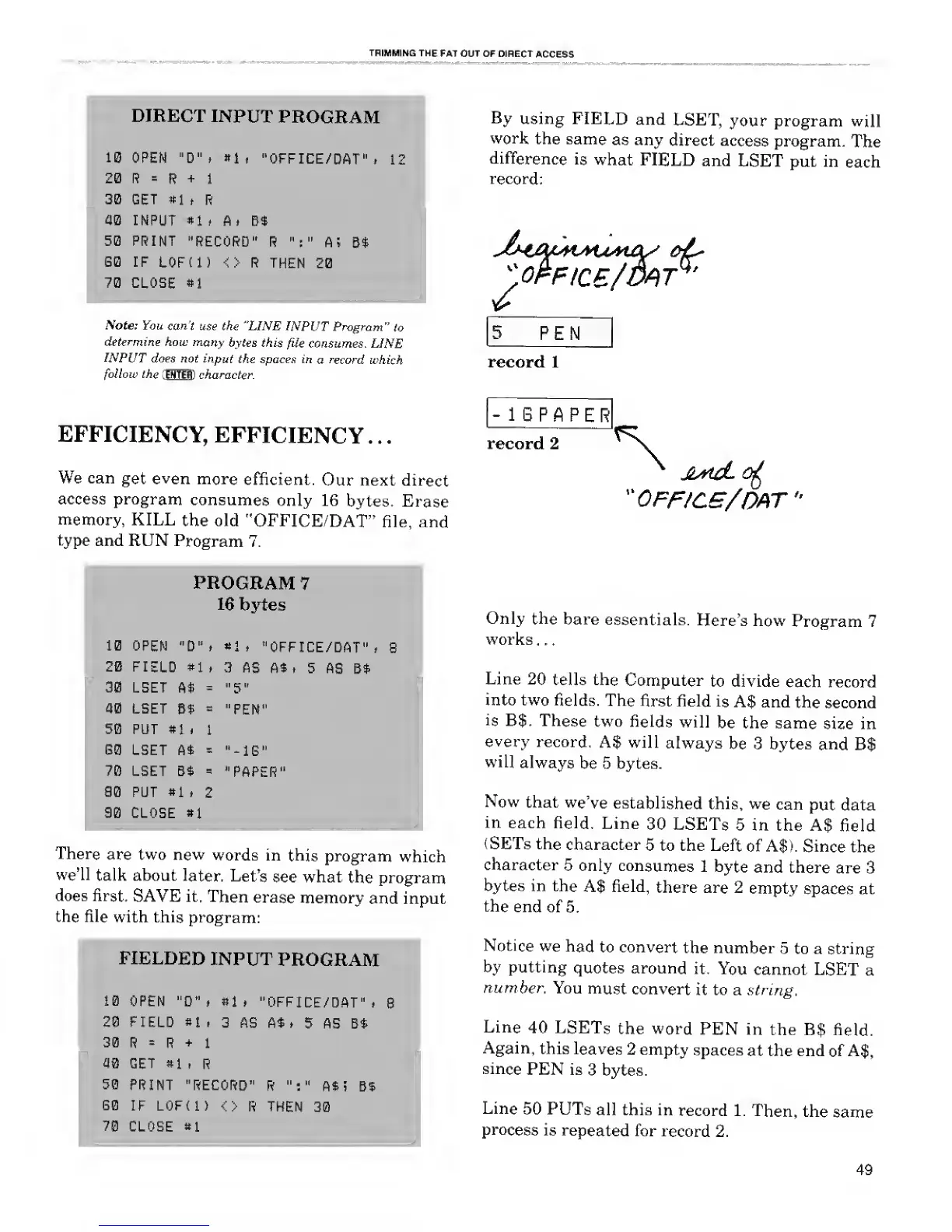
By
using FIELD
and
LSET,
your program
will
work
the same
as any
direct
access
program.
The
difference
is
what
FIELD
and
LSET put in
each
record:
PEN
record 1
-
1
6 P A P
E R
record 2
"OFF/CS/OAT
Only
the
bare
essentials.
Here's how
Program 7
works .
.
.
Line
20 tells the
Computer
to divide
each record
into two
fields. The
first field
is
A$ and
the second
is
B$.
These
two
fields
will
be the same
size in
every
record,
A$ will
always
be 3 bytes
and
B$
will
always
be 5 bytes.
Now
that
we've
established
this,
we
can
put data
in
each field.
Line
30 LSETs
5 in the A$
field
(SETs the
character
5 to the
Left
of A$).
Since
the
character
5
only
consumes
1
byte
and there
are 3
bytes in the
A$ field,
there are 2
empty
spaces at
the
end of
5.
Notice
we
had
to convert
the number
5 to a string
by putting
quotes around
it.
You
cannot
LSET
a
number.
You
must
convert
it to a string.
Line
40
LSETs
the
word
PEN
in
the B$
field.
Again,
this
leaves
2 empty
spaces
at the end
of
A$,
since
PEN is
3 bytes.
Line
50
PUTs
all this in
record 1.
Then,
the
same
process
is
repeated
for
record
2.
49

Related product manuals