IMPORTANT SAFETY INSTRUCTIONS
17 TASCAM CD-GT2
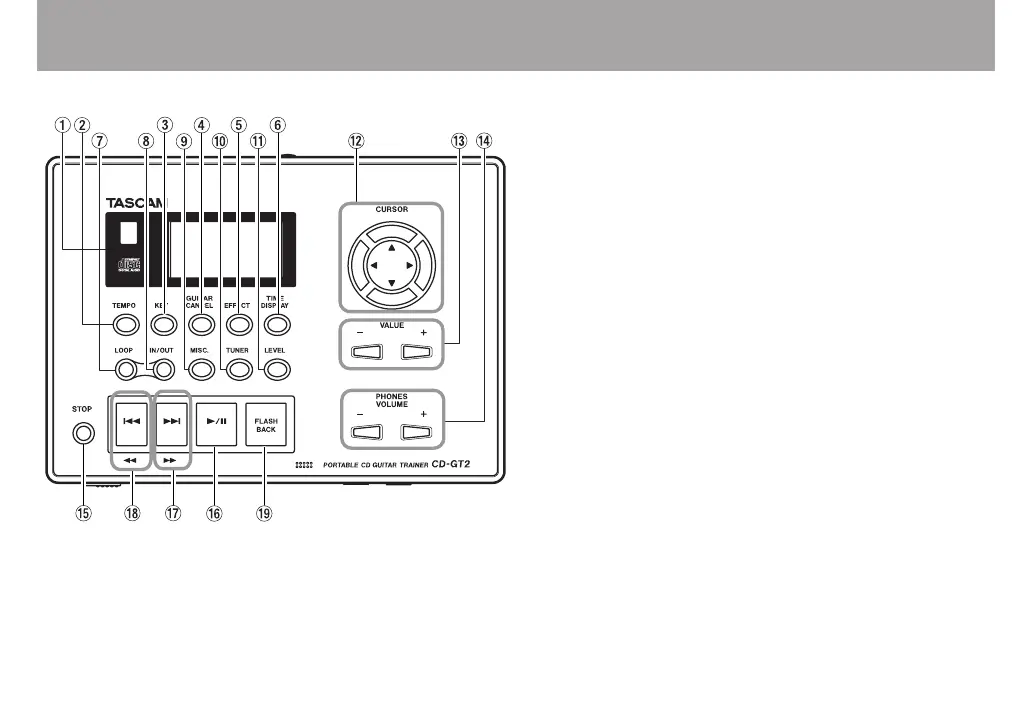
Names and functions of parts
Control panel
1 Display
Shows CD status during playback, device settings and
other information.
2 TEMPO key
Press this key to open the TEMPO CHANGE screen. You
can change the playback tempo and turn the VSA function
ON and OFF on this screen. (See “Changing the tempo”
and “Changing the pitch with the tempo” on page 25.)
3 KEY key
Press this key to open the KEY & PITCH screen.
You can change the playback pitch on this screen. (See
“Changing only the pitch” on page 26.)
4 GUITAR CANCEL key
Press this key to open the GUITAR CANCEL screen.
Turn the guitar cancel function ON and OFF and change
its settings on this screen. (See “Reducing the sound of
recorded guitars” on page 26.)
5 EFFECT key
Press this key to open the EFFECTOR screen. Make
guitar and mic effect settings on this screen. (See “Using
built-in effects” on page 30.)
6 TIME DISPLAY key
Press this key to open the TIME DISPLAY screen,
which shows the status of the CD during playback and
other information. (See “TIME DISPLAY screen” on page
21.)
7 LOOP key
Turns the loop playback and repeat playback functions ON



 To Next Page