IMPORTANT SAFETY INSTRUCTIONS
19 TASCAM CD-GT2
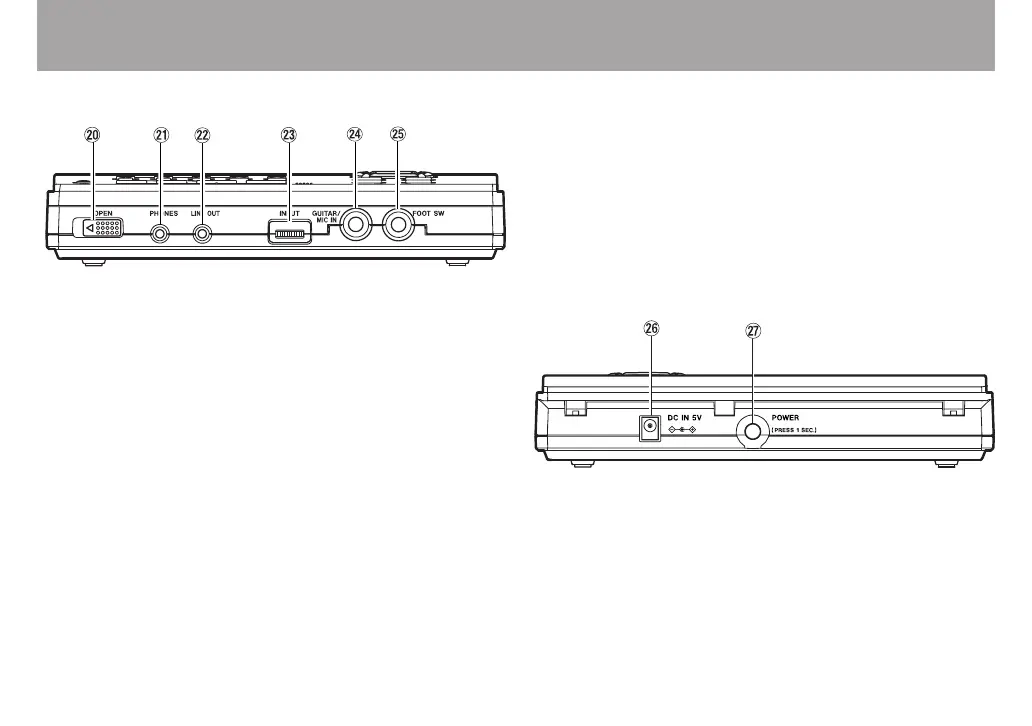
Names and functions of parts
Front
p OPEN switch
Slide this switch away from the PHONES jack to open the
control panel and insert and remove discs.
a PHONES jack (stereo minijack)
Connect headphones to this jack to output the CD
playback signal and the input signal from the GUITAR/MIC
IN jack.
s LINE OUT jack (stereo minijack)
Outputs the CD playback signal and input signal from the
GUITAR/MIC IN jack. Connect an audio system, speakers
with built-in amplifiers or similar equipment.
d INPUT dial
Adjusts the input level of the GUITAR/MIC IN jack signal.
f GUITAR/MIC IN jack (standard phone jack)
Connect an electric guitar or microphone.
g FOOT SW jack (standard phone jack)
Connect a TASCAM RC-30P or other momentary
footswitch (non-latching). Set the footswitch function on
the SETUP & MISC. screen.
Rear
h DC IN 5V jack
Connect a TASCAM PS-P520 AC adapter (sold
separately).
j POWER switch
Turn the power ON and OFF. Press and hold the switch for
more than one second to turn the power ON and OFF.



 To Next Page