34 TASCAM CD-GT2
IMPORTANT SAFETY PRECAUTIONS
Other functions
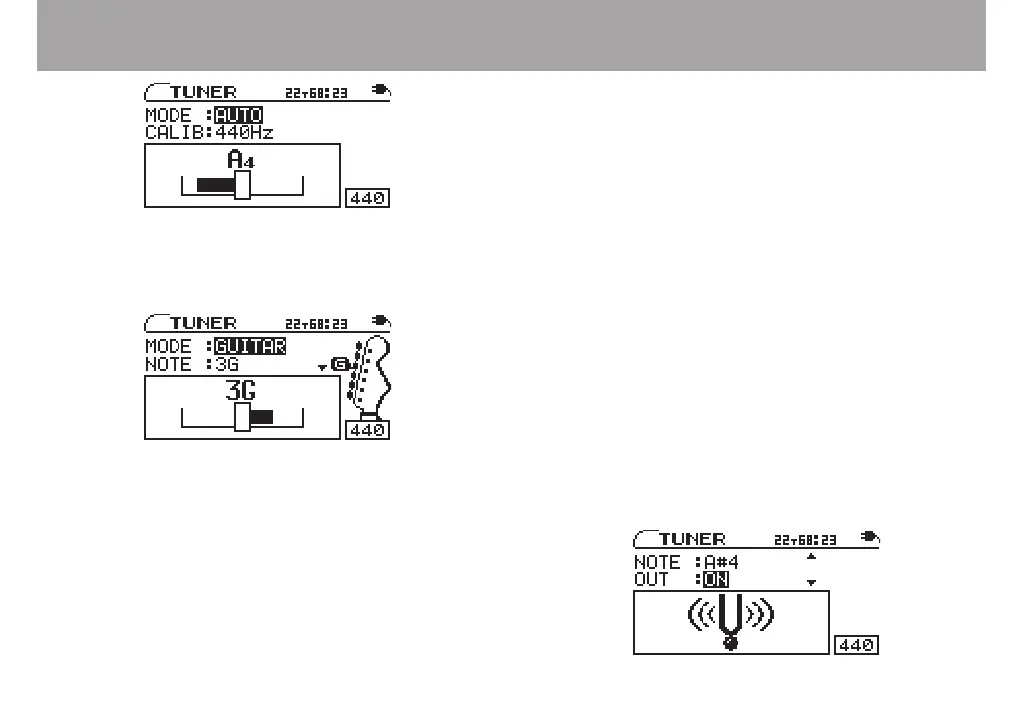
GUITAR (guitar tuner mode)
Change the setting for each string to be tuned.
1 Use the CURSOR ¶ key to select CALIB, and the
VALUE (+, –) keys to set the standard frequency of
middle A between 435 Hz and 445 Hz.
This setting affects all tuner modes.
2 Use the CURSOR § key to select NOTE, and use the
VALUE (+, –) keys to select the string that you are
tuning (1E, 2B, 3G, 4D, 5A, 6E).
The note name of the selected string appears at the top of the
meter. (A guitar peg also appear at the right side of the screen.)
3 The guitar is tuned when the center of the meter is
highlighted. The tuning procedures are the same as
described above for the AUTO mode.
OSC. (oscillator mode)
The built-in oscillator can output a sine wave of a pitch in the
three octaves between C4 and B6 through the PHONES and
LINE OUT jacks. The oscillator mode has the following four
setting items. Use the CURSOR (§, ¶) keys to select the items
and the VALUE (+, –) keys to change their settings.
NOTE
Set the output pitch (C4–B6).
OUT
Set whether or not the oscillator sound is output from the
PHONES and LINE OUT jacks. When ON, an image of a
vibrating pitchfork appears on screen.



 To Next Page