26 TASCAM CD-GT2
IMPORTANT SAFETY PRECAUTIONS
Listening to CDs
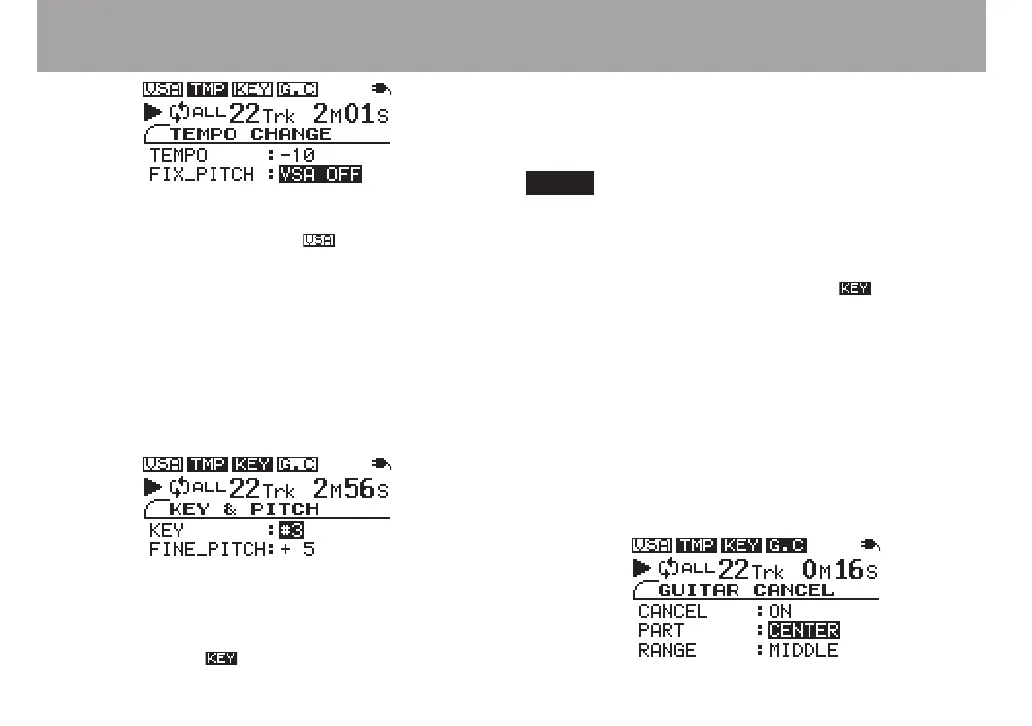
When the VSA function is OFF, the icon at the top of the
screen appears normally.
Changing only the pitch
You can change the pitch without changing the tempo.
1 Press the KEY key to open the KEY & PITCH screen.
2 With the KEY item selected, use the VALUE (+, –) keys
to adjust the pitch up or down in semitones.
The KEY item allows the pitch to be raised or lowered 1 to 6
semitones (â6 – ã6). Any setting other than 0 changes the
playback pitch and the display icon appears in inverse.
3 Use the CURSOR ¶ key to select the FINE PITCH
item and the VALUE (+, –) keys to make minute adjust-
ments to the pitch in cents (1/100 semitone).
Select the KEY or FINE PITCH item and press both
VALUE (+, –) keys simultaneously to reset the adjustment
of that setting to 0.
Even if the KEY item setting is “0”, the icon at the
top of the screen appears in inverse if FINE PITCH is
adjusted.
Reducing the sound of recorded guitars
You can reduce the recorded sound of guitars on a CD.
1 Press the GUITAR CANCEL key to open the GUITAR
CANCEL screen.
2 With the CANCEL item selected, use the VALUE (+, –)
keys to turn the setting ON.



 To Next Page