20 TASCAM CD-GT2
IMPORTANT SAFETY PRECAUTIONS
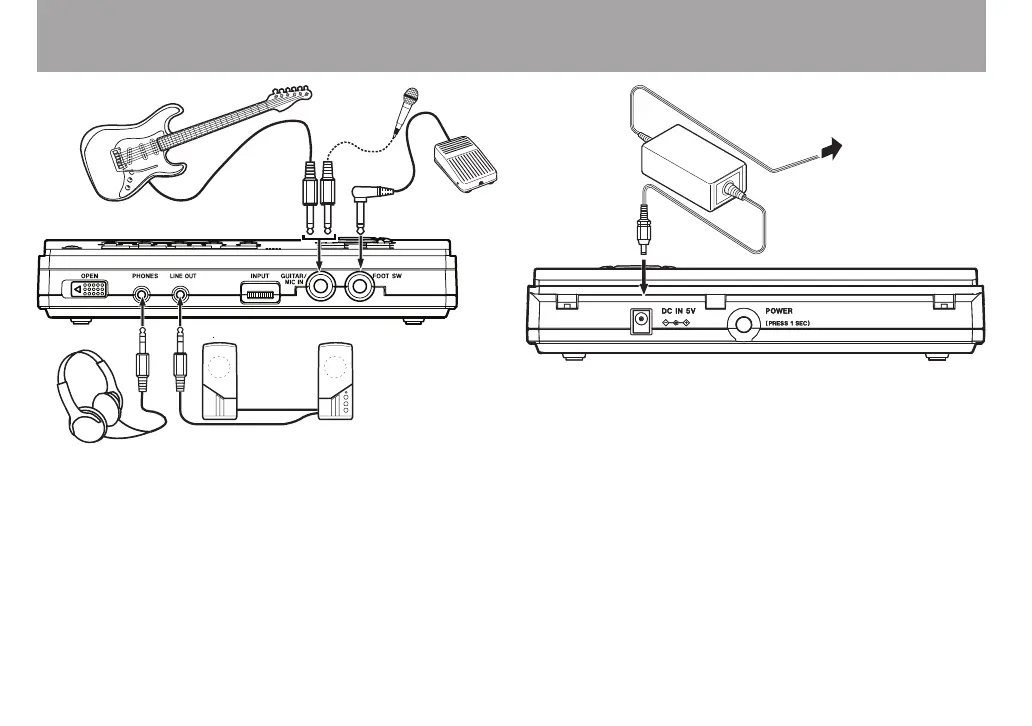
Making connections
PHONES jack: headphones
LINE OUT jack: audio system, speakers with built-in ampli-
fiers, etc. (Use a conversion cable as necessary.)
GUITAR/MIC IN jack: guitar or mic
FOOT SW jack: TASCAM RC-30P or other momentary
footswitch (non-latching)
•
•
•
•
DC IN 5V: PS-P520 AC adapter (sold separately) (See
“Operation with an AC adapter” on page 15.)
•
Guitar
Mic
Footswitch
Headphones
Speakers with built-in amplification
or stereo system
TASCAM
PS-P520
(sold separately)
AC outlet
DC PLUG



 To Next Page