EasyManua.ls Logo

Tascam DA-88 - Hookup Guide; Formatting a Tape

Tascam DA-88
26 pages
Print Icon
To Next Page IconTo Next Page
To Previous Page IconTo Previous Page
Loading...
[i«M
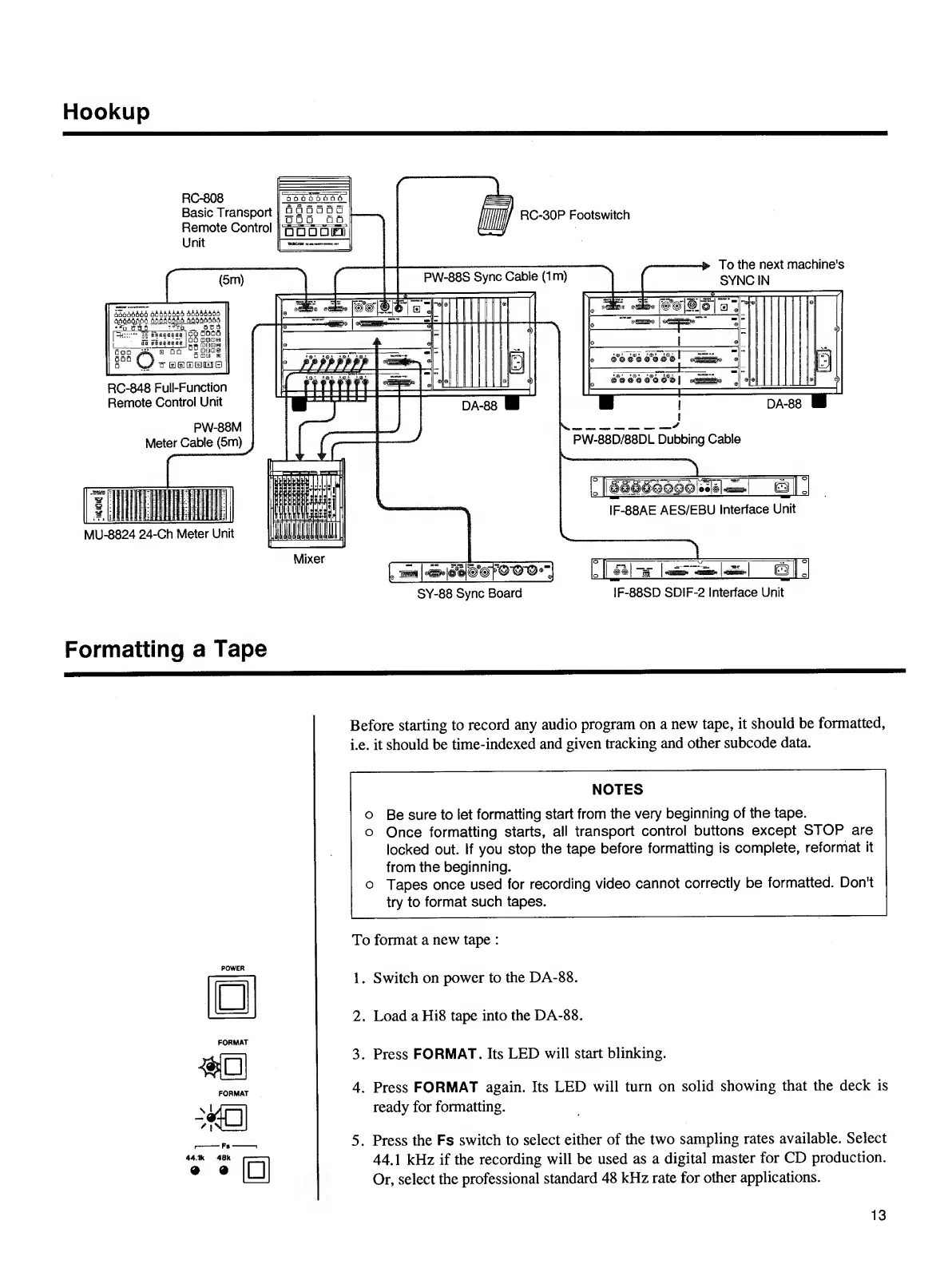
Hookup
RC-848
Full-Function
Remote
Control
Unit
PW-88M
Meter
Cable
(5m)
MU-8824
24-Ch
Meter
Unit
PW-88D/88DL
Dubbing
Cable
i
\
3
%
If#"
""©"O'©
'
SY-88
Sync
Board
IF-88AE
AES/EBU
Interface
Unit
IF-88SD
SDIF-2
Interface
Unit
Formatting
a
Tape
POWER
Before
starting
to
record
any
audio
program
on
a
new
tape,
it
should
be
formatted,
i.e,
it
should
be
time-indexed
and
given
tracking
and
other
subcode
data.
NOTES
o
Be
sure
to
let
formatting
start
from
the
very
beginning
of
the
tape,
o
Once
formatting
starts,
all
transport
control
buttons
except
STOP
are
locked
out.
If
you
stop
the
tape
before
formatting
is
complete,
reformat
it
from
the
beginning.
o
Tapes
once
used
for
recording
video
cannot
correctly
be
formatted.
Don't
try
to
format
such
tapes.
To
format
a
new
tape
:
1.
Switch
on
power
to
the
DA-88.
2.
Load
a
Hi8
tape
into
the
DA-88.
3.
Press
FORMAT.
Its
LED
will
start
blinking.
4.
Press
FORMAT
again.
Its
LED
will
turn
on
solid
showing
that
the
deck
is
ready
for
formatting.
5.
Press
the
Fs
switch
to
select
either
of
the
two
sampling
rates
available.
Select
44.1
kHz
if
the
recording
will
be
used
as
a
digital
master
for
CD
production.
Or,
select
the
professional
standard
48
kHz
rate
for
other
applications.
13

Other manuals for Tascam DA-88

Related product manuals