EasyManua.ls Logo

Tascam DA-88 - Multiple DA-88 Synchronization; Synchronization Setup

Tascam DA-88
26 pages
Print Icon
To Next Page IconTo Next Page
To Previous Page IconTo Previous Page
Loading...
o
Pressing
any
transport
control
button
during
repeat
play
activates
the
function
pressed,
and
repeat
play
will
start
again
if
you
—:
Press
AUTO
PLAY
then
LOC
(whether
1
or
2)
when
the
tape
is
at
any
point.
OR
Press
LOC
when
the
tape
is
at
any
point,
and,
when
the
tape
stops
at
the
beginning
or
end
of
loop,
press
PLAY.
OR
Press
PLAY
when
the
tape
is
within
the
loop
or
at
a
lower
point
than
the
beginning
of
the
loop.
Multiple-DA-88
System
sv
HRpNIZATION
You
can
set
up
a
maximum
of
16
DA-88s
for
128
tracks
to
let
them
behave
in
sync
with
sample
accuracy,
one
DA-88
serving
as
the
master,
and
all
others
as
slaves,
this
without
having
to
use
any
external
synchronizer,
but
simply
by
connecting
their
SYNC
IN
and
OUT
jacks
in
series.
NOTES
o
To
synchronize
multiple
DA-88s,
it
is
imperative
that
tapes
in
use
are
previously
formatted
and
have
ABS
time
data.
o
You
cannot
synchronize
tapes
if
they
have
been
formatted
for
different
sampling
rates.
o
When
multiple
DA-88s
are
hooked
up,
be
sure
to
keep
all
of
them
turned
on,
whether
they
are
all
actually
in
use
or
not.
If
some
DA-88s
are
in
record
or
play
and
you
turn
any
others
on
or
off,
the
recording
or
playing
tapes
can
run
irregularly.
Connections
Before
anything
else,
check
to
see
that
all
elements
of
your
system
are
turned
off.
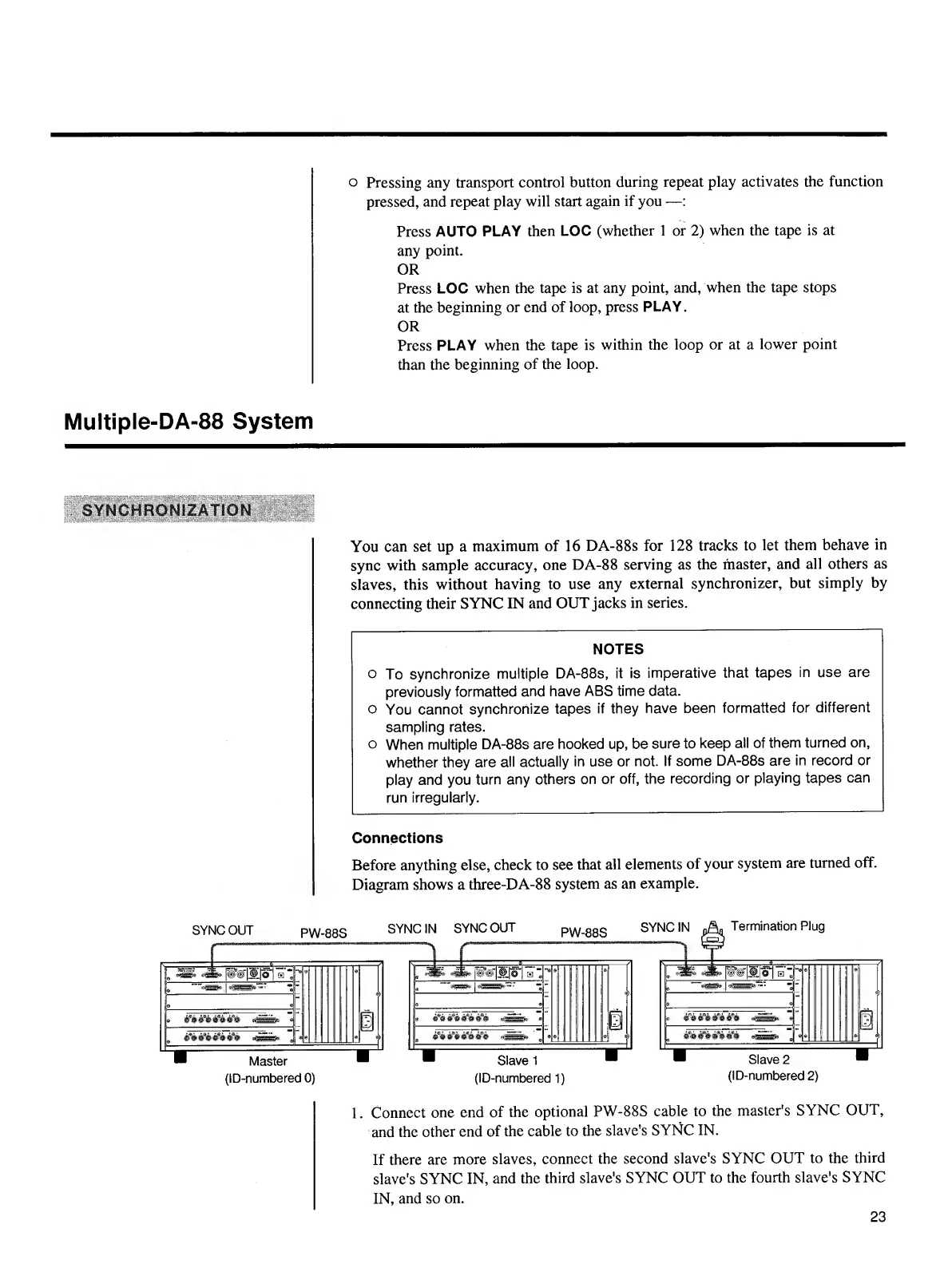
Diagram
shows
a
three-DA-88
system
as
an
example.
1.
Connect
one
end
of
the
optional
PW-88S
cable
to
the
master's
SYNC
OUT,
and
the
other
end
of
the
cable
to
the
slave’s
SYNC
IN.
If
there
are
more
slaves,
connect
the
second
slave's
SYNC
OUT
to
the
third
slave's
SYNC
IN,
and
the
third
slave's
SYNC
OUT
to
the
fourth
slave's
SYNC
IN,
and
so
on.
23

Other manuals for Tascam DA-88

Related product manuals