EasyManua.ls Logo

Tascam DA-88 - Autolocation Controls; Setting Locating Points; Repeat Play Function

Tascam DA-88
26 pages
Print Icon
To Next Page IconTo Next Page
To Previous Page IconTo Previous Page
Loading...
Autolocation
Controls
□
Setting
Locating
Points
MEMO
1
□
DISPLAY
□
▼
▲
□
□
T
A
□
□
LOC
1
□
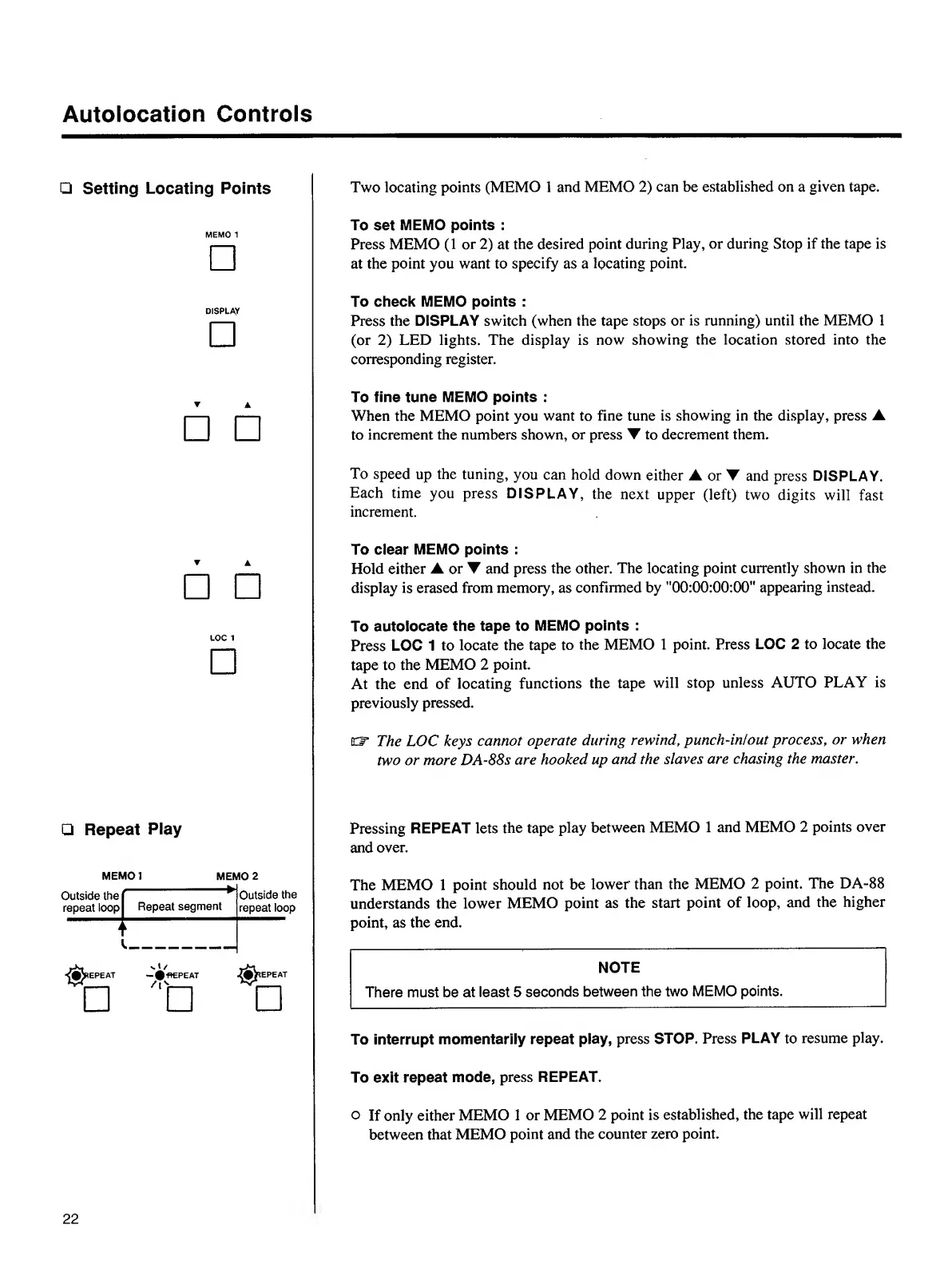
Two
locating
points
(MEMO
1
and
MEMO
2)
can
be
established
on
a
given
tape.
To
set
MEMO
points
:
Press
MEMO
(1
or
2)
at
the
desired
point
during
Play,
or
during
Stop
if
the
tape
is
at
the
point
you
want
to
specify
as
a
locating
point.
To
check
MEMO
points
:
Press
the
DISPLAY
switch
(when
the
tape
stops
or
is
running)
until
the
MEMO
1
(or
2)
LED
lights.
The
display
is
now
showing
the
location
stored
into
the
corresponding
register.
To
fine
tune
MEMO
points
:
When
the
MEMO
point
you
want
to
fine
tune
is
showing
in
the
display,
press
A
to
increment
the
numbers
shown,
or
press
T
to
decrement
them.
To
speed
up
the
tuning,
you
can
hold
down
either
A
or
▼
and
press
DISPLAY.
Each
time
you
press
DISPLAY,
the
next
upper
(left)
two
digits
will
fast
increment.
To
clear
MEMO
points
:
Hold
either
A
or
▼
and
press
the
other.
The
locating
point
currently
shown
in
the
display
is
erased
from
memory,
as
confirmed
by
"00:00:00:00"
appearing
instead.
To
autolocate
the
tape
to
MEMO
points
:
Press
LOC
1
to
locate
the
tape
to
the
MEMO
1
point.
Press
LOC
2
to
locate
the
tape
to
the
MEMO
2
point.
At
the
end
of
locating
functions
the
tape
will
stop
unless
AUTO
PLAY
is
previously
pressed.
EF
The
LOC
keys
cannot
operate
during
rewind
,
punch-in!out
process,
or
when
two
or
more
DA-88s
are
hooked
up
and
the
slaves
are
chasing
the
master.
□
Repeat
Play
Pressing
REPEAT
lets
the
tape
play
between
MEMO
1
and
MEMO
2
points
over
and
over.
Outside
the
repeat
loop
-
►
Repeat
segment
Outside
the
repeat
loop
j
l
Repeat
i
l
_
—
#f*EPEAT
-i
'^|^*
EPEAT
□
□
The
MEMO
1
point
should
not
be
lower
than
the
MEMO
2
point.
The
DA-88
understands
the
lower
MEMO
point
as
the
start
point
of
loop,
and
the
higher
point,
as
the
end.
NOTE
There
must
be
at
least
5
seconds
between
the
two
MEMO
points.
To
interrupt
momentarily
repeat
play,
press
STOP.
Press
PLAY
to
resume
play.
To
exit
repeat
mode,
press
REPEAT.
o
If
only
either
MEMO
1
or
MEMO
2
point
is
established,
the
tape
will
repeat
between
that
MEMO
point
and
the
counter
zero
point.
22