EasyManua.ls Logo

Tascam DA-88 - Digital Dubbing Procedure

Tascam DA-88
26 pages
Print Icon
To Next Page IconTo Next Page
To Previous Page IconTo Previous Page
Loading...
â–¡
Digital
dubbing
POWER
#
â–¡
With
digital
recording,
how
many
times
dubbing
is
repeated,
no
hiss
or
distortion
is
added
;
you
can
copy
important
multitrack
tapes
as
many
times
as
you
need
to
create
work
tapes
or
copies
for
distribution
without
having
to
worry
about
any
deterioration.
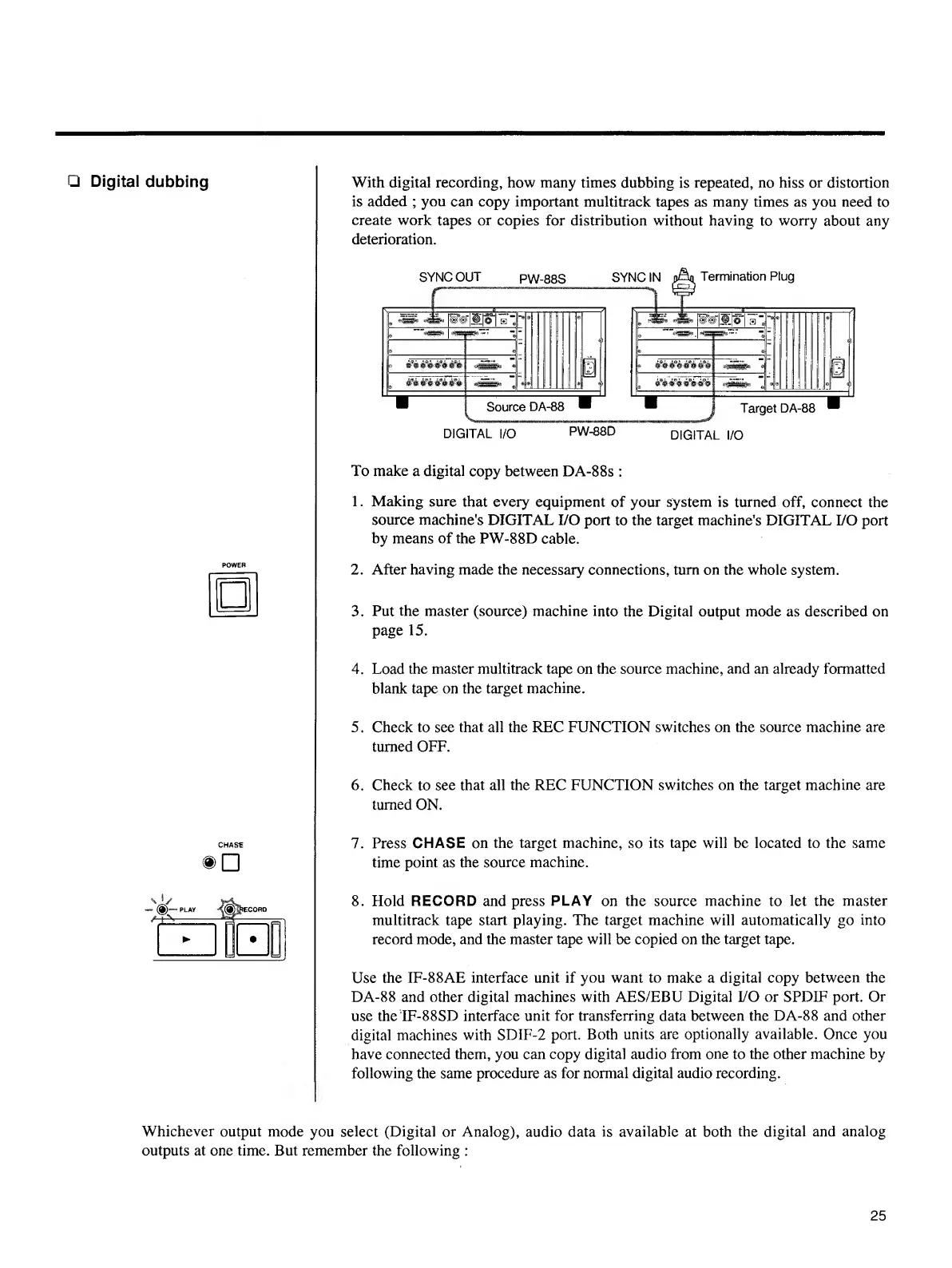
DIGITAL
I/O
PW-88D
DIGITAL
I/O
To
make
a
digital
copy
between
DA-88s
:
1.
Making
sure
that
every
equipment
of
your
system
is
turned
off,
connect
the
source
machine's
DIGITAL
I/O
port
to
the
target
machine's
DIGITAL
I/O
port
by
means
of
the
PW-88D
cable.
2.
After
having
made
the
necessary
connections,
turn
on
the
whole
system.
3.
Put
the
master
(source)
machine
into
the
Digital
output
mode
as
described
on
page
15.
4.
Load
the
master
multitrack
tape
on
the
source
machine,
and
an
already
formatted
blank
tape
on
the
target
machine.
5.
Check
to
see
that
all
the
REC
FUNCTION
switches
on
the
source
machine
are
turned
OFF.
6.
Check
to
see
that
all
the
REC
FUNCTION
switches
on
the
target
machine
are
turned
ON.
7.
Press
CHASE
on
the
target
machine,
so
its
tape
will
be
located
to
the
same
time
point
as
the
source
machine.
8.
Hold
RECORD
and
press
PLAY
on
the
source
machine
to
let
the
master
multitrack
tape
start
playing.
The
target
machine
will
automatically
go
into
record
mode,
and
the
master
tape
will
be
copied
on
the
target
tape.
Use
the
IF-88AE
interface
unit
if
you
want
to
make
a
digital
copy
between
the
DA-88
and
other
digital
machines
with
AES/EBU
Digital
I/O
or
SPDIF
port.
Or
use
the
IF-88SD
interface
unit
for
transferring
data
between
the
DA-88
and
other
digital
machines
with
SDIF-2
port.
Both
units
are
optionally
available.
Once
you
have
connected
them,
you
can
copy
digital
audio
from
one
to
the
other
machine
by
following
the
same
procedure
as
for
normal
digital
audio
recording.
Whichever
output
mode
you
select
(Digital
or
Analog),
audio
data
is
available
at
both
the
digital
and
analog
outputs
at
one
time.
But
remember
the
following
:
25

Other manuals for Tascam DA-88

Related product manuals