16
TASCAM DP-006
2 – Quick Start Guides
5. Press the F2 [EXEC] button to save the currently loaded song and create
the new song.
6. Press the HOME button to reopen the Home Screen.
Setting the internal mics as input sources
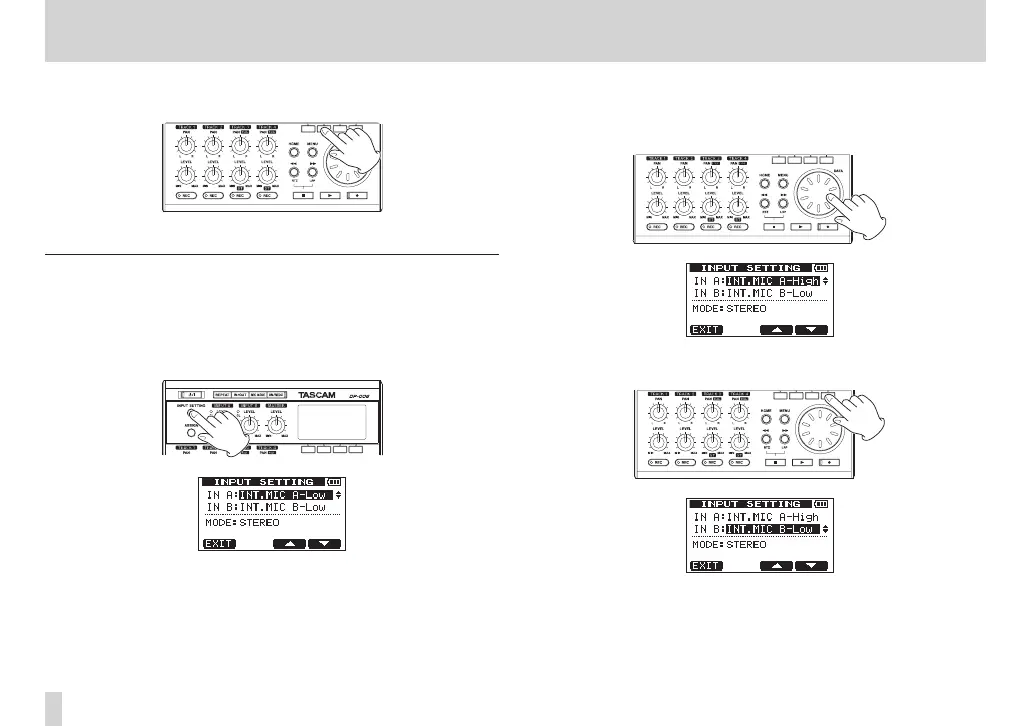
1. Press the INPUT SETTING button to open the
INPUT SETTING
screen. On this screen, you can set the input source for both
IN A
(INPUT
A) and
IN B
(INPUT B).
At first, the current input source for
IN A
(INPUT A) is selected
(highlighted).
2. In order to use the built-in MIC A to record the guitar to stereo TRACK 3,
use the DATA wheel to set the input source for
IN A
(INPUT A) to
INT
MIC A-Low
,
INT MIC A-Mid
or
INT MIC A-High
. (See “Selecting
the input source” on page 51.)
3. Press the F4 [b] button to select (highlight) the current input source for
IN B
(INPUT B).










 To Next Page