TASCAM DP-006
33
3 – Names and functions of parts
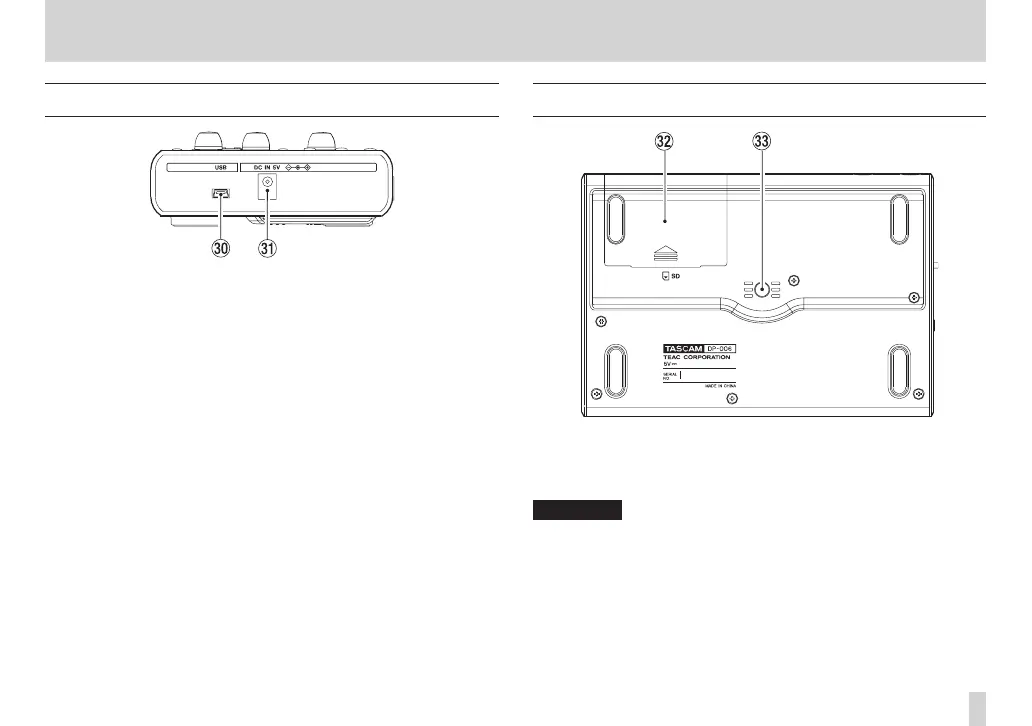
Right side panel
; USB connector
Connect the unit to a computer using the included USB cable. This allows
to sharing, importing and exporting files between the unit and the
computer, including backup of the song files. (See “Connecting with a
computer” on page 84.)
z DC IN 5V connector
Connect a dedicated power adaptor (PS-P520, sold separately).
Bottom panel
x Battery compartment cover
c Tripod screw thread (1/4-inch)
Use this to mount the unit on a tripod.
CAUTION
•
To prevent this unit from falling, thoroughly tighten the mounting and
adjustment screws of the tripod or mic stand.
•
When using this unit mounted on a tripod or mic stand, place the tripod or
mic stand on a level surface.
•
Depending on the tripod, the size of the screw might be different and
directly mounting the unit on it might not be possible. In such cases, use a
commercially-available adapter.










 To Next Page