34
TASCAM DP-006
3 – Names and functions of parts
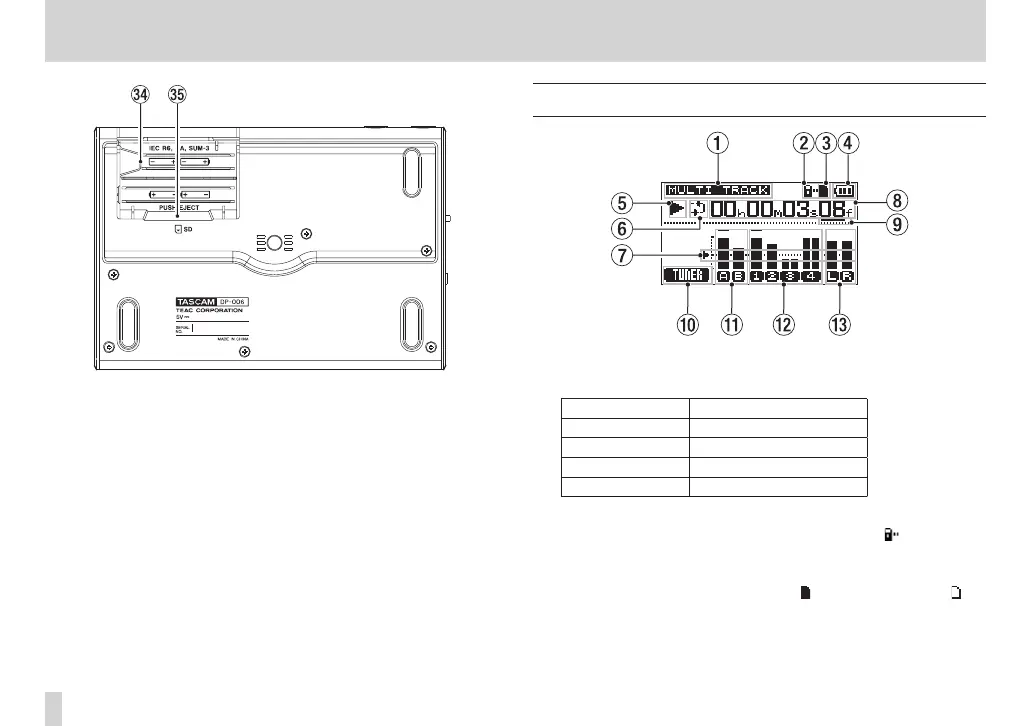
v Battery compartment
The batteries (four AA) that power the unit are inserted here. The SD card
slot is in the back of the compartment.
b SD card slot
Insert SD cards into this slot.
Home Screen
1 Recorder mode
Shows the current recorder mode.
Indication Recoder mode
MULTI TRACK
Multitrack recording mode
BOUNCE
Bounce mode
MASTER REC
Master recording mode
MASTER PLAY
Master playback mode
2 SD card write-protection indicator
If the SD card write-protection switch is set to “Lock”, the icon appears
here.
3 SD card insertion status
When an SD card is loaded in the unit, the icon appears here. (The
icon appears when no card is loaded in the unit.)
4 Battery status
A battery icon appears when the unit is being powered by batteries.










 To Next Page