TASCAM DP-006
31
3 – Names and functions of parts
s Record (0) button / indicator
Press the PLAY (7) button while pressing this button to start recording.
The indicator lights when recording. If you press this button when any
of the track REC indicators is lit, or during playback, recording will begin
(punch in). (See “Punching in and out” on page 61.)
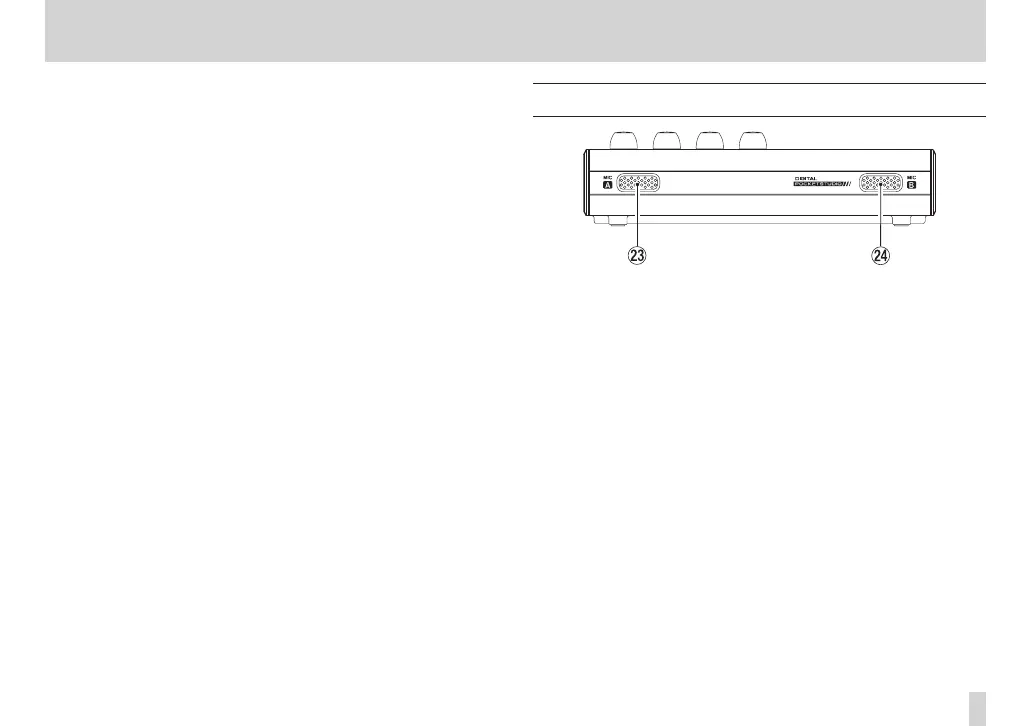
Front panel
d MIC A
This built-in microphone is omnidirectional.
This internal mic can be set as the input source for INPUT A (INT.MIC
A-Low, INT.MIC A-Mid or INT.MIC A-High).
f MIC B
This built-in microphone is omnidirectional.
This internal mic can be set as the input source for INPUT B (INT.MIC
A-Low, INT.MIC A-Mid or INT.MIC A-High).



 To Next Page