HM10 Home AC Charger Mobile Application (APP) User Guide
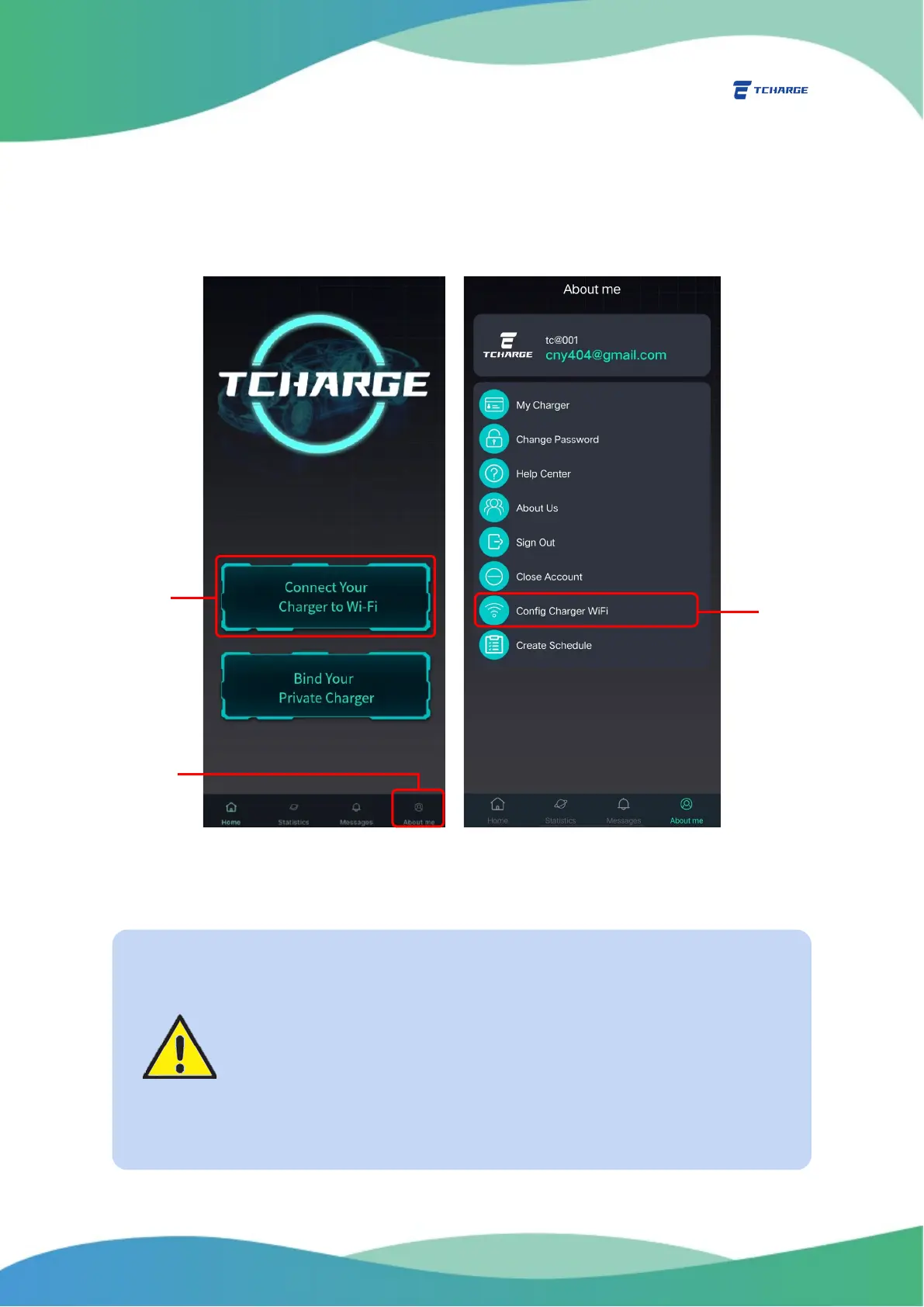
(marked as A in Figure 3.1), or go to the About me tab through the navigation bar
(B1 in Figure 3.1) and select “Config Charger Wi-Fi” (B2 in Figure 3.1)
You can also connect your mobile device directly to the built-in hotspot of
your charger with your mobile device’s Wi-Fi setup functions.
Figure 3.1 Finding Config Charger Wi-Fi Page
Important Notes
• Because of the possible requirement of cutting off the power
supply to your charger, it is recommended to install the charger on a
circuit with its own circuit breaker, or in proximity to your home electric
panel. Please refer to the installation manual for more information.
• In cases where you have multiple TCHARGE
®
HM10 chargers to be
configured on site, to avoid confusion, you may power on the chargers
one at a time. This will make hotspots of each charger easier to track.


 To Next Page