EasyManua.ls Logo

Teac A-400 - Playback Performance Verification

Teac A-400
56 pages
Print Icon
To Next Page IconTo Next Page
To Previous Page IconTo Previous Page
Loading...
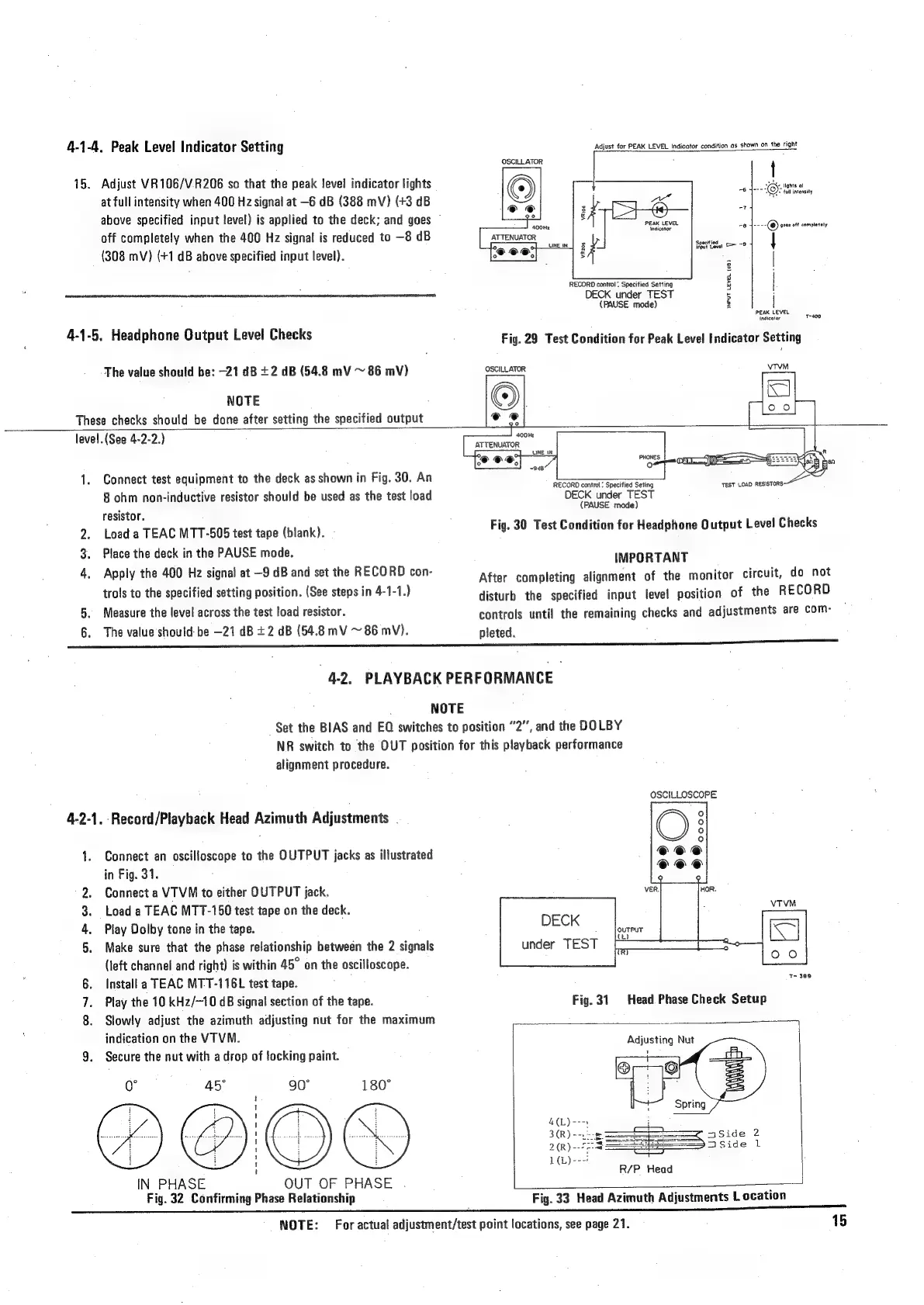
4-1-4,
Peak
Level
Indicator
Setting
15.
Adjust
VR106/V.R206
so
that
the
peak
level
indicator
lights
at
full
intensity
when
400
Hz
signal
at
—6
dB
(388
mV)
(+3
dB
above
specified
input
level)
is
applied
to
the
deck;
and
goes
©
off
completely
when
the
400
Hz
signal
is
reduced
to
—8
dB
(308
mV)
(+1
dB
above
specified
input
level).
4-1-5.
Headphone
Output
Level
Checks
The
value
should
be:
-21
dB
+2
dB
(54.8
mV
~
86
mV)
NOTE
These
checks
should
be
done
after
setting
the
specified
output
Adjust
for
PEAK
LEVEL
indicotor
condition
as
shown
on
the
right
OSCILLATOR
*
t
ve
TY.
lights
ot
8
yn
KOY>
cult
intensity
AX
PEAK
LEVEL
indicator
7
-e
4----
©
goes
off
completely
ATTENUATOR
;
Si
8
|
|
PEAK
LEVEL
7
Indicator
Tae
VR206
RECORD
control:
Specified
Setting
DECK
under
TEST
(PAUSE
mode)
INPUT
LEVEL
(d8)
Fig.
29
Test
Condition
for
Peak
Level
Indicator
Setting
OSCILLATOR
VTVM
level.
(See
4-2-2.)
1.
Connect
test
equipment
to
the
deck
as
shown
in
Fig.
30.
An
8
ohm
non-inductive
resistor
should
be
used
as
the
test
load
resistor.
2.
Load
a
TEAC
MTT-505
test
tape
(blank).
3.
Place
the
deck
in
the
PAUSE
mode.
4.
Apply
the
400
Hz
signal
at
—9
dB
and
set
the
RECORD
con-
trols
to
the
specified
setting
position.
(See
steps
in
4-1-1.)
5.
Measure
the
level
across
the
test
load
resistor.
The
value
should
be
—21
dB
+2
dB
(54.8
mV
~
86
mV).
400Ht
ATTENUATOR
RECORD
contro!
:
Specified
Seting
DECK
under
TEST
(PAUSE
mode)
Fig.
30
Test
Condition
for
Headphone
Output
Level
Checks
IMPORTANT
After
completing
alignment
of
the
monitor
circuit,
do
not
disturb
the
specified
input
level
position
of
the
RECORD
controls
unti!
the
remaining
checks
and
adjustments
are
com-
pleted.
“4-2.
PLAYBACK
PERFORMANCE
NOTE
Set
the
BIAS
and
EQ
switches
to
position
“2”,
and
the
DOLBY
NR
switch
to
the
OUT
position
for
this
playback
performance
alignment
procedure.
4-2-1.
Record/Playback
Head
Azimuth
Adjustments
=
Connect
an
oscilloscope
to
the
OUTPUT
jacks
as
illustrated
in
Fig.
31.
Connect
a
VTVM
to
either
OUTPUT
jack.
Load
a
TEAC
MTT-150
test
tape
on
the
deck.
Play
Dolby
tone
in
the
tape.
Make
sure
that
the
phase
relationship
between
the
2
signals
(left
channel
and
right)
is
within
45°
on
the
oscilloscope.
Install
a
TEAC
MT-T-116L
test
tape.
Play
the
10
kHz/—10
GB
signal
section
of
the
tape.
8.
Slowly
adjust
the
azimuth
adjusting
nut
for
the
maximum
indication
on
the
VTVM.
9.
Secure
the
nut
with
a
drop
of
tocking
paint.
a
Pew
PbAg2
Go
"oe
AS
90°
t
i
'
|
a
i
1
1
ae
1
t
IN
PHASE
OUT
OF
PHASE
Fig.
32
Confirming
Phase
Relationship
NOTE:
180°
OSCILLOSCOPE
DECK
under
TEST
T>
389
Head
Phase
Check
Setup
Fig.
31
Adjusting
Nut
R/P
Head
Fig.
33
Head
Azimuth
Adjustments
Location
For
actual
adjustment/test
point
locations,
see
page
21.
15

Related product manuals