EasyManua.ls Logo

Teac A-400 - Solenoid and Muting Switch Adjustments

Teac A-400
56 pages
Print Icon
To Next Page IconTo Next Page
To Previous Page IconTo Previous Page
Loading...
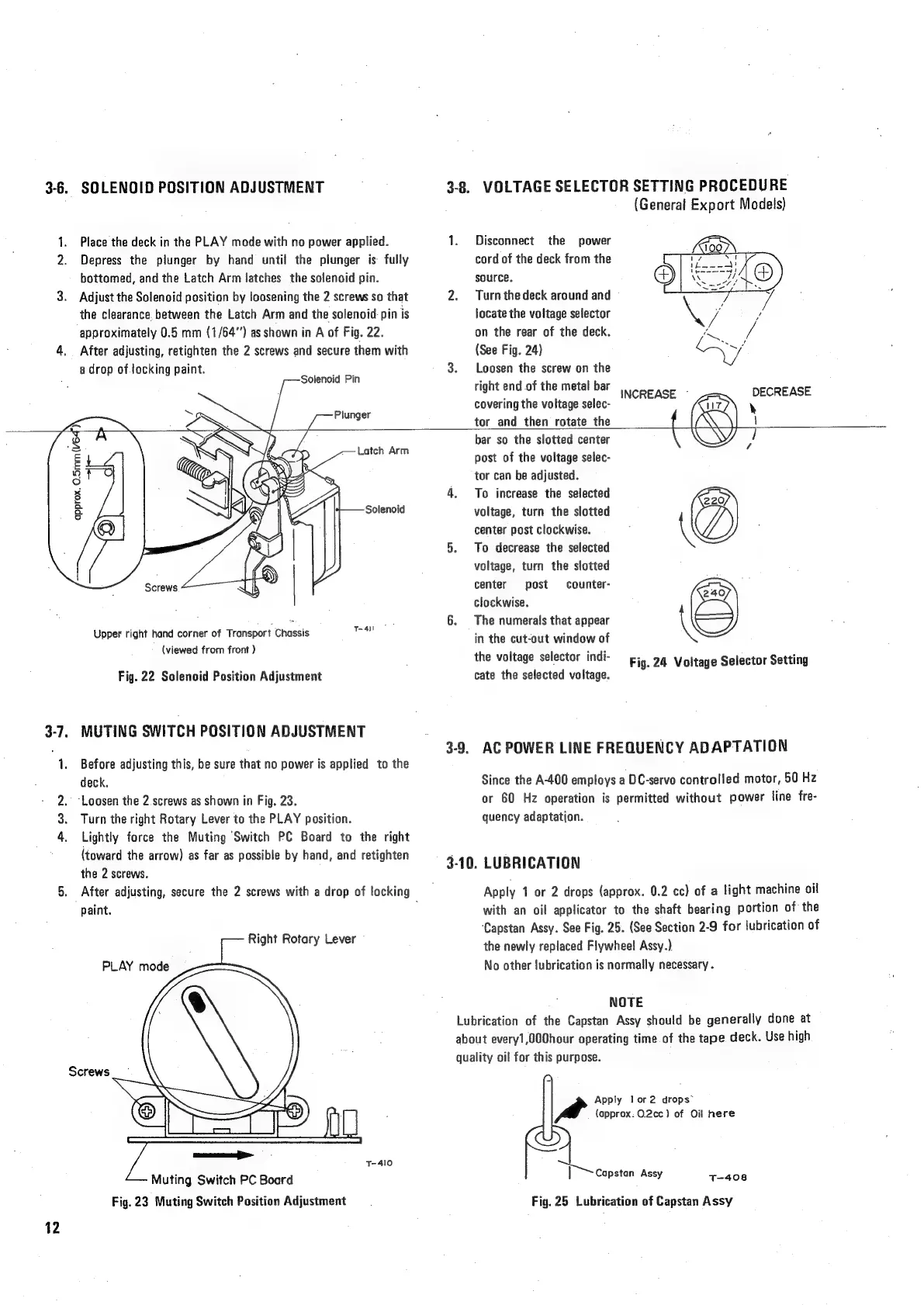
3-6.
SOLENOID
POSITION
ADJUSTMENT
1.
Place
the
deck
in
the
PLAY
mode
with
no
power
applied.
2.
Depress
the
plunger
by
hand
until
the
plunger
is
fully
bottomed,
and
the
Latch
Arm
latches
the
solenoid
pin.
3.
Adjust
the
Solenoid
position
by
loosening
the
2
screws
so
that
the
clearance
between
the
Latch
Arm
and
the
solenoid-pin
is
approximately
0.5
mm
(1/64)
as
shown
in
A
of
Fig.
22.
4,
After
adjusting,
retighten
the
2
screws
and
secure
them
with
a
drop
of
locking
paint.
P
oP
Solenoid
Pin
Plunger
3-8.
VOLTAGE
SELECTOR
SETTING
PROCEDURE
(General
Export
Models)
1.
Disconnect
the
power
cord
of
the
deck
fram
the
source.
2.
Turn
thedeck
around
and
locate
the
voltage
selector
on
the
rear
of
the
deck.
(See
Fig.
24)
3.
Loosen
the
screw
on
the
right
end
of
the
metal
bar
covering
the
voltage
selec-
tor
and
then
rotate
the
Latch
Arm
Solenoid
approx.
O.Smm(v64")
Screws
T-411
Upper
right
hand
corner
of
Transport
Chassis
(viewed
from
front
)
Fig.
22
Solenoid
Position
Adjustment
3-7.
MUTING
SWITCH
POSITION
ADJUSTMENT
1.
Before
adjusting
this,
be
sure
that
no
power
is
applied
to
the
deck.
2.
‘Loosen
the
2
screws
as
shown
in
Fig.
23.
3.
Turn
the
right
Rotary
Lever
to
the
PLAY
position.
4.
Lightly
force
the
Muting
Switch
PC
Board
to
the
right
{toward
the
arrow)
as
far
as
possible
by
hand,
and
retighten
the
2
screws.
5.
After
adjusting,
secure
the
2
screws
with
a
drop
of
locking
paint.
Right
Rotary
Lever
PLAY
mode
Screws
1-410
Muting
Switch
PC
Board
Fig.
23
Muting
Switch
Position
Adjustment
12
bar
so
the
slotted
center
post
of
the
voltage
selec-
tor
can
be
adjusted.
4.
To
increase
the
selected
220
voltage,
turn
the
slotted
center
post
clockwise.
:
\(
5.
To
decrease
the
selected
voltage,
turn
the
slotted
center
post
counter-
:
240
clockwise.
6.
The
numerals
that
appear
\K
in
the
cut-out
window
of
the
voltage
selector
indi-
Fig.
24
Voltage
Selector
Setting
cate
the
selected
voltage.
3-9.
AC
POWER
LINE
FREQUENCY
ADAPTATION
Since
the
A-400
employs
a
DC-servo
controlled
motor,
50
Hz
or
60
Hz
operation
is
permitted
without
power
line
fre-
quency
adaptation.
3-10.
LUBRICATION
Apply
1
or
2
drops
(approx.
0.2
cc)
of
a
light
machine
oil
with
an
oil
applicator
to
the
shaft
bearing
portion
of
the
‘Capstan
Assy.
See
Fig.
25.
(See
Section
2-9
for
lubrication
of
the
newly
replaced
Flywheel!
Assy.)
No
other
lubrication
is
normally
necessary
.
NOTE
Lubrication
of
the
Capstan
Assy
should
be
generally
done
at
about
every1,000hour
operating
time
of
the
tape.
deck.
Use
high
quality
oil
for
this
purpose.
Apply
lor2
drops”
y
A
(approx:
O.2¢c)
of
Oil
here
8
Capstan
Assy
T-408
Fig.
25
Lubrication
of
Capstan
Assy

Related product manuals