EasyManua.ls Logo

Teac A-400 - Reel Table and Motor Replacement

Teac A-400
56 pages
Print Icon
To Next Page IconTo Next Page
To Previous Page IconTo Previous Page
Loading...
2-7.
REEL
TABLE
REPLACEMENT
2-7A.
Take-up
Reel
Table
1.
2-2)
2.
Open
the
Cassette
Holder
door
to
the
45
degree
position
by
pushing
the
EJECT
Lever
to
‘the
right,
and
the
full
85
degree
position
by
pushing
the
door
to
the
left.
3.
Remove
the
Cassette
Guide
Plate
@)
from
the
Tape
2-PSA
Transport
Chassis
by
taking
off
the
4
screws
@):
eae
4,
Remove
the
Index
Counter
Belt
3)
from
the
groove
of
the
Take-up
Reel
Table(4)and
the
Index
Counter
Pulley.
5.
Remove
the
Flywheel
Ass’y
(See
2-9).
6.
Remove
the
Cassette
Holder
Stopper
®)
and
the
Reel
Table
Remove
the
Cabinet
and
the
Front
Panel.
(See
Section
2-1,
@
TAKE-UP
REEL
TABLE
@
simultaneously
by
taking
off
the
2
screws
6).
_-
2-7B.
Supply
Reel
Table
1.
2.
2-8.
Repeat
steps
1
to
3
in
2-7A
(Take-up
Reel
Table).
Remove
the
Cassette
Holder
Stopper
®
and
the
Supply
Reel
Table
at
the
same
time
by
taking
off
the
2
screws
MOTOR
REPLACEMENT
After
removing
the
Tape
Transport
Chassis
from
the
Main
Chassis,
do
the
following
procedures
(See
Section
2-1,
2-2,
2-4).
Remove
the
Capstan
Belt
(1)
from
the
Motor
Pulley
@.
Remove
the
PC
Board
(part
of
the
Motor
Assy)
@
from
the
Main
Chassis.
,
Bend
open
the
Wire
Clamp
®@
to
loosen
the
wires.
Unsolder
the
2
wires
(5)
(connected
from
the
Power
Supply
PC
Board)
to
the
PC
Board(3).
Remove
the
screw
(6)
attaching
the
Cassette
Guide
B
®,
and
loosen
the
screw
43)
and
turn
the
Guide
slightly
in
the
direction
of
the
arrow.
(for
access
to
the
Motor)
Remove
the
Motor
Assy
(incl.
the
Motor
Mount.
Plate
@)
from
the
Transport
Chassis
by
taking
off
the
3
nuts
(0).
Remove
the
Motor
Assy
a)
from
the
Motor
Mount.
Plate
@)
by
taking
off
the
3
screws
qd.
NOTE
Since
the
entire
Motor
Assy
includes
the
DC-servo
Ampl.
PC
Board
(provided
for
motor
speed
control),
always
replace
the
Motor
together
with
its
PC
Board.
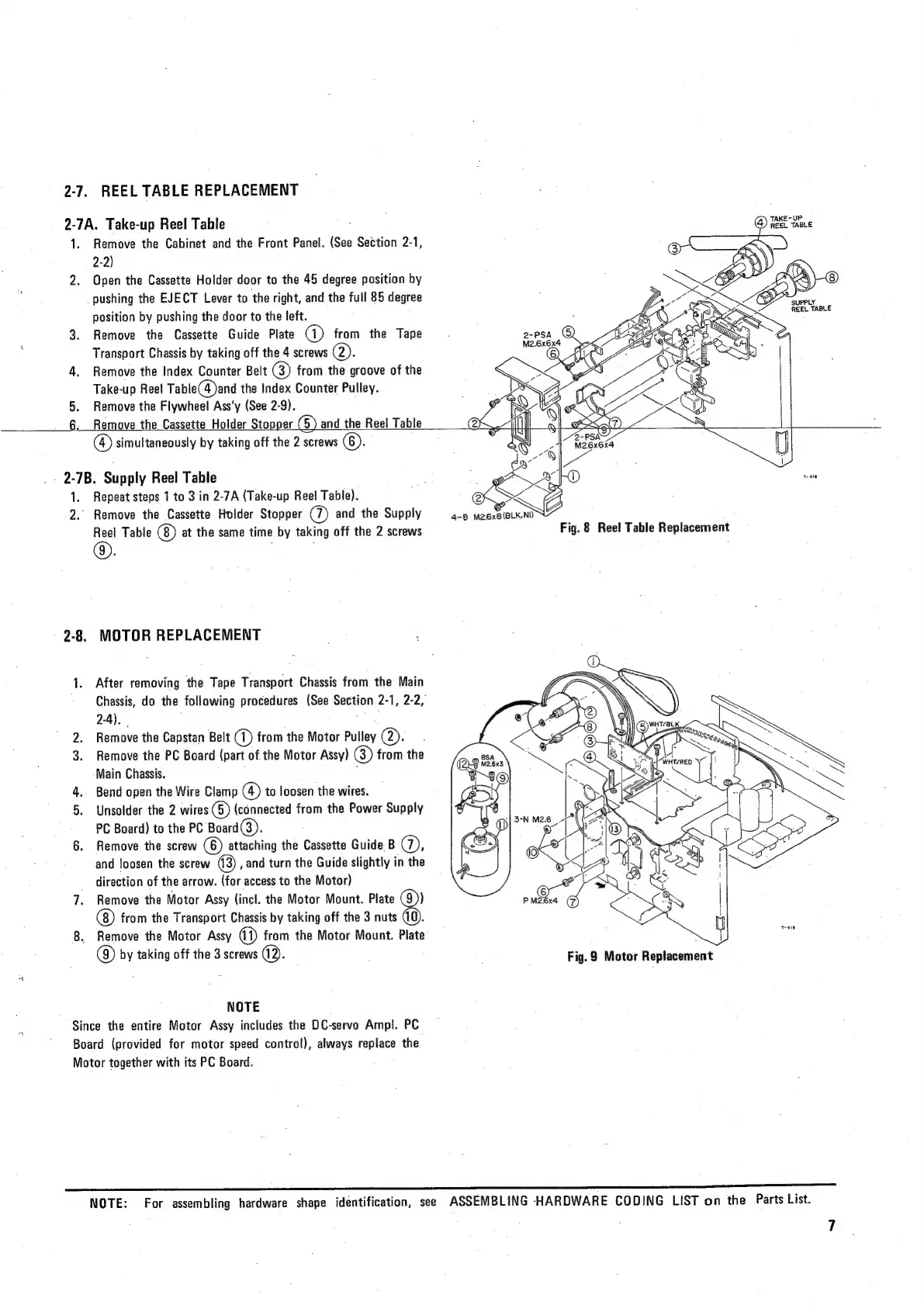
Fig.
8
Reel
Table
Replacement
o)
ND
I.
\
y
7
Ne
y
j
<9
|
{
Al
|
|
B)WHT/ALK,
4
ee
NOTE:
For
assembling
hardware
shape
identification,
see
ASSEMBLING
HARDWARE
CODING
LIST
on
the
Parts
List.

Related product manuals