EasyManua.ls Logo

Teac A-400 - Tape Speed and Wow;Flutter Adjustment

Teac A-400
56 pages
Print Icon
To Next Page IconTo Next Page
To Previous Page IconTo Previous Page
Loading...
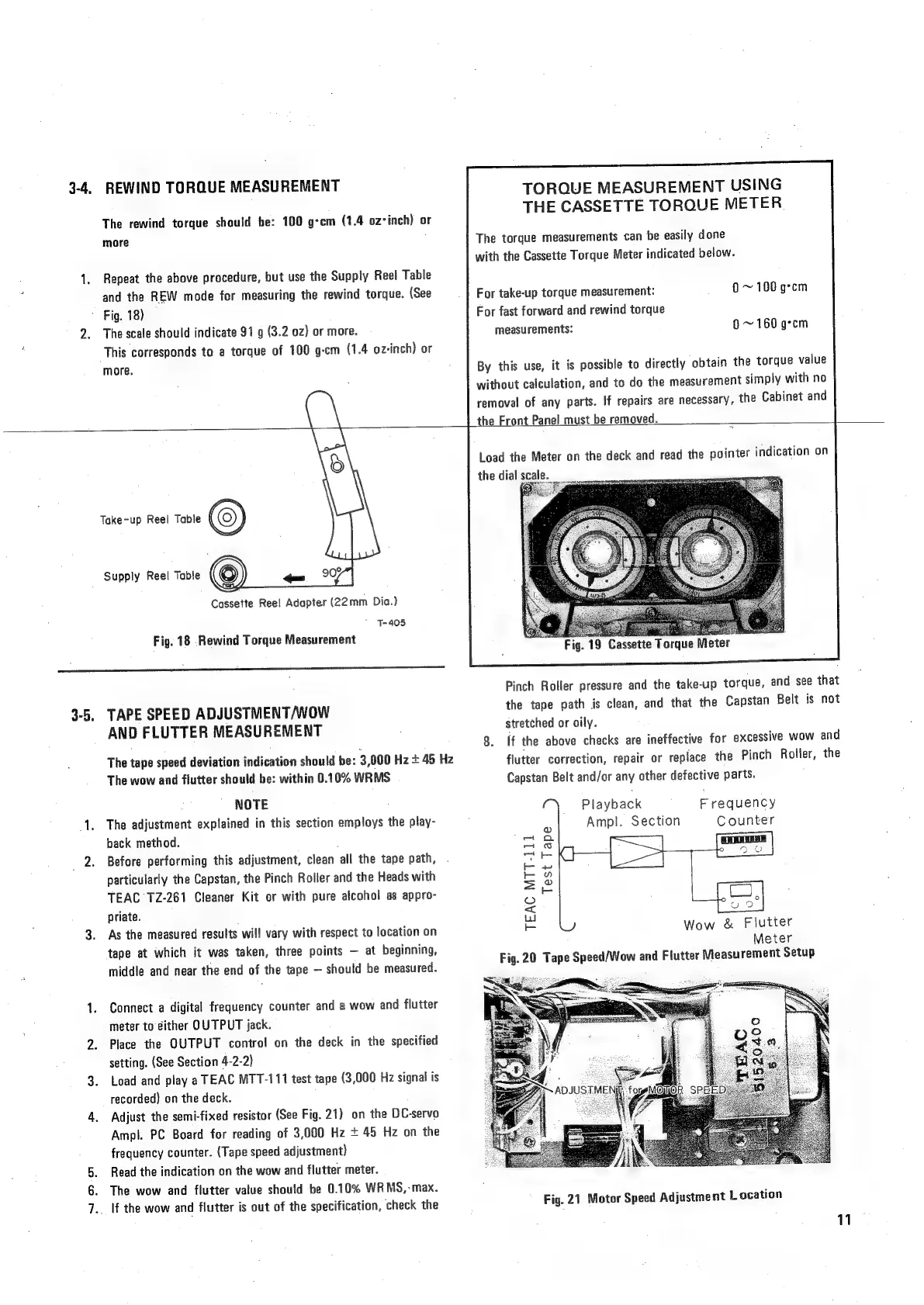
3-4,
REWIND
TORQUE
MEASUREMENT
The
rewind
torque
should
be:
100
g-cm
(1.4
oz*inch)
or
more
Repeat
the
above
procedure,
but
use
the
Supply
Reel
Table
and
the
REW
mode
for
measuring
the
rewind
torque.
(See
~
Fig.
18)
The
scale
should
indicate
91
g
(3.2
oz)
or
more.
This
corresponds
to
a
torque
of
100
g-cm
(1.4
oz-inch)
or
more.
TORQUE
MEASUREMENT
USING
THE
CASSETTE
TORQUE
METER.
The
torque
measurements
can
be
easily
done
with
the
Cassette
Torque
Meter
indicated
below.
For
take-up
torque
measurement:
0~
100
g°cm
For
fast
forward
and
rewind
torque
measurements:
6
~
160
g-cm
By
this
use,
it
is
possible
to
directly
obtain
the
torque
value
without
calculation,
and
to
do
the
measurement
simply
with
no
removal
of
any
parts.
If
repairs
are
necessary,
the
Cabinet
and
the
Front
Panel
must
be
removed.
3-5.
o
Take-up
Reel
Table
(
Supply
Reel
Table
-
9
Cassette
Ree!
Adapter
(22mm
Dia.)
‘7-405
Fig.
18
Rewind
Torque
Measurement
TAPE
SPEED
ADJUSTMENT/WOW
AND
FLUTTER
MEASUREMENT
The
tape
speed
deviation
indication
should
be:
3,000
Hz
+
45
Hz
The
wow
and
flutter
should
be:
within
0.10%
WRMS
NOTE
The
adjustment
explained
in
this
section
employs
the
play-
back
method.
Before
performing
this
adjustment,
clean
all
the
tape
path,
.
particularly
the
Capstan,
the
Pinch
Roller
and
the
Heads
with
TEAC
12-261
Cleaner
Kit
or
with
pure
alcohol
as
appro-
priate.
As
the
measured
results
will
vary
with
respect
to
location
on
tape
at
which
it
was
taken,
three
points
at
beginning,
middle
and
near
the
end
of
the
tape
should
be
measured.
Connect
a
digital
frequency
counter
and
a
wow
and
flutter
meter
to
either
OUTPUT
jack.
Place
the
OUTPUT
contro!
on
the
deck
in
the
specified
setting.
(See
Section
4-2-2)
Load
and
play
a
TEAC
MTT-111
test
tape
(3,000
Hz
signal
is
recorded)
on
the
deck.
Adjust
the
semi-fixed
resistor
(See
Fig.
21)
on
the
DC-servo
Ampl.
PC
Board
for
reading
of
3,000
Hz
+ 45
Hz
on
the
frequency
counter.
(Tape
speed
adjustment)
Read
the
indication
on
the
wow
and
flutter
meter.
The
wow
and
flutter
value
should
be
0.10%
WRMS,-max.
_
lf
the
wow
and
flutter
is
out
of
the
specification,
check
the
Load
the
Meter
on
the
deck
and
read
the
painter
indication
on
Fig.
19
Cassette
Torque
Meter
Pinch
Roller
pressure
and
the
take-up
torque,
and
see
that
the
tape
path
is
clean,
and
that
the
Capstan
Belt
is
not
stretched
or
oily.
8.
if
the
above
checks
are
ineffective
for
excessive
wow
and
flutter
correction,
repair
or
replace
the
Pinch
Roller,
the
Capstan
Belt
and/or
any
other
defective
parts.
Playback
Frequency
3
Ampl.
Section
Counter
oe
Po
coal
ood
o
m0
Ey
S|
=
a
LC)
2
©
5
ae
e
Wow
&
Flutter
Meter
Fig.
20
Tape
Speed/Wow
and
Flutter
Measurement
Setup
Fig.
21
Motor
Speed
Adjustment
Location
11

Related product manuals