15
SCHEDULE MANUALLY
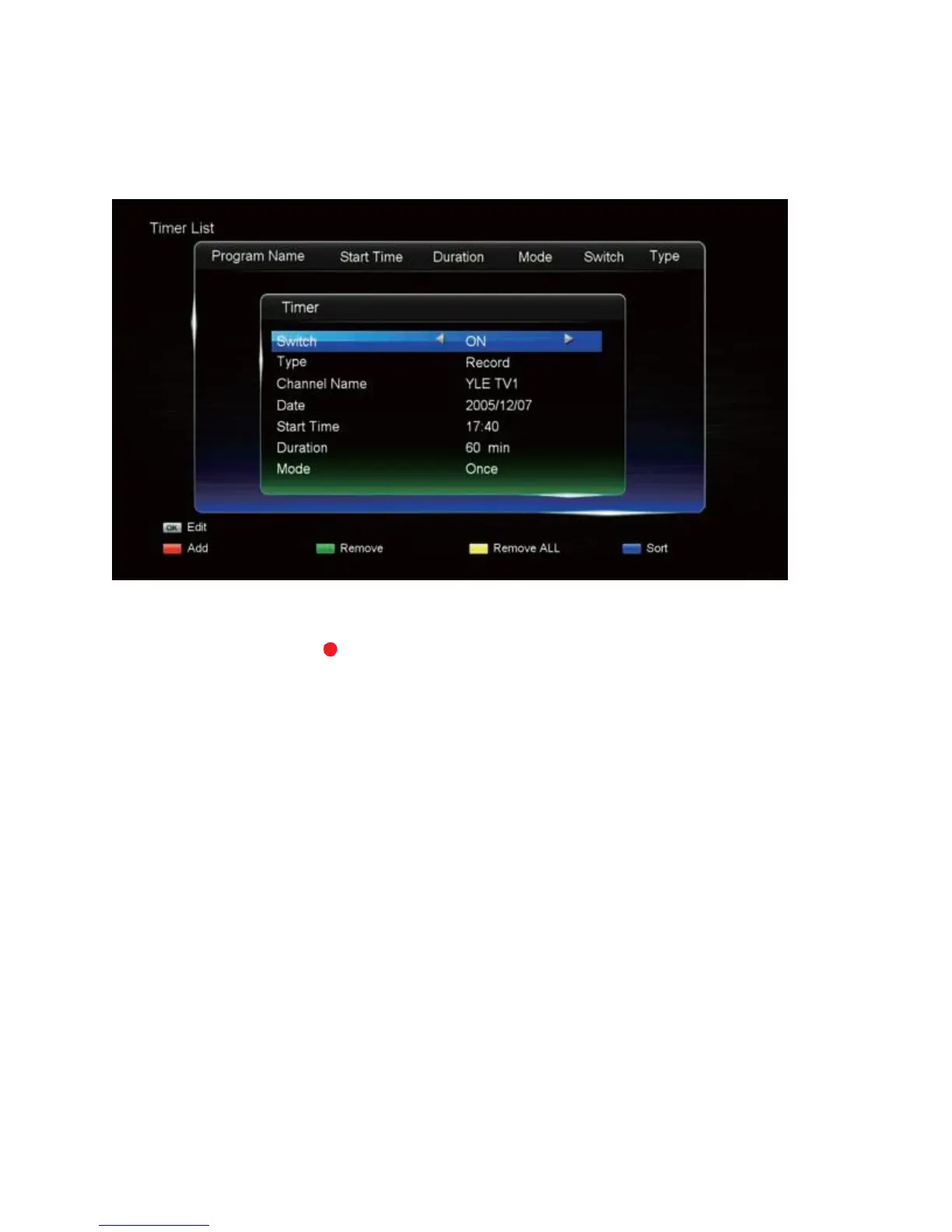
Use this method if you wish to manually set a start time and recording length for a scheduled
recording.
1. Press the SCHED. button, then the RED button. (Alternatively, press the EPG button,
then the RECORD ( ) button.)
2. The "Timer" menu will now display. Customise each detail by highlighting them with the
UP/DOWN buttons, then adjust the values with the LEFT/RIGHT buttons.
3. To finish, press the OK button and your newly scheduled item will appear on the list.
CHECK AND DELETE SCHEDULED ITEMS
1. Press the SCHED. button for the Schedule List.
2. If you want to sort the items on the list, press the BLUE button and use the UP/DOWN
buttons to highlight the sort preference, then press the OK button.
3. If you want to delete an item on the list, use the UP/DOWN buttons to highlight the
desired item, then press the GREEN button. If you want to delete all items on the list,
press the YELLOW button.
4. Choose "Yes/No" and press OK to finish.


 To Next Page