ENGLISH FRANÇAIS
Playback 1 Lecture 1
20
CD:
A commercial pre-recorded CD or a
finalized CD-R
CD-R, NO TOC:
A CD-R which has yet to be finalized
CD-RW, NO TOC:
A CD-RW which has yet to be finalized
CD-RW:
A finalized CD-RW
blank:
No disc or unreadable disc
total number of the tracks
total play time
elapsed time
track number
TRAY
@
1
3
2
4
TRAY @ can be used to play back CD, CD-
R and CD-RW discs.
TRAY
! can be used to play back CD and
finalized CD-R/CD-RW discs.
Please note that CD-R/CD-RW discs that
haven't been finalized cannot be played
on TRAY
!.
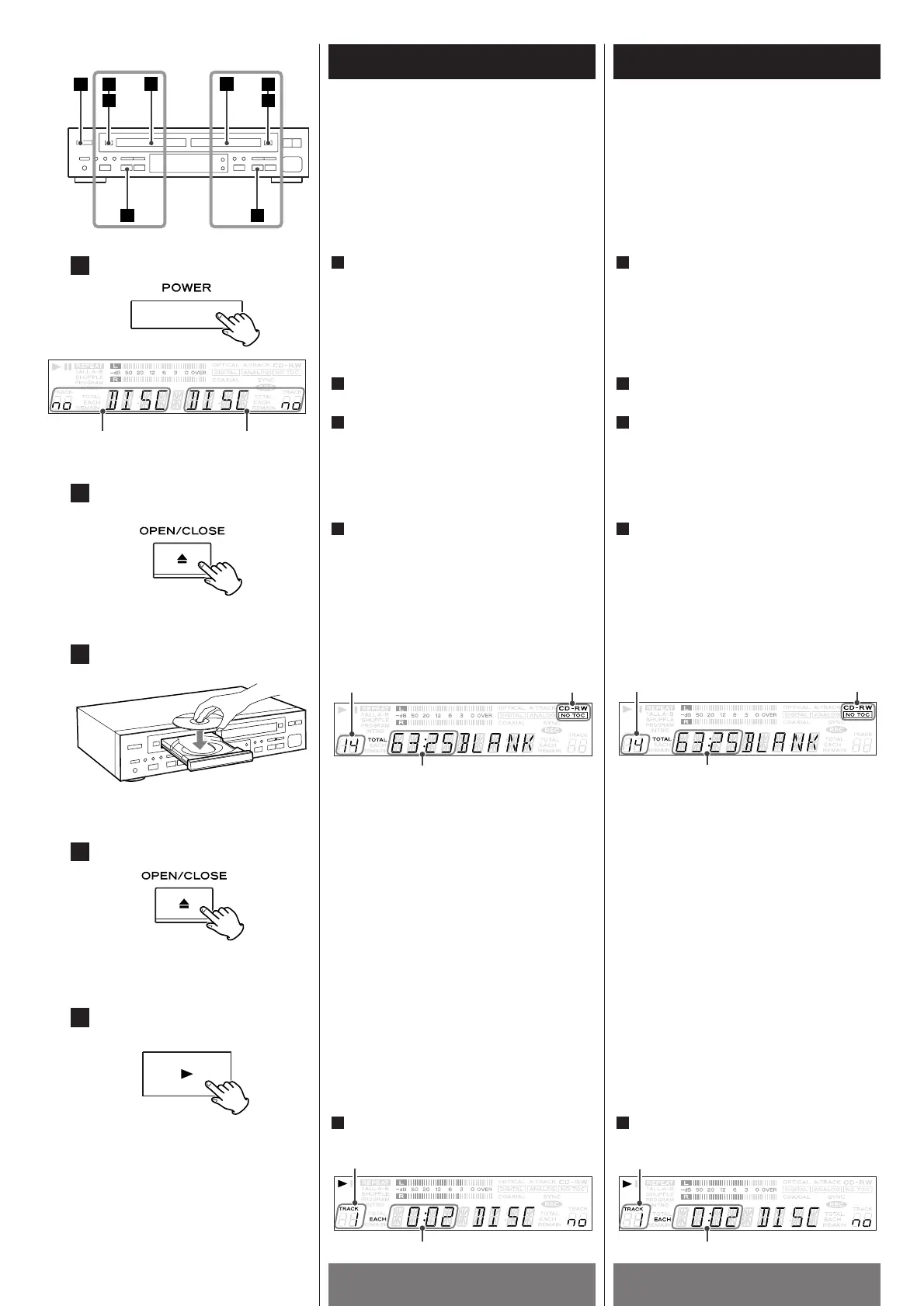
Press the POWER switch to turn the unit
ON.
The display briefly shows "READING".
When no disc is set, "no DISC DISC no"
will be shown on the display.
1
TRAY ! TRAY @
Press the OPEN/CLOSE button (L ) of
TRAY
! or @.
2
Place a disc on the disc tray with the
label side facing up.
Make sure that the disc is properly
centered within the ridges in the disc
tray.
3
Press the OPEN/CLOSE button (L ) of
TRAY
! or @ to close the disc tray.
When a disc is loaded into the unit, the
display shows "READING" for a while as it
determines the contents of the disc.
When the TOC has been read, the display
will show the following information:
4
Press the PLAY button (y) of TRAY ! or
@ to start playback.
5
5
< When a blank disc is set on TRAY @, the
display will show "BLANK".
<
When a disc is set on TRAY @, the display
will show one of the following:
TRAY ! TRAY @
TRAY @ peut être utiliser pour la lecture
de disques CD, CD-R et CD-RW
TRAY ! peut être utiliser pour la lecture de
disques CD et disques finalisés CD-R/CD-RW.
Veuillez noter que les disques CD-R/CD-
RW qui ne sont pas finaliser ne peuvent
pas être jouer sur TRAY
!.
Appuyer sur le commutateur
d’alimentation pour allumer l’appareil.
“READING” est affiché brièvement. Si il
n’y a pas de disque, ”NO DISC DISC no”
est affiché.
1
Appuyer sur la touche OPEN/CLOSE (L)
de TRAY
! ou @.
2
Déposer un disque dans le tirroir,
l’étiquette vers le haut.
Assurez-vous que le disque est bien
centré en dedans des rayures du tirroir
du disque.
3
Appuyer sur la touche OPEN/CLOSE (L)
de TRAY
! ou @ pour fermer le tirroir du
disque.
Quand un disque est chargé dans
l’appareil, “READING” est affiché durant
le temps que l’appareil analyse le contenu
du disque. Quand le contenu a été lu,
l’information suivante sera affichée.
4
< Quand un disque vierge est inséré dans
TRAY
@, “BLANK” est affiché.
<
Quand un disque est inséré dans TRAY @,
une des choses qui suit sera affichées:
CD:
Un CD commercial pré-enregistré ou
un disque CD-R finalisé
CD-R, NO TOC:
Un CD-R qui n’a pas été finalisé
CD-RW:
Un CD-RW finalisé
Aucune mention:
Aucun disque ou disque endommagé
Appuyer sur la touche PLAY (y ) de
TRAY
! ou @ pour commencer la lecture.
5
nombre total de pistes
temps écoulé
durée totale d'écoute
TRAY @
numéro de piste



 To Next Page