ENGLISH FRANÇAIS
Erase or Unfinalize a CD-RW
1
Effacement ou dé-finalisation d’un CD-RW
54
It is possible to erase the last recorded
track. It is also possible to erase a whole
disc.
Erase procedures are possible only on an
unfinallized CD-RW disc. If a CD-RW disc
has been finalized, unfinalize it prior to
erasure.
Remember that it is not possible to perform
any erase procedures on a CD-R disc.
2
3
A
B
C
Il est possible d’effacer la dernière piste
enregistrée. Il est aussi possible d’effacer le
disque entièrement.
Les procédures d’effacement fonctionnent
strictement sur un disque non-finalisé. Si un
disque CD-RW est finalisé, dé-finalisé le
disque avant l’effacement.
Rappelez-vous qu’il n’est pas possible
d’effacer sur un disque CD-R.
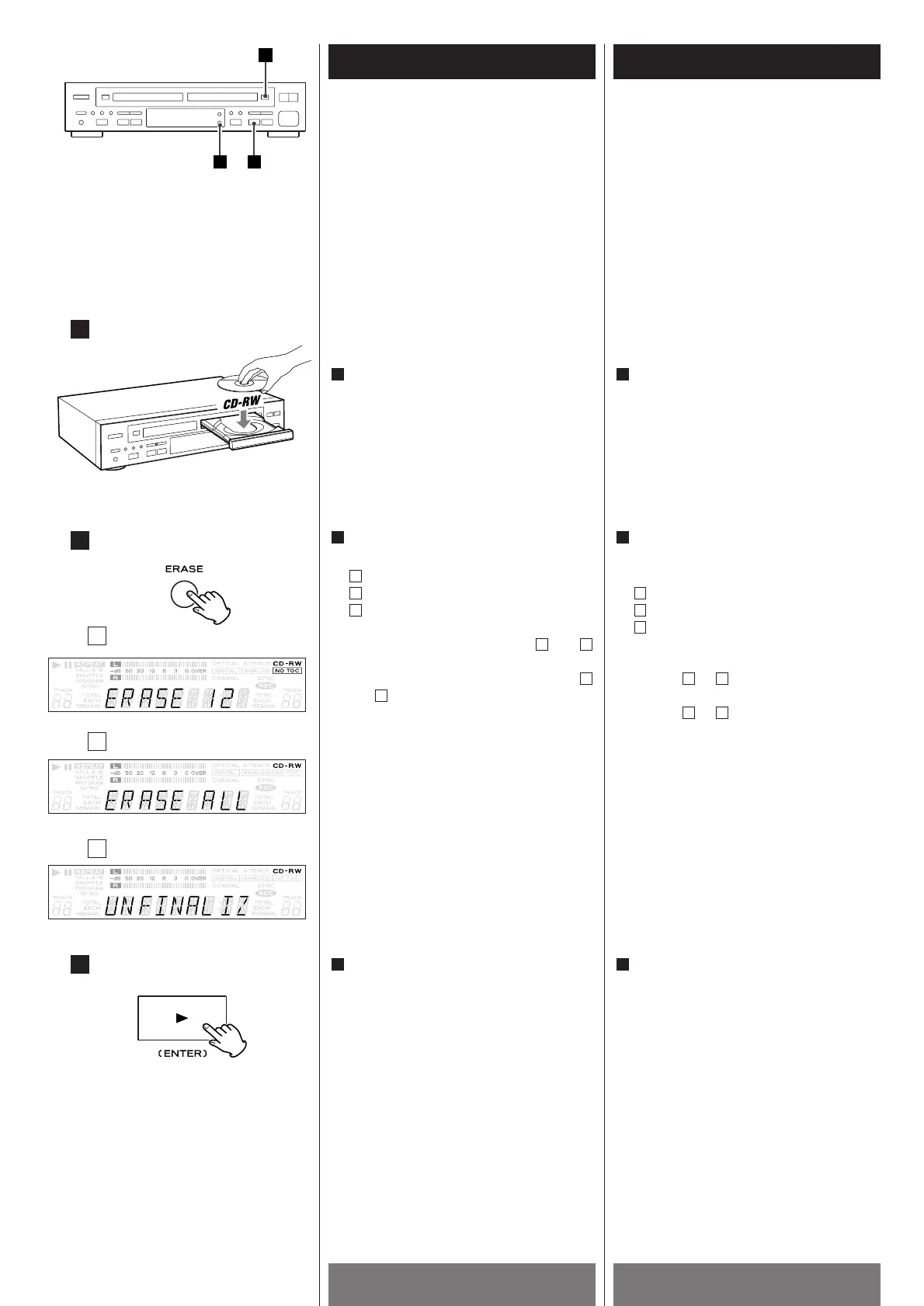
Press the PLAY (ENTER) button.
<
This operation cannot be undone. If you
are going to erase tracks, make sure that
they are recordings that you really want
to erase.
When the operation is finished, the word
"COMPLETE" will appear briefly on the
display, and the display will return to the
track/time display.
3
Appuyer sur la touche PLAY (ENTER).
<
Cette opération ne peut pas être annuller.
Si vous allez effacer des pistes, assurez-
vous qu’ils sont des enregistrements que
vous voulez vraiement effacer.
Quand l’opération est terminé,
“COMPLETE” est affiché brièvement et
l’afficheur re-montre piste/durée.
3
In the stop mode, press the ERASE button
repeatedly to select one of the following:
erase the last track
erase all the tracks
unfinalize the disc
When a finalized CD-RW is set, and
are selectable.
When an unfinalized CD-RW is set,
and are selectable.
If you select "ERASE ALL" with finalized
CD-RW, the disc will be automatically
unfinallized and erased.
<
To cancel the erasing or unfinalizing
process, press the STOP button (H
).
B
A
CB
C
B
A
2
Load a recorded CD-RW in TRAY @.
1
Déposer un disque enregistré CD-RW
dans le TRAY
@.
1
En mode d’arrêt, appuyer sur la touche
ERASE répététivement afin de
sélectionner un des choix suivants:
Effacement de la dernière piste
Effacement de toute les pistes
Dé-finalisation du disque
Quand un disque finalisé CD-RW est
chargé, et peuvent être choisi.
Quand un disque non-finalisé CD-RW est
chargé, et peuvent être choisi.
Si vous sélectionnez “ERASE ALL” sur un
disque finalisé CD-RW, le disque sera
automatiquement dé-finalisé et effacer.
<
Pour annuller l’effacement ou dé-
finalisation appuyer sur la touche STOP
(H
).
BA
CB
C
B
A
2



 To Next Page