ENGLISH FRANÇAIS
Playback 2 Lecture 2
22
A
B
C
D
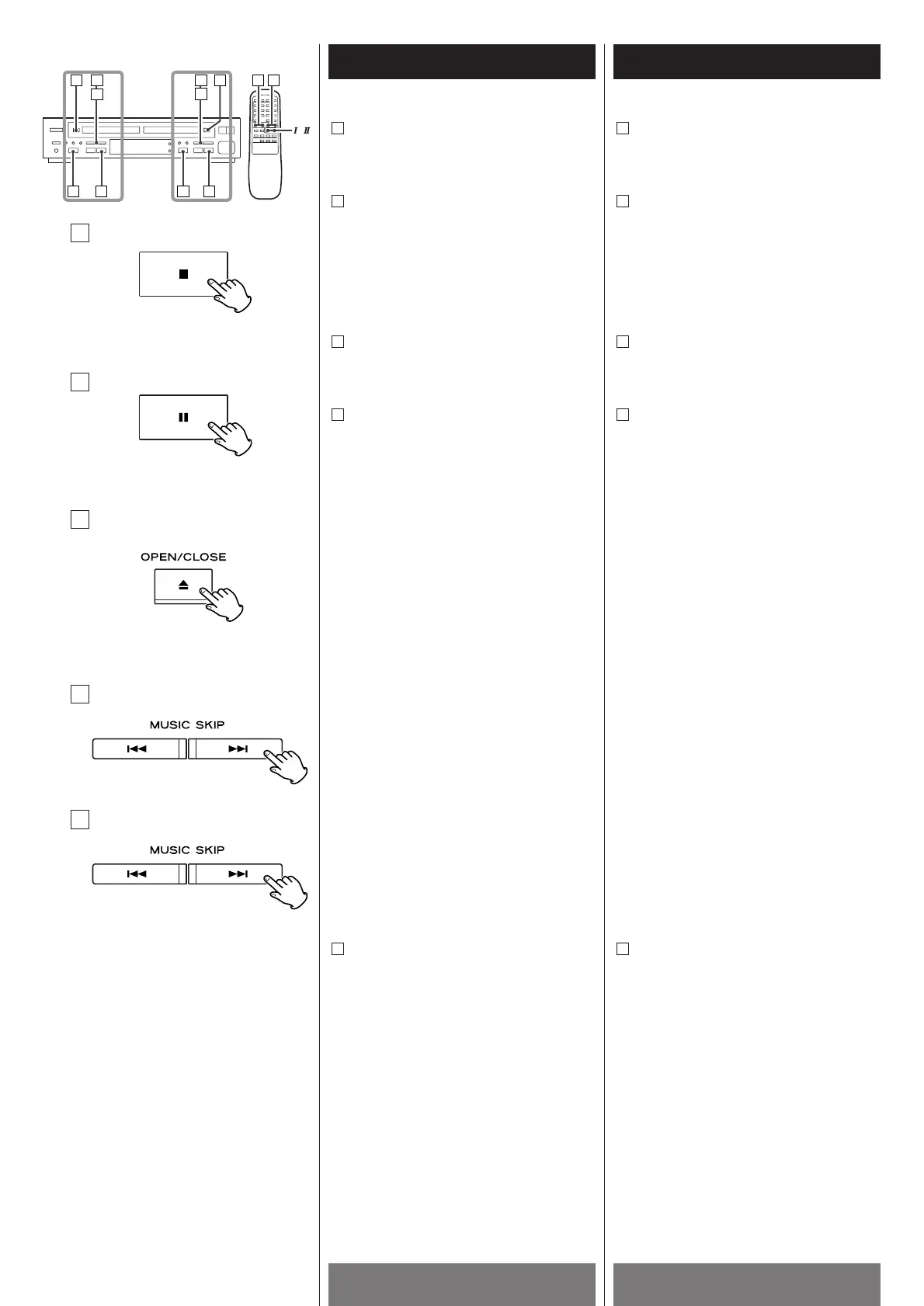
To stop playback
Press the STOP button (H ) to stop
playback.
To suspend playback temporarily (pause
mode)
Press the PAUSE button (J). Playback
stops at the current position. To resume
playback, press the PAUSE button (J
) or
PLAY button (y
).
To open the disc tray
Press the OPEN/CLOSE button (L ) to
open the disc tray.
To skip to the next or a previous track
Press the MUSIC SKIP button
(.
or/ ) repeatedly until the
desired track is found. The selected track
will be played from the beginning.
<
When the . button is pressed once
during playback, the track being played
will be played from the beginning. To
return to the beginning of the previous
track, press the .
button twice.
<
In the stop or pause mode, the unit enters
pause mode at the beginning of the
selected track. Press the PLAY button
(y
) to start playback.
<
During program playback, the next or
previous track in the program is played.
<
When using the remote control unit,
select the tray by the
!/ @ button before
pressing the MUSIC SKIP button.
Search for a part of a track
During playback, hold down the MUSIC
SKIP button (.
or/) and release it
when the part you want to listen to is
found.
<
When using the remote control unit,
select the tray by the
!/@ button and then
press and hold the SEARCH button
(m
or,).
E
D
C
B
A
E
TRAY ! TRAY @
Pour arrêter la lecture
Appuyer sur la touche STOP (H) pour
arrêter la lecture.
Suspension de la lecture momentannée
(pause)
Appuyer sur la touche PAUSE (J). La
lecture s’arrête à la position courante.
Pour continuer la lecture, appuyer sur la
touche PAUSE (J
) ou la touche PLAY
(y
).
Pour ouvrir le tirroir du disque
Appuyer sur la touche OPEN/CLOSE (L)
pour ouvrir le tirroir du disque.
Pour sauter à la piste suivante ou
précédente
Appuyer sur la touche MUSIC SKIP
(.
or/ ) répététivement jusqu’à
temps que la piste désirée est trouvée. La
piste choisie va jouée à partir du début.
<
Quand la touche . est appuyée une
fois durant la lecture, la piste qui joue
commencera au début. Pour retourner au
début de la piste précédente, appuyer sur
la touche .
deux fois.
<
En mode arrêt ou pause, le mode pause
est engendré au début de la piste choisie.
Appuyer sur la touche PLAY (y
) pour
débuter la lecture.
<
Durant la lecture programmée, la piste
précédente ou suivante du programme
est jouée.
<
Quand vous utilisez la télécommande,
choisir le tirroir utilisant la touche
!/ @
avant d’appuyer sur la touche MUSIC
SKIP.
Chercher une section de piste
Durant la lecture, tenir appuyer la touche
MUSIC SKIP (.
ou/) et la relacher
quand vous avez atteint la section que
vous désirez écoutée.
<
Quand vous utilisez la télécommande,
choisir le tirroir utilisant la touche
!/@ et
ensuite tenir appuyer la touche SEARCH
(m
ou,).
E
D
C
B
A



 To Next Page