ENGLISH FRANÇAIS
Advanced Recording 2
1
Enregistrement avancé 2
46
Digital Synchronized
Recording
Synchronized recording means that
recording will begin automatically when a
signal is received, and will stop when the
signal ends.
Digital synchronized recording is possible
only when recording digitally from an
external source (e.g. CD player, MD deck).
The conditions under which an input signal
is used as the trigger to start recording are:
an increment signal is detected
or
detect the sound above the selected
increment level
To start synchronized recording:
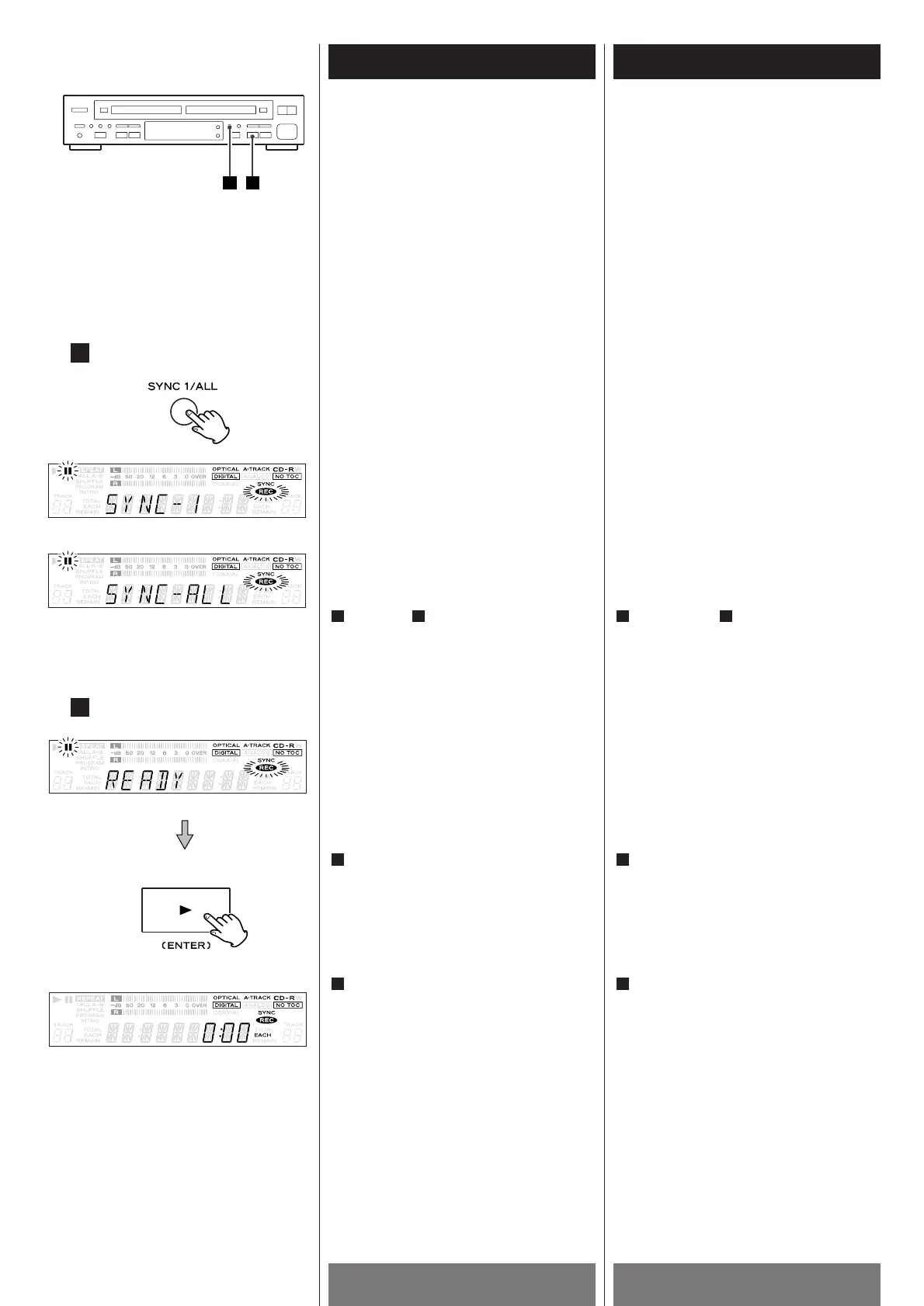
After step of page 48, press the SYNC
1/ALL button and select SYNC 1 or SYNC
ALL.
Every time the SYNC 1/ALL button is
pressed, the mode is changed.
To record only one track, select SYNC 1.
To record all the tracks, select SYNC ALL.
After "READY" is displayed, press the
PLAY button (y
) of TRAY @.
J
disappears, and "REC" lights steadily.
Start playing the source. The unit will
start synchronized recording.
When the source is stopped, the unit
enters record pause mode.
Press the STOP button (H
) to stop the
recording.
3
2
51
2
Enregistrement numérique
synchronisé
Un enregistrement synchronisé est un
enregistrement qui débute automatiquement
quand un signal est reçu et s’arrête quand le
signal disparait.
Un enregistrement synchronisé numérique
est possible seulement quand vous
enregistrez numériquement d’une source
externe (i.e. Lecteur CD, platine MD).
Les conditions sous les quelles un signal
d’entrée est utilisé pour enclencher le début
de l’enregistrement sont:
un signal d’incrémentation est détecté.
ou
détection du son au-dessus du niveau d
’incrémentation choisie.
Pour commencer l’enregistrement
synchronisé:
Après l’étape de la page 48, appuyer
sur la touche SYNC1/ALL et sélectionner
SYNC 1 ou SYNC ALL.
Chaque fois que la touche SYNC 1/A1LL
est appuyé, le mode est changé.
Pour enregistrer seulement sur une piste,
choisir SYNC 1. Pour enregistrer toutes
les pistes, choisir SYNC ALL.
Après que “READY” est affiché, appuyer
sur la touche PLAY (y
) du TRAY @.
J
disparait et “REC” s’allume solidement
Commencer la lecture de la source.
L’apparail va commencé
l’enregistrement synchronisé.
Quand la source s’arrête, l’appareil se
place en mode pause.
Appuyer sur la touche STOP (H
) pour
arrêter l’enregistrement.
3
2
51



 To Next Page