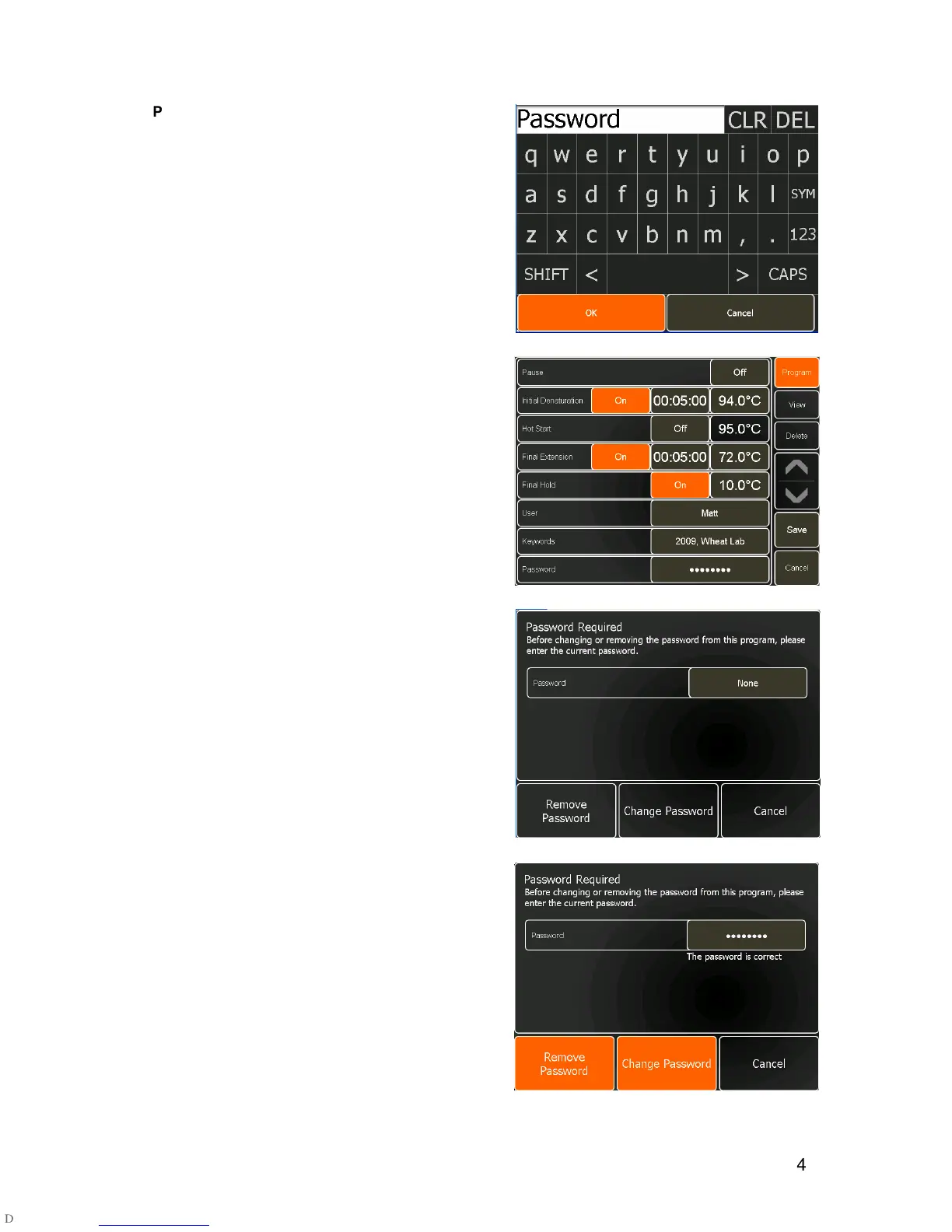
A password can be created to protect the program
from being edited and deleted by other users. The
password will be requested if a user attempts to edit or
delete the program.
•
To create a password, touch the
None
button next
to Password.
•
Enter the required password then touch
OK
. The
password is case-sensitive.
•
Touch
Cancel
to return to Program Options without
entering a password.
•
Touch the
Program
button to return to the
Programming screen.
•
To change or remove the password, from the
Program Options screen, touch the button next to
Password
.
•
On the Password Editing screen, touch the
None
button and enter the password.
•
To remove the password, touch
Remove
Password
.
•
To change the password, touch
Change
Password
and type in the new password, followed
by
OK
.
•
Touch
Cancel
to return to the Program Options
screen if no change is required.


 To Next Page