1504/2019 - EN/V9 Technetix Group Limited
Product user manual
DBE-1200S
3.5 Powering up the amplifier
1. After any bench pre-configuration required by the network design and once the amplifier is mounted into the network
location, temporarily remove the fuses. Connect the RF cables to the relevant RF ports and connect the earth/grounding
wire (in accordance with local electrical installation regulations) on the right-hand side of the housing.
2. Using a true RMS digital voltmeter, confirm AC power is present on the port where incoming power is present in
accordance with the network design drawings. The voltage should be within the amplifier specification and thenetwork
design drawing calculation.
3. Install the input port fuse per the network design drawings and ensure that it is fully inserted into the fuse holder
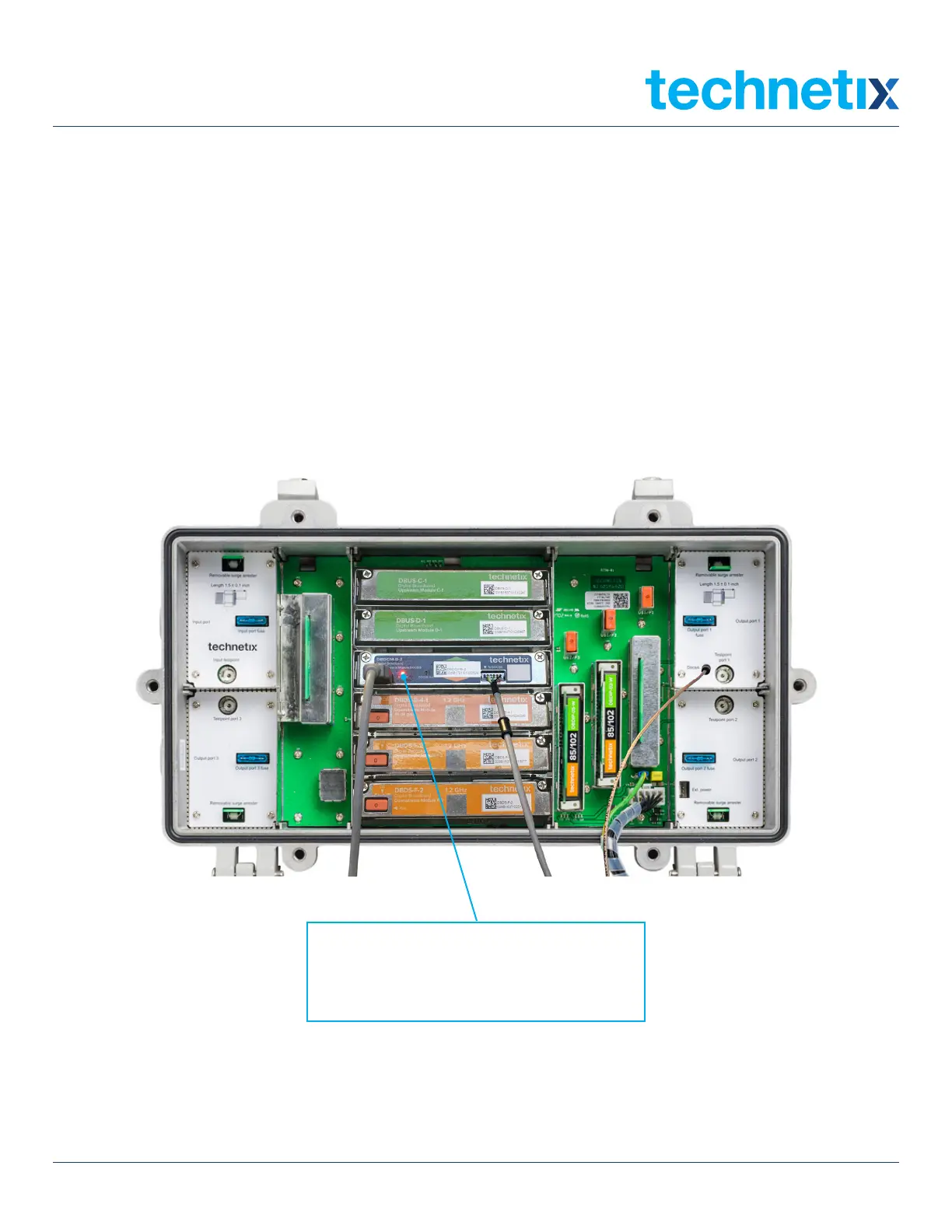
for incoming AC power. Then check that the amplifier DBDCM module LED (DBDCM-A-x = red, DBDCM-B-x = green)
is illuminated.
The LED on the control module indicates
that the DBE-1200S amplifier is powered
up when it is illuminated.


 To Next Page