EasyManua.ls Logo

Technics SA-EX 140 - Listening to Radio Broadcasts Oes; Va Toutes Easaserpenaueetreaieiacnteanes; Irienna er Sae Aaaea Tesasvonudanespaptineddenantacsererteataniee

Technics SA-EX 140
20 pages
Print Icon
To Next Page IconTo Next Page
To Previous Page IconTo Previous Page
Loading...
Operations
i
a
Selected
band
|
tovpurvvoavvvvev
vtvevvoupvasaoppanasasasasasnna
(EEETETTTEETTTEET
‘QUARTZ
LOCKC
STEREO
i
itn
F
i
ha
DHG
ite
RQTS221
Listening
to
radio
broadcasts
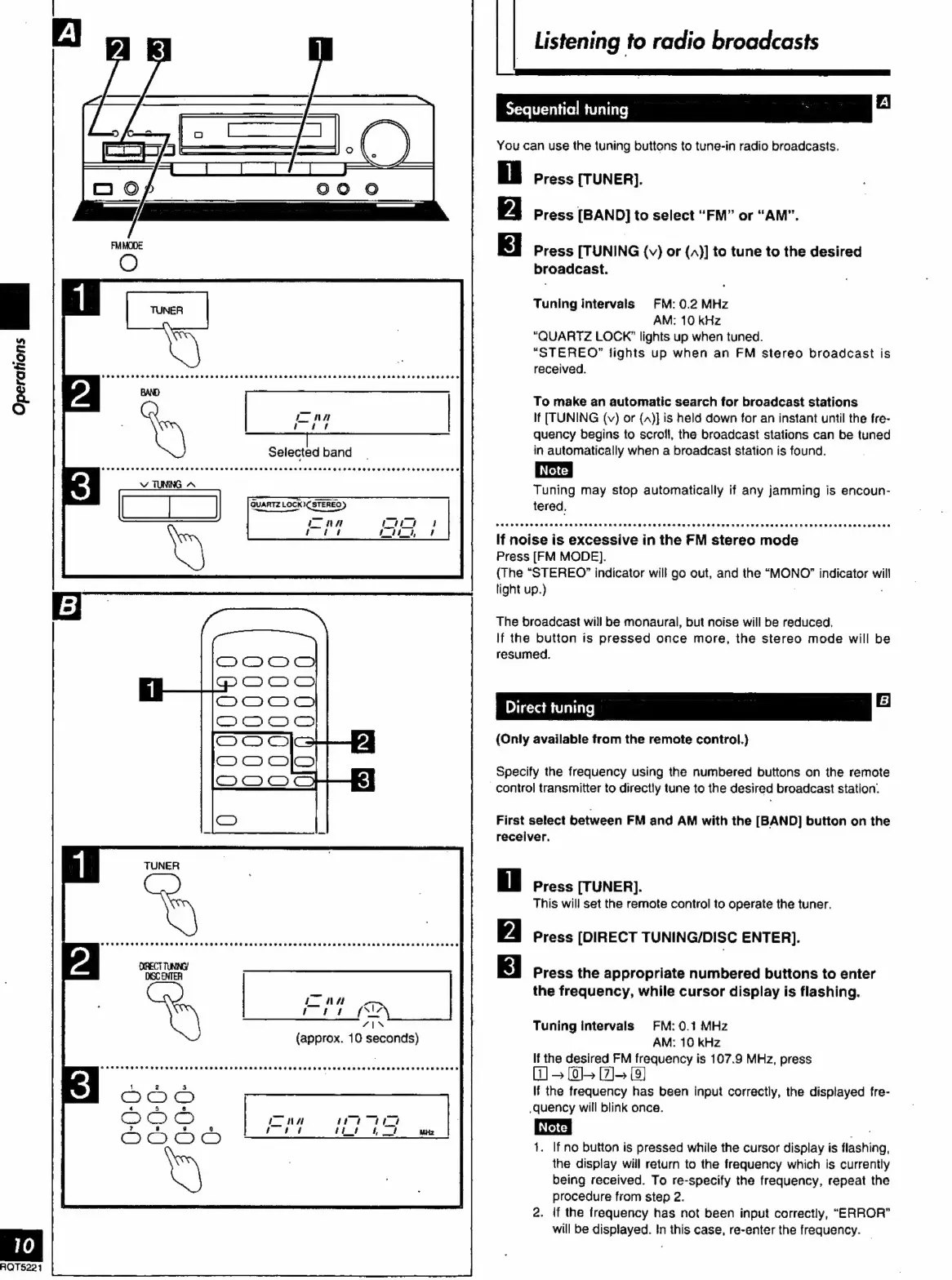
Sequential
tuning
>
Al
You
can
use
the
tuning
buttons
to
tune-in
radio
broadcasts.
Press
[TUNER].
Press
[BAND]
to
select
“FM”
or
“AM”.
Press
[TUNING
{v}
or
{,)}]
to
tune
to
the
desired
broadcast.
Tuning
intervals
FM:
0.2
MHz
AM:
10
kHz
“QUARTZ
LOCK”
lights
up
when
tuned.
“STEREO”
lights
up
when
an
FM
stereo
broadcast
is
received.
To
make
an
automatic
search
for
broadcast
stations
If
[TUNING
(v)
or
{A)]
is
held
down
for
an
instant
until
the
fre-
quency
begins
to
scroll,
the
broadcast
stations
can
be
tuned
in
automatically
when
a
broadcast
station
is
found.
Tuning
may
stop
automatically
if
any
jamming
is
encoun-
tered.
If
noise
is
excessive
in
the
FM
stereo
mode
Press
[FM
MODE).
(The
“STEREO?
indicator
will
go
out,
and
the
“MONO”
indicator
will
light
up.)
.
The
broadcast
will
be
monaural,
but
noise
will
be
reduced,
If
the
button
is
pressed
once
more,
the
stereo
mode
will
be
resumed.
Direct
tuning
2
(Only
available
from
the
remote
control.}
Specify
the
frequency
using
the
numbered
buttons
on
the
remote
-control
transmitter
to
directly
tune
to
the
desired
broadcast
station.
First
select
between
FM
and
AM
with
the
[BAND]
button
on
the
receiver.
Press
[TUNER].
This
will
set
the
remote
control
to
operate
the
tuner.
Press
[DIRECT
TUNING/DISC
ENTER].
Press
the
appropriate
numbered
buttons
to
enter
the
frequency,
while
cursor
display
is
flashing.
Tuning
intervals
FM:
0.1
MHz
AM:
10
kHz
If
the
desired
FM
frequency
is
107.9
MHz,
press
W
>
0-
[27]
[3]
If
the
frequency
has
been
input
correctly,
the
displayed
fre-
quency
will
blink
once.
1.
If
no
button
is
pressed
while
the
cursor
display
is
flashing,
the
display
will
return
to
the
frequency
which
is
currently
being
received.
To
re-specify
the
frequency,
repeat
the
procedure
from
step
2.
2.
if
the
frequency
has
not
been
input
correctly,
“ERROR”
will
be
displayed.
In
this
case,
re-enter
the
frequency.

Related product manuals