EasyManua.ls Logo

Technics SA-EX 140 - Making a Recording; Recording on a Tape Deck; To Listen through Headphones; Ioann a Nranasan a

Technics SA-EX 140
20 pages
Print Icon
To Next Page IconTo Next Page
To Previous Page IconTo Previous Page
Loading...
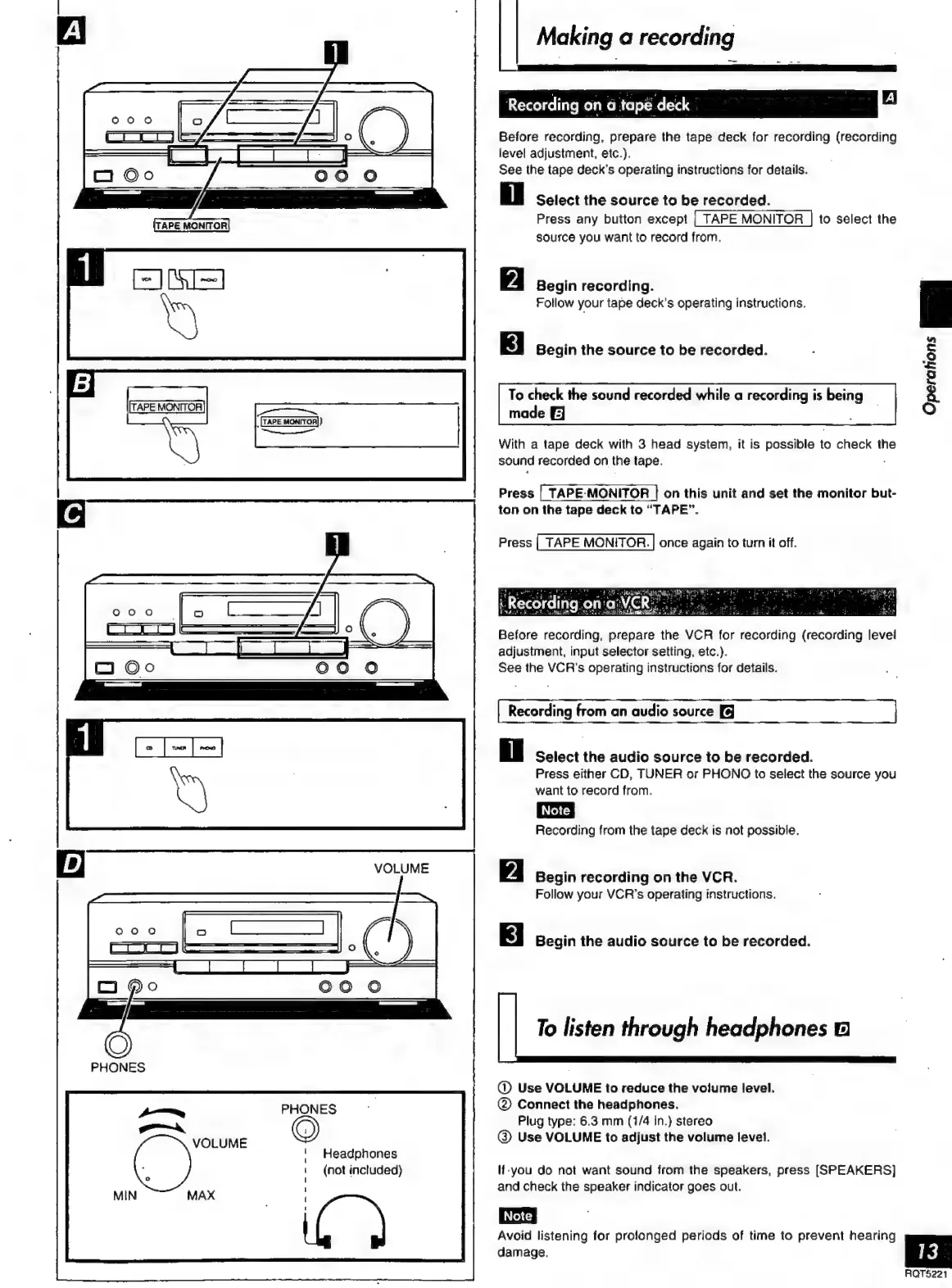
TAPE
MONITOR
VOLUME
[TAPE
MONITOR])
~~
ee
VOLUME
PHONES
Headphones
(not
included)
Making
a
recording
Recording
on
a
tapë
deck
Before
recording,
prepare
the
tape
deck
for
recording
(recording
level
adjustment,
etc.).
See
the
tape
deck’s
operating
instructions
for
details.
i
Select
the
source
to
be
recorded.
Press
any
button
except
|
TAPE
MONITOR
|
to
select
the
source
you
want
to
record
from.
Begin
recording.
Follow
your tape
deck’s
operating
instructions.
Begin
the
source
to
be
recorded.
To
check
the
sound
recorded
while
a
recording
is
being
made
EJ
a
With
a
tape
deck
with
3
head
system,
it
is
possible
to
check
th
sound
recorded
on
the
tape.
.
Operations
al
Press
|
TAPE-MONITOR
|
on
this
unit
and
set
the
monitor
but-
ton
on
the
tape
deck
to
“TAPE”.
Press
|
TAPE
MONITOR.
|
once
again
to
turn
it
off.
Before
recording,
prepare
the
VCR
for
recording
(recording
levei
adjustment,
input
selector
setting,
etc.).
See
the
VCR's
operating
instructions
for
details.
Recording
from
an
audio
source
Select
the
audio
source
to
be
recorded.
Press
either
CD,
TUNER
or
PHONO
to
select
the
source
you
want
to
record
from.
Recording
from
the
tape
deck
is
not
possible.
Begin
recording
on
the
VCR.
Follow
your
VCR’s
operating
instructions.
Begin
the
audio
source
to
be
recorded.
To
listen
through
headphones
B
@
Use
VOLUME
to
reduce
the
volume
level.
(2)
Connect
the
headphones.
Plug
type:
6.3
mm
(1/4
in.)
stereo
@
Use
VOLUME
to
adjust
the
volume
level.
If-you
do
not
want
sound
from
the
speakers,
press
[SPEAKERS]
and
check
the
speaker
indicator
goes
out.
Avoid
listening
for
prolonged
periods
of
time
to
prevent
hearing
damage.
RQT5221

Related product manuals