EasyManua.ls Logo

Technics SA-EX 140 - Page 12

Technics SA-EX 140
20 pages
Print Icon
To Next Page IconTo Next Page
To Previous Page IconTo Previous Page
Loading...
Listening
to
radio
broadcasts
_|
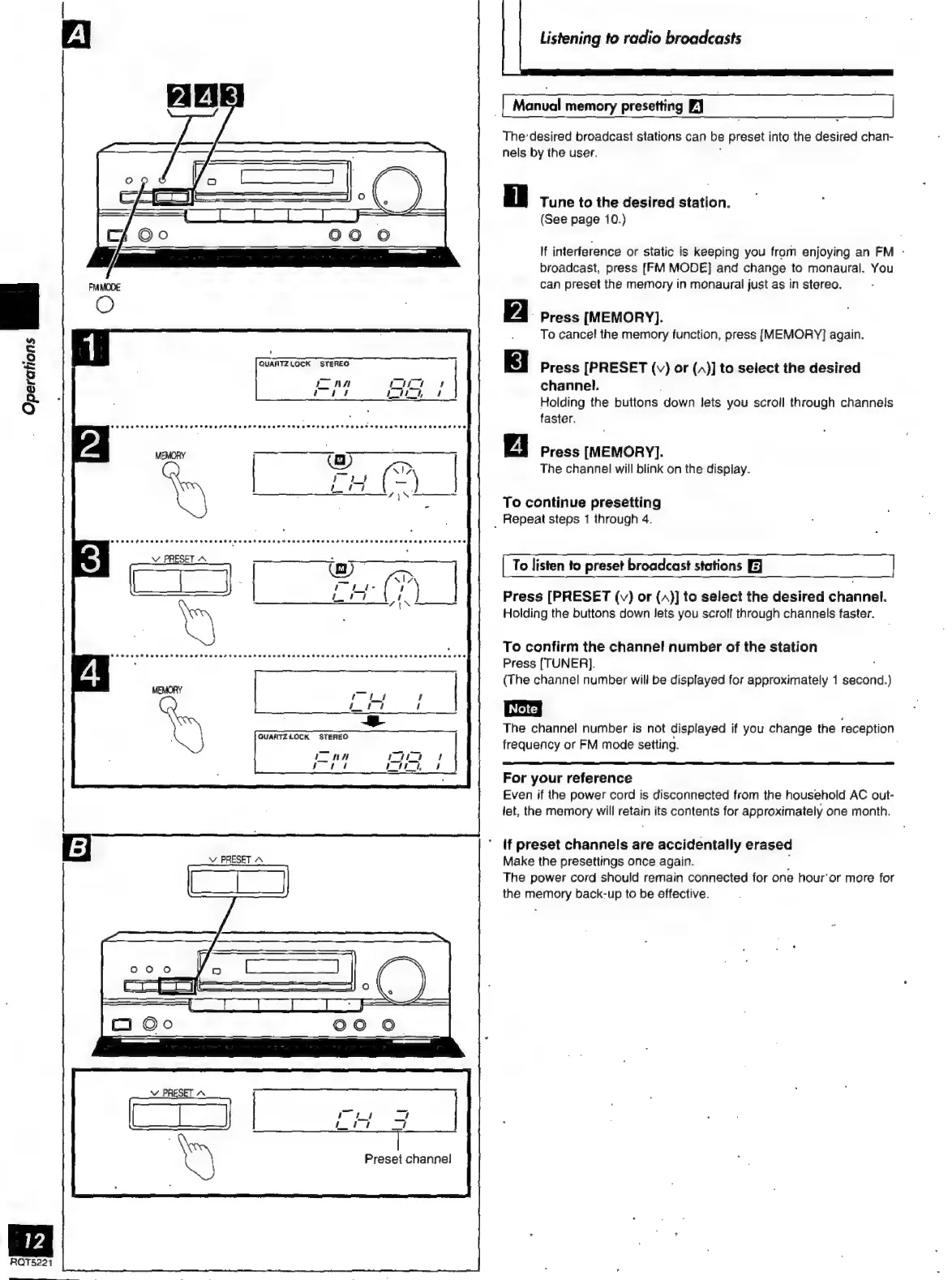
Manual
memory
presetting
PJ
l
The'desired
broadcast
stations
can
be
preset
into
the
desired
chan-
nels
by
the
user.
'
Tune
to
the
desired
station.
(See
page
10.)
If
interference
or
static
is
keeping
you
from
enjoying
an
FM
-
broadcast,
press
[FM
MODE]
and
change
to
monaural.
You
can
preset
the
memory
in
monaural
just
as
in
stereo.
Press
[MEMORY].
To
cancel
the
memory
function,
press
[MEMORY]
again.
Operations
ial
Semen
nee
Press
[PRESET
(v)
or
()]
to
select
the
desired
ep
ma
channel.
,
Holding
the
buttons
down
lets
you
scroll
through
channels
faster.
Press
[MEMORY].
The
channel
will
blink
on
the
display.
To
continue
presetting
_
Repeat
steps
1
through
4.
To
listen
to
preset
broadcast
stations
[EJ
Press
[PRESET
(v)
or
(4)]
to
select
the
desired
channel.
Holding
the
buttons
down
lets
you
scroll
through
channels
faster.
To
confirm
the
channel
number
of
the
station
Press
[TUNER].
(The
channel
number
will
be
displayed
for
approximately
1
second.)
The
channel
number
is
not
displayed
if
you
change
the
reception
frequency
or
FM
mode
seiting.
For
your
reference
Even
if
ihe
power
cord
is
disconnected
from
the
household
AC
out-
let,
the
memory
will
retain
its
contents
for
approximately
one
month.
if
preset
channels
are
accidentally
erased
Make
the
presettings
once
again.
j
The
power
cord
should
remain
connected
for
one
hour'or
more
for
the
memory
back-up
to
be
effective.
Preset
channe!
RQT5221

Related product manuals