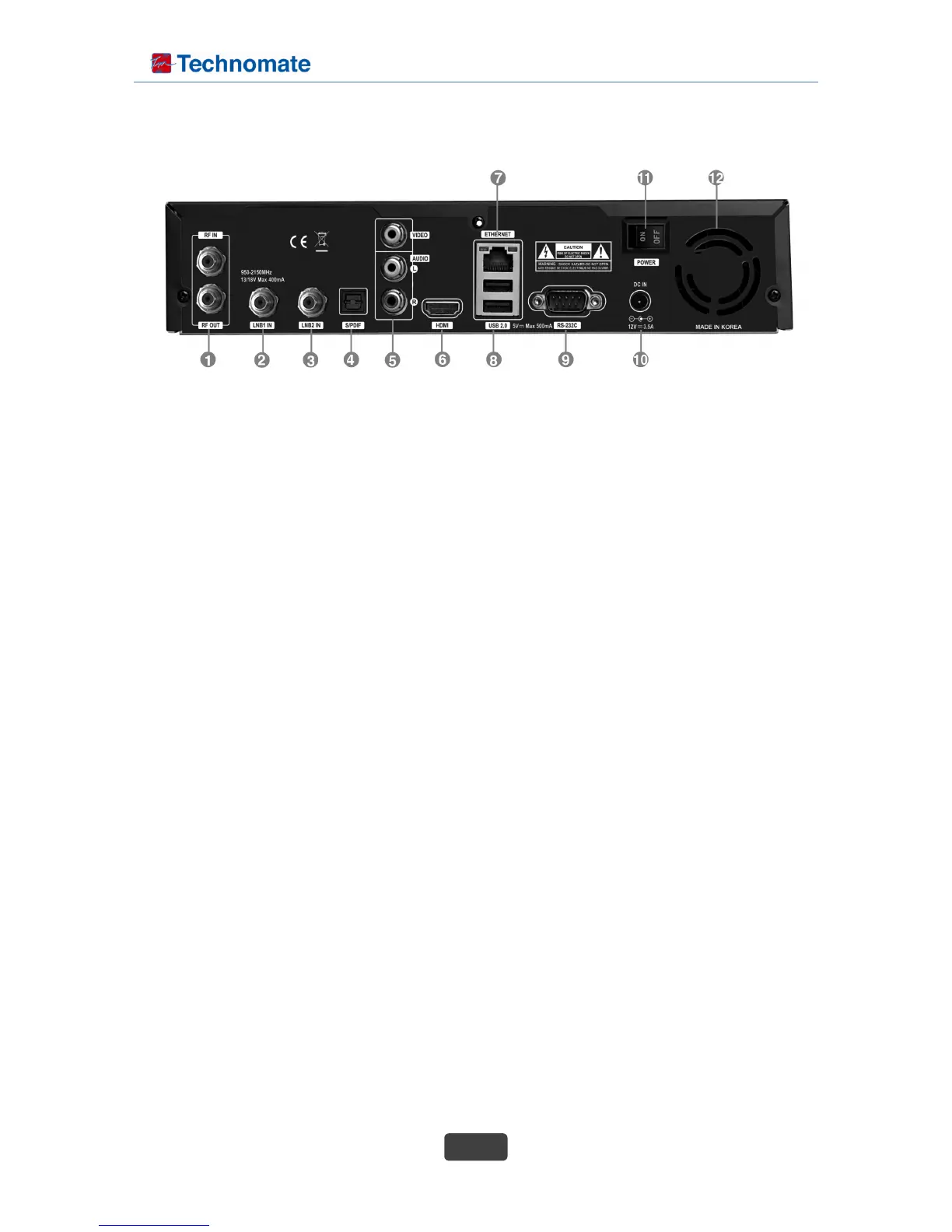
◆ Rear Panel
1. RF IN/OUT : Hybrid tuner input/loop-through for DVB T2/T and C signal. Turn the receiver OFF first
before connecting.
2. LNB INPUT 1 : 1st satellite tuner input from the LNB on a dish antenna. Turn the receiver OFF first
before connecting.
3. LNB INPUT 2 : 2nd satellite tuner input from the LNB on a dish antenna. Turn the receiver OFF first
before connecting.
4. S/PDIF
: Connect it with optical audio cable to your Hi-Fi system.
5. Audio/Video Output
: Connect to TV using RCA cable.
6. HDMI
: Connect to TV using a HDMI cable for both audio and video signals.
7. Ethernet
: Communication port via HTTP, FTP, NFS, Telnet and Samba to access network or to upload channel
lists. This is also used to update TM-NAN-3T Combo's software.
8. 2X USB 2.0 Port
: Connect to the External HDD or USB storage with USB cable (Max. 500mA).
9. RS232
: RS232 serial data port is provided.
10. External Power Supply
: Connect the power supply(12V/3.5A) that came with TM-NANO-3T Combo.
11. Power Switch
: Turn AC Power On/Off.
12. FAN Hole
: For cooling fan with speed control function.



 To Next Page