Need help?
Do you have a question about the TECNA 3680 and is the answer not in the manual?
Identifies the touch screen operator panel on the machine.
Locates the main power switch for the machine.
Indicates the port for USB connectivity.
Shows where the pneumatic welding gun connects.
Identifies connections for the gun's power and compressed air.
Locates the gun's signal cable and cooling system connections.
Details the compressed air and electrical power connections for the machine.
Describes the arm component and start trigger of the welding gun.
Details electrode holders, filter, and cooling tank cap.
Describes optional support rods and the balancer system.
Lists available pneumatic welding gun models.
Explains symbols providing information or indicating minor risks.
Details symbols for serious risks, including death or severe/immediate injury.
Explains the manual's purpose for installation, use, and maintenance.
Outlines warranty period, exclusions, and contact for support.
Details identification data on machine and gun nameplates.
Provides essential guidelines for safe machine operation and maintenance.
Lists safety devices and required Personal Protective Equipment.
Explains safety and information signs used on the machine.
Addresses ergonomic, crushing, and magnetic field risks.
Warns about fume inhalation, burn risks, and fire hazards.
Details risks of overheating and associated prevention measures.
Describes machine features and operating modes like SMART+, QUICK, FULL.
Defines proper industrial use and prohibited improper applications.
Outlines steps for machine installation, including transport and storage.
Covers assembly of parts, power supply, and air connections.
Provides instructions for filling the cooling system with specified mixtures.
Details preparing the machine, fitting electrodes, and switching it on.
Covers choosing operating modes and setting welding parameters.
Describes final usage steps and powering down the machine.
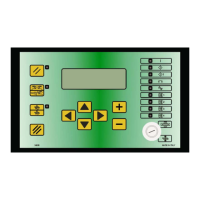
Explains the symbols and common elements on the operator panel interface.
Details initial settings, PIN entry, and gun detection.
Explains how to perform calibration and when it's required.
Covers accessing settings for clock, language, and measurement units.
Details adding, editing, and deleting user profiles and their access PINs.
Covers electrode maintenance checks and backing up programs to USB.
Discusses machine configuration and selecting the SMART+ operating mode.
Explains using QUICK mode and saving welding parameters.
Details FULL mode operation and editing welding program stages.
Covers saving programs, creating folders, and managing program photos.
Details editing, protecting, copying, and deleting programs.
Explains how to manage photos attached to welding programs.
Covers electrode maintenance notifications and the NO WELD function's use.
Details how to view, scroll, and filter weld log entries.
Lists common alarms and their causes/solutions.
Covers inspection of power cables, gun connections, and coolant level.
Details checks for contact surfaces, condensate, and the cooling system.
Explains how to clean the heat exchanger radiator.
Details checks for protective conductor and earth connection efficiency.
Provides instructions for cleaning the machine and electrodes.
Step-by-step guide for replacing electrodes, including safety precautions.
Explains how to open the arm for obstacle clearance.
Details replacing the fixed arm and mobile electrode holder.
Covers proper disposal of packaging, batteries, and the device.
Provides specific instructions for disposing of electrical and electronic waste.
Lists other documents essential for product use.
Displays current user and job name/settings.
Shows measured resistance and sheet thickness values.
Provides access to the weld log and results of the last welds.
Covers setup for electrodes, arm, gun, and accessing settings.
Displays screens for calibration and initial machine setup.
Shows interfaces for user management, program backup, and tool wear.
Displays user lists and forms for configuring user profiles.
Shows screens for caps maintenance, inverter settings, and thermal protection.
Displays screens for selecting different welding program modes (M1-M4).
Shows the real-time display of welding parameters like time, current, and force.
Interface for editing welding parameters for different stages.
Interface for managing programs, including editing, locking, and adding photos.
Shows caps maintenance screen and system status with gun icons.
Displays the archive of performed welds with navigation options.
Allows filtering welds by date and searching by job name.
Details power supply voltage and nominal power ratings.
Lists input/output currents, output voltage, insulation, and protection ratings.
Specifies power cable length, diameter, and required system cables.
Details maximum electrode force, cooling capacity, and machine/gun weights.
Lists required electrical line protection components like plugs and circuit breakers.
Specifies air pressure, hose diameter, flow, and operating environmental conditions.
Reports airborne noise and vibration levels of the machine.
Defines the conditions under which welding measurements are taken.
Details power supply voltage and nominal power ratings for the 220V version.
Lists currents, voltage, insulation, and protection for the 220V version.
Specifies cable requirements for the 220V version.
Details specifications for the 220V version.
Lists required protection for the 220V version's electrical line.
Specifies air and environmental data for the 220V version.
Reports noise and vibration for the 220V version.
Defines measurement conditions for the 220V version.
Shows the main power input and control circuitry connections.
Details the inverter control board and its connections, including power sockets.
Lists suggested accessories for the 8679TS pneumatic welding gun.
Lists suggested accessories for the 8679TS7 pneumatic welding gun.
Lists single-point guns and snap-hooks for balancers.
Details conductivity grease, Allen keys, antifreeze liquid.
Lists spare handles for guns and specific tools.
Lists sets of electrode caps and different types of electrodes.
Describes electrode extractors and pressure boosters.
Shows an exploded view diagram identifying machine components for spare parts.
Provides a list of spare parts with codes, descriptions, and quantities.
Illustrates the components of the cooling unit for spare parts identification.
Lists specific spare parts for the cooling unit with their codes and quantities.
Shows the pneumatic group components for spare parts identification.
Lists specific spare parts for the pneumatic group with codes and quantities.
Illustrates the components of the welding arm for spare parts identification.
Lists specific spare parts for the welding arm with codes and quantities.
Shows the gun head assembly components for spare parts identification.
Lists specific spare parts for the gun head assembly.
Exploded view of the 220V machine for identifying spare parts.
Lists spare parts specific to the 220V version of the machine.
Illustrates the cart and chassis components for spare parts identification.
Lists specific spare parts for the cart and chassis.
Declares conformity with Machine, EMC, and Low Voltage directives.
Lists the harmonised standards applied for product compliance.
 General
| Brand | TECNA |
|---|---|
| Model | 3680 |
| Category | Welding System |
| Language | English |

 To Next Page