64 Linea 2K and 4K Monochrome Line Scan Camera User's Manual
03-032-20206-00 Teledyne DALSA
The last file operation has completed
successfully.
The last file operation has completed
unsuccessfully for an unknown reason.
The last file operation has completed
unsuccessfully because the file is currently
unavailable.
The last file operation has completed
unsuccessfully because the selected file in not
present in this camera model.
Displays the file operation result. For Read or
Write operations, the number of successfully
read/ written bytes is returned. (RO)
Represents the size of the selected file in bytes.
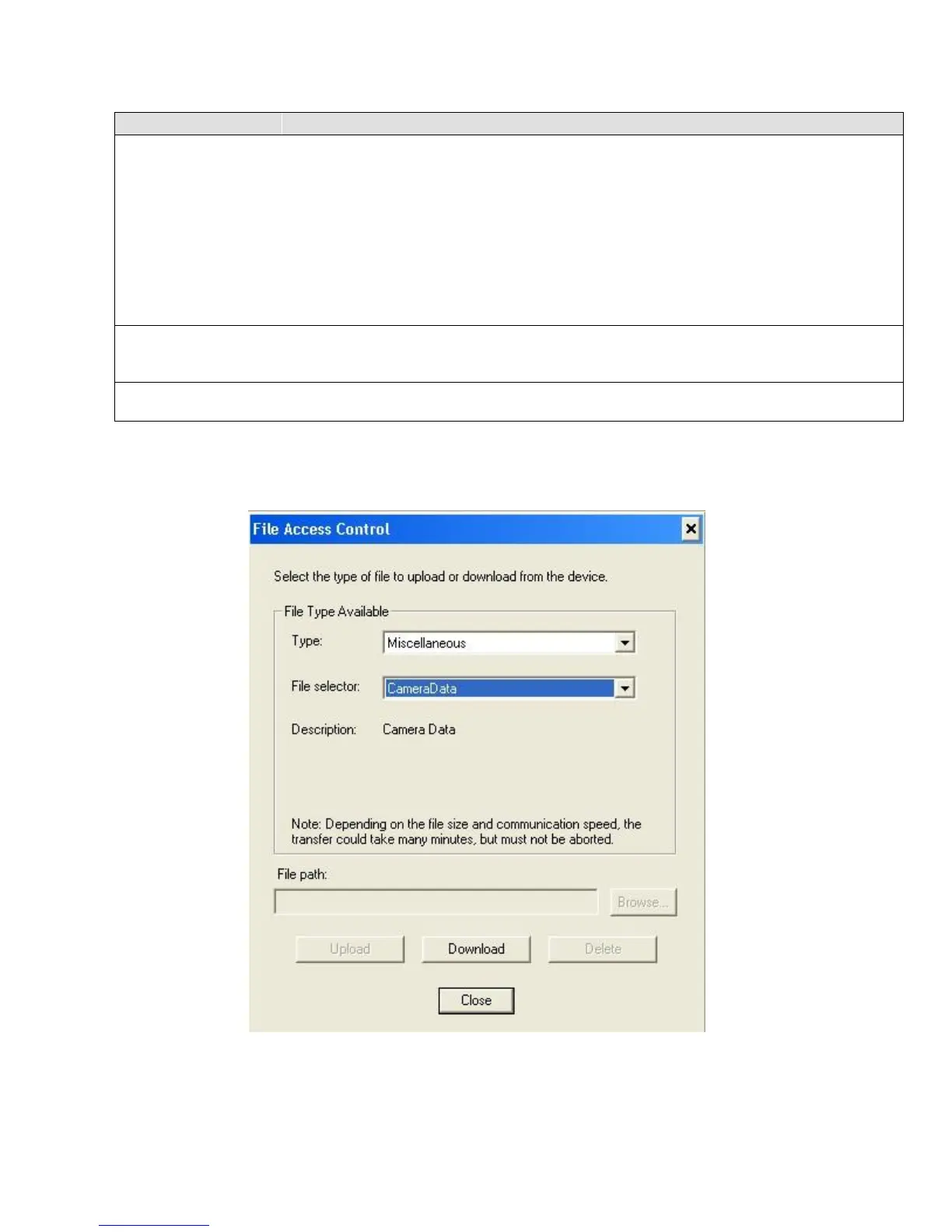
File Access via the CamExpert Tool
1. Click on the ―Setting…‖ bu tton to show the file selection m enu .
2. From the Type drop menu, select the file type that will be uploaded to the camera.
3. From the File Selector drop menu, select the camera memory location for the uploaded data. This
menu presents only the applicable data locations for the selected file type.


 To Next Page