Linea 2K and 4K Monochrome Line Scan Camera User's Manual 65
Teledyne DALSA 03-032-20206-00
4. Click the Browse button to open a typical Windows Explorer window.
5. Select the specific file from the system drive or from a network location.
6. Click the Upload button to execute the file transfer to the camera.
7. Note that firmware changes require a device reset command from the Camera Information
Controls and, additionally, CamExpert should be shutdown and restarted following a reset.
Download a List of Camera Parameters
For diagnostic purposes you may want to download a list of all the parameters and values associated
with the camera.
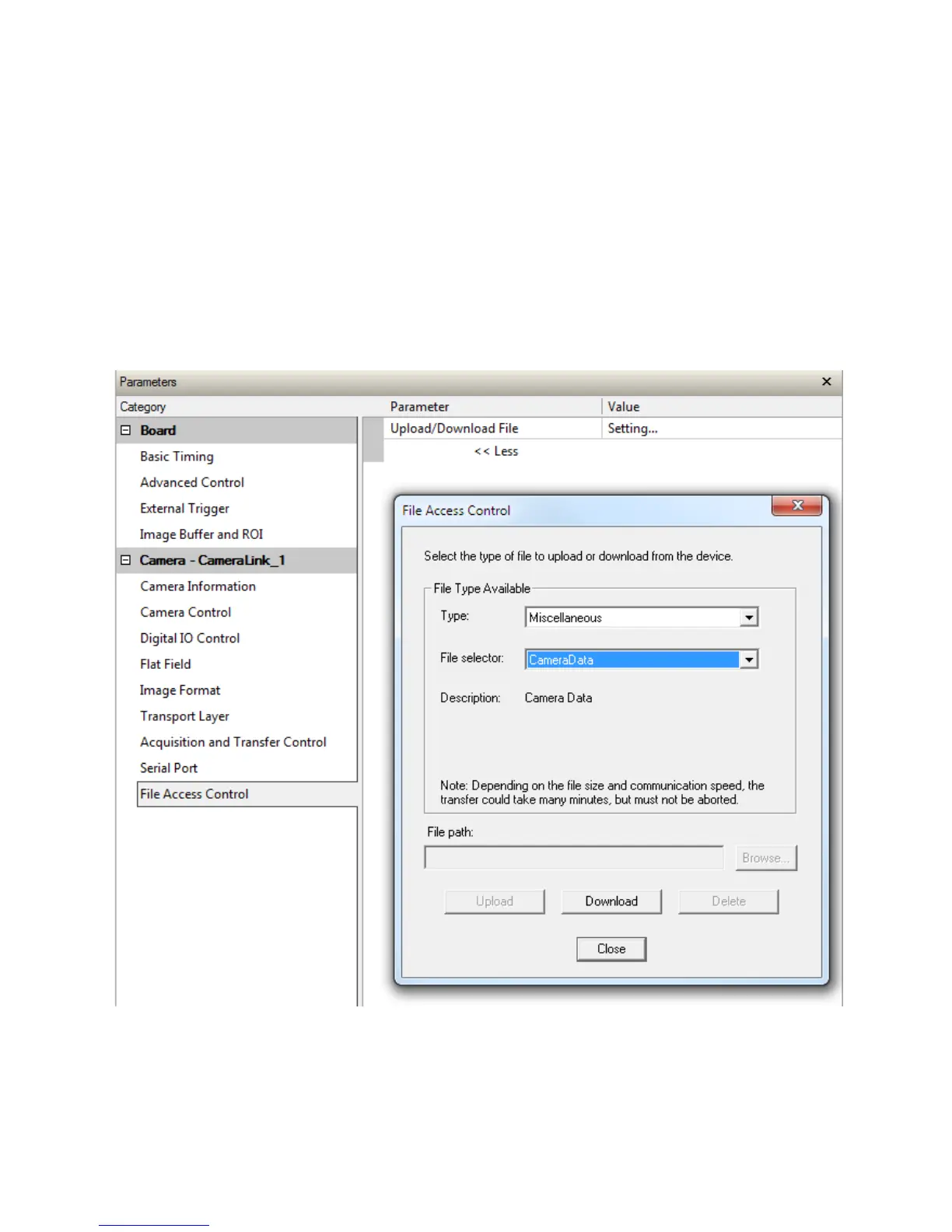
1. Go to File Access Control
2. Click on Settings
3. In the ―Typ e‖ drop d ow n box select ―Miscellaneous.‖
4. In the ―File selector‖ d rop d ow n box select ―CameraData .‖
5. Hit ―Dow nload ‖
6. Save the text file and send the file to Teledyne DALSA customer support.


 To Next Page