Linea 2K and 4K Monochrome Line Scan Camera User's Manual 85
Teledyne DALSA 03-032-20206-00
Appendix F: Camera, Frame
Grabber Communication
Setting Up Communication between the Camera and the Frame
Grabber
Teledyne DALSA Camera Link cameras support the GenCP Camera Link standards.
To configure Teledyne DALSA GenCP Camera Link Cameras:
1. Install the Teledyne DALSA frame grabber in the host computer; refer to the hardware
installation manual.
2. Install Sapera LT and the Teledyne DALSA frame grabber driver.
3. Connect the camera to the frame grabber; refer to the camera installation manual.
4. Power up the camera and wait until the status LED is solid green.
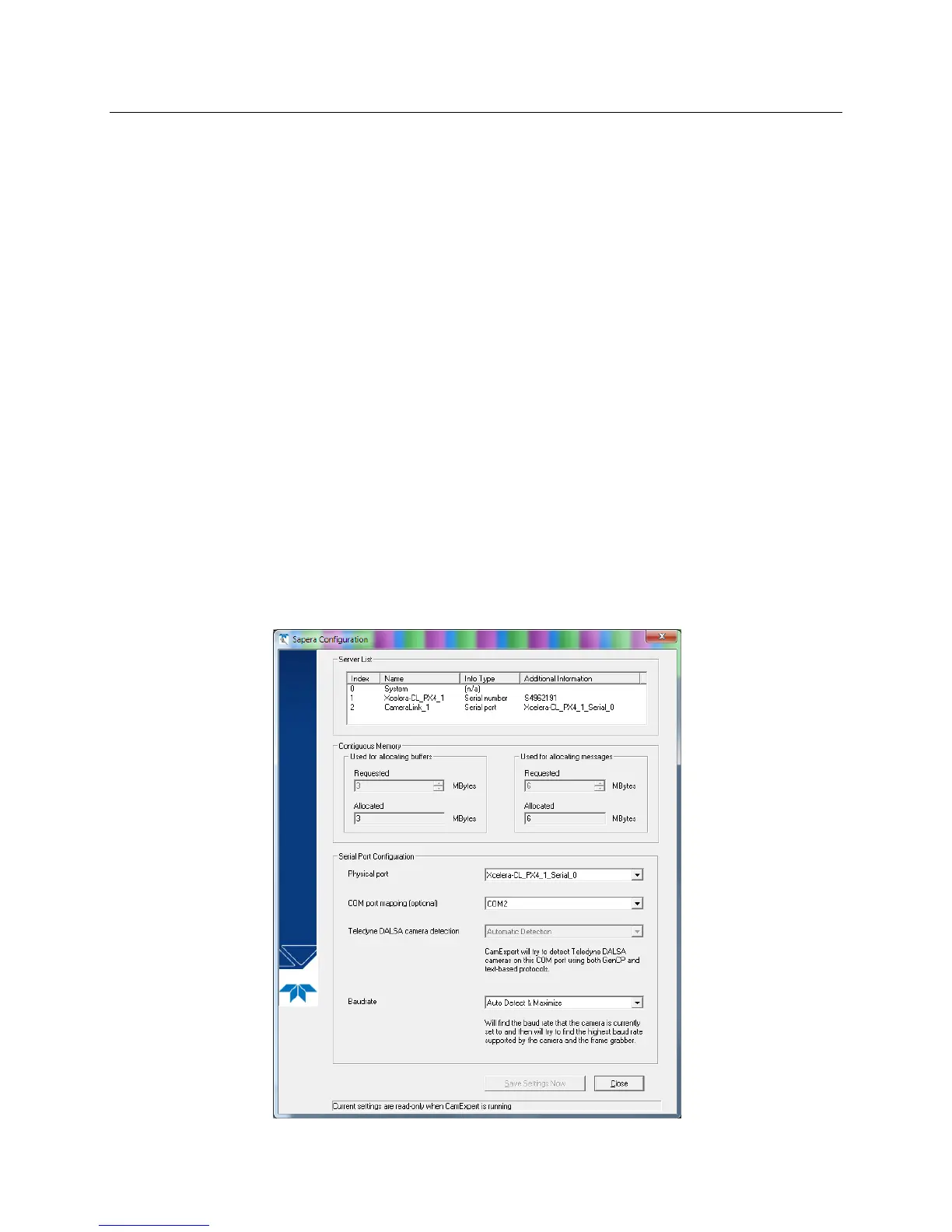
5. Run the Sapera Configuration utility and select the frame grabber serial port connected to the
camera. Set Teledyne DALSA camera detection to Automatic Detection and Baudrate to Auto
Detect & Maximize.
6. If the camera will be configured using three-letter text commands via a terminal program, such as
HyperTerminal, then set COM port mapping (optional) to an available COM port (e.g. COM2).


 To Next Page